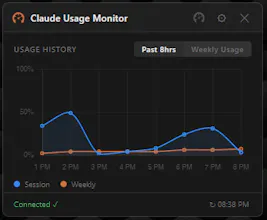
Standalone Windows desktop widget that shows your Claude.ai session and weekly usage in real-time, right on your desktop and always visible. No more digging through settings menus just to check where you stand. It tracks your session window, weekly limit countdown, and usage history all at once, and alerts you before you hit the limit. Free, no API keys, no third-party servers. Just your actual Claude.ai usage, always in sight.
No reviews yetBe the first to leave a review for Claude Usage Monitor
Maker
📌
Hey Product Hunt! 👋 I'm theLonesmith, the solo developer behind Claude Usage Monitor.
The inspiration came from a simple frustration. I kept getting cut off mid-conversation by Claude's usage limits without any warning. I'd be deep into something important, and suddenly the limit hit. No visibility, no heads-up, just a hard stop.
Claude buries your usage information inside the settings menu. Every time I wanted to know what my usage looked like, I had to stop what I was doing, dig through menus, find the right page, check the percentages, then get back to work. Over and over.
I wanted something I could glance at in half a second without breaking my flow. So I built a widget that lives in your system tray and puts your session and weekly usage right on your desktop, always visible, always current.
No digging. No menus. Just a quick glance and you know exactly where you stand.
No API keys. No third-party servers. It just reads directly from Claude.ai. Free, because this felt like something every Claude user deserved to have.
If you've ever been interrupted by a surprise usage limit, this was built for you. It's live now and I'd love your feedback. Happy to answer any questions below! 🛠️