
Mangavia
Convert CBZ ↔ PDF locally, privately in your browser
7 followers
Convert CBZ ↔ PDF locally, privately in your browser
7 followers
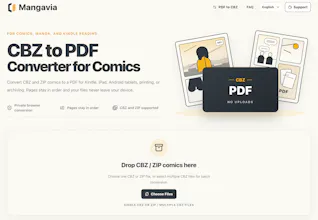
Mangavia is a browser-based comic conversion toolkit for comic readers. Convert CBZ to PDF, PDF to CBZ, or batch process multiple files directly in your browser. Everything runs locally on your device, so your files never leave your computer. No uploads, no accounts, no complicated software. Whether you're reading on a tablet, organizing a comic library, or converting an entire collection, Mangavia makes the workflow fast and private.


Free
Launch Team / Built With


Render: Get up to $100K in startup creditsThe fastest way to deploy and scale apps and agents
Promoted
Hi Product Hunt 👋
I built Mangavia because comic readers often have their collections locked inside CBZ archives, while many reading devices work better with PDF files.
The goal was simple:
- Convert CBZ/ZIP comics without installing software
- Keep files private by processing them locally
- Make comic archives easier to read, print, and store
I’d love feedback from comic readers:
What formats or features would make your reading workflow better?
Thanks for checking it out!
Love that it runs entirely in the browser, way overdue for something this simple. One thing that would make it a daily driver for me: letting users pick the page order and either split oversized archives into per-issue PDFs or merge several CBZ files into one. Single-file at a time works, but most of my reading sessions are whole runs, not random issues.
@muharremnejxc2 Thanks for the detailed feedback! This is really helpful to understand how people manage larger comic collections.
You’re right that single-file conversion is only one part of the workflow — splitting large archives, combining collections, and having more control over page order are all interesting directions to explore.
I’ll keep these in mind as I plan future updates. Appreciate you sharing your reading workflow!
Would love to see a batch queue where I can drag in a whole folder of CBZ files and convert them all to PDF in one go, rather than doing them one at a time.
@kezbanr0p1 Thanks for the feedback! This is exactly the kind of workflow I want to make easier for comic readers with large collections.
A batch queue for multiple CBZ files is a great idea. I’ll look into the best way to add this in a future update. Appreciate you sharing this!
@kezbanr0p1 Thanks again for the suggestion! Just wanted to let you know that batch conversion is now live in Mangavia. You can now process multiple CBZ files in one go. Really appreciate the feedback that helped shape this update! 🚀
Tried it with a 200-issue archive and it handled the batch without eating my RAM, which honestly surprised me. The no-upload thing is a nice touch for sketchy file collections.
@melih787606 Thanks for trying it out! Really appreciate you testing it with such a large archive.
Keeping everything processed locally was one of the main things I wanted to get right, especially for people with large comic collections who may not want to upload their files anywhere.
Glad to hear it handled your 200-issue archive smoothly!
finally a cbz converter that actually works in the browser without trying to make me sign up for something. dragged in a 500mb archive and it just spat out a clean pdf, no fuss.
@bayramonraleyq Thanks for giving it a try! Really appreciate you testing it with such a large archive.
Making CBZ conversion work directly in the browser without accounts or uploads was one of the main goals of this project.
Glad to hear it handled your 500MB collection smoothly — thanks for sharing your experience!
honestly really nice that it all happens locally, dragged in a cbz and got a clean pdf in seconds. works great for my tablet.
@hakkbarutuoljv Thanks for trying it out! I built CBZ to PDF around the idea that comic files should stay on your own device while you convert them.
Really glad it fits your tablet reading workflow. Thanks for sharing!
🚀 Batch conversion and PDF to CBZ are now available!
Thanks to everyone who shared feedback after launch. Several of the most requested features are now live, and I'm continuing to improve Mangavia based on your suggestions.