
CabinLink
Flight map from cabin Wi-Fi
507 followers
Flight map from cabin Wi-Fi
507 followers
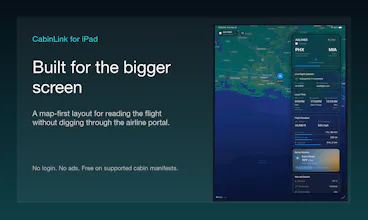
CabinLink reads supported in-flight Wi-Fi manifests and turns them into a native flight dashboard. See route, current position, altitude, speed, ETA, aircraft details, and destination weather, with last-known updates when the cabin connection drops. No login, no ads, and no paid Wi-Fi pass required for supported manifests. Launches Jun 7, 2026 at 9 AM MST on iPhone, iPad, Mac, and Apple Vision Pro.



Free
Launch Team / Built With


ArticosTest your messaging on buyers, right in your agent
Promoted


Hi Product Hunt, I built CabinLink because airline Wi-Fi portals often have a useful flight map, but the details are buried, slow, or disappear when the cabin connection gets flaky.
CabinLink reads supported onboard flight manifests over cabin Wi-Fi and turns them into a native Apple app experience. You get the route, current position, altitude, ground speed, heading, time remaining, aircraft details, and destination weather when an internet connection is available. If the Wi-Fi drops, the last known reading stays on screen instead of leaving you with a spinner.
It is built for iPhone, iPad, Mac, and Apple Vision Pro. There is no login, no ads, and supported cabin manifests usually do not require a paid Wi-Fi pass.
Thanks to Rudrank Riyam (@ rudrank on X.com), creator of ASCCLI, and Paul Hudson (@ twostraws on X.com), creator of Kickstart. ASCCLI helped with App Store Connect launch work, and Kickstart helped keep the launch plan grounded in actual distribution and Product Hunt best practices.
I would love feedback on airline coverage, the first-run explanation, and what flight detail would be most useful to add next.
Every other tracker either makes me type a flight number or leans on a GPS trick that dies the second the screen locks. My one question is the offline behavior - when the cabin wifi cuts out and you hold the last reading, are you dead-reckoning position from the last speed and heading?
@artstavenka1 mostly, but that would leave me at risk for showing inaccurate data so after a certain threshold I show a message about stale data instead of showing anything close to guesswork.
The "supported manifests" caveat is where the first-run experience is going to make or break it — most users won't know if their airline is supported until they're already in the air with expectations set. Is there a way to tell someone before they board whether their flight will work, or does that require knowing the carrier in advance?
@habibferdous i have a list of supported airlines on vishrutjha.com/cabinlink and also in the settings section of the app so that the users are aware beforehand. Also I provide a section in the app where users can send me requests to support their airline with metadata collected automatically to help me better prepare for the airline's manifest.
Do you have an Android version or a repo link?
@ben_park2 No plans on Android from my end but have a friend who has tasked upon himself to present a Material You take on the design
@vishrutjha the list is great, keep it growing.
Which airlines or wifi providers are actually supported via manifests right now?
@thamibenjelloun it's required by law to present this data on the in-flight network wherever there's wifi on board. but each system has a different way to host it and hence I only support a limited number of airlines as of now. had that been a standardized practice, it would make my job way easier.
Is this for airplanes that don’t have seatback screens? Usually, the same information can be viewed on the screen in the seat in front of you, or if there isn’t one, on the screen at the end of the row.
@natalia_iankovych yes, and more. not all information is displayed on those screens, or more often than not, those screens are of poor quality. I try to present the information in a sleek manner on the best screens you already own - your iPhone, your iPad, your Mac, your Vision Pro (the best) and even your Apple Watch for easy glancability.