A local-first pipeline automation app for developers powered by AI, running natively on your machine. Think of it as a local Zapier or n8n, built specifically for developers who want to chain shell commands, AI calls, HTTP requests, and file operations into reusable pipelines then trigger them on a schedule, on a file change, or via webhook.
I wanted to thank everyone for all the support and feedback during the launch..working on the next version and was wondering if you have any feature requests ? feel free to share :)
Hey PH! 👋 I'm the maker of buildpipe, and I'm really excited to share this today.
The idea came from a simple frustration: I kept writing the same throwaway shell scripts to chain together AI calls, HTTP requests and file operations then losing them, forgetting what they did and rewriting them from scratch. I wanted something visual, local, and fast. No YAML. No cloud account. No vendor lock-in.
So I built buildpipe, a desktop app where you compose pipelines out of typed steps (shell commands, AI calls, HTTP requests, file ops, conditionals, loops, notifications) and wire them together by referencing outputs like {{step_id.output}}. Everything runs on your machine and stays there.
A few things I'm particularly proud of:
🔁 **Triggers** — cron, file-watch, or webhook. Set it and forget it.
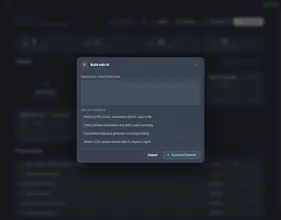
✦ **AI Build** — describe a pipeline in plain English and it scaffolds the steps for you.
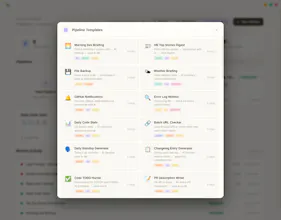
📋 **48 templates** — from daily standups to Docker health checks, ready to clone.
🔒 **Privacy-first** — no telemetry, no accounts, API keys encrypted.
I'd love to hear what workflows you'd automate first. And if anything feels broken or missing, please tell me. This is v1.0.0 and I'm all ears. 🙏
A lot of automation effort gets stuck on auth and secrets: how do credentials work in practice (API keys, OAuth flows, rotation, per-project scoping), and what tradeoffs did you make versus hosted tools that can smooth OAuth but require sending data through their servers?
@curiouskitty I have not added any auth flows yet. Your llm api keys are encrypted and stored locally. Adding auth flow to the app in the next version I didn't feel it was a top req for v1. The goal was local pipes as a desktop app and I wanted to focus on that.
Thank you for the feedback!
Report
the AI calls step in the pipeline is the one i'd want to understand better. chaining shell commands and HTTP requests is well-understood territory. adding AI calls introduces non-determinism into the pipeline which changes how you think about error handling and retry logic. if an AI step returns something unexpected does the pipeline fail, retry, or branch? and how do you define what unexpected means for a step that's inherently probabilisti
@ansari_adin I would define json outputs to everything so that you can measure with a field that there was a success in atleast processing the ai request. A score of confidence as well. It is upto you and how you decide to write your pipeline.
Report
Local-first pipeline runner is a smart positioning. I've lost count of how many one-off shell scripts I wrote to chain API calls and then forgot where they lived. The {{step_id.output}} referencing pattern feels natural — similar to how n8n handles it but without the cloud dependency. One thing I'd want before adopting: can pipelines be versioned in git as plain files, or is the visual graph the only source of truth?
@xiaosong001 thank you. Currently there is no versioning but a history of logs and individual runs are stored. I love the idea though. I will start working on versioning tomorrow. Maybe keep the last 5 versions ?
Report
hey buddy! The idea looks very interesting for productivity.
Just my concern for recurring workflows like Hacker News summaries or daily briefings, do you maintain a searchable history of previous runs? For example, if I saw a story in the morning and later wanted to revisit the ai summary or outputs, having run history would be super useful. It is what we usually do.
But at the same time, storing every pipeline output/log long-term could also become a storage challenge locally specially for heavy AI workflows.
@naresh_chandanbatve great question...yes the logs are stored of each run under the .build-pipe folder in your user directory :)
Report
Multi-step AI workflows are powerful when they include clear checkpoints. Can a buildpipe workflow pause for approval before a step changes code, posts externally, or calls a paid API?
@cyrus_elmtalab great suggestions currently there is no approval process but I'll add it to the roadmap. Thank you for the suggestion.
Report
The file-watch trigger is interesting — curious whether buildpipe can handle asset pipelines where the output is binary files rather than code. For instance, running a font build step that produces WOFF2 files and then pushing them to a CDN as a chained step. Is the pipeline model flexible enough for arbitrary file artifact workflows, or is it currently more focused on shell/AI/HTTP steps?
@sunnyallan Great question the short answer is yes, this works today, but you'd be doing it through shell steps rather than a dedicated artifact primitive.
The pattern would be: file-watch trigger on your source fonts → shell step running your font build tool (outputting WOFF2s to a known path) → HTTP or shell step pushing to your CDN, with {{step_id.output}} passing the path between them. Since everything runs locally on the same machine, binary files are just files no serialization needed.
Binary/asset pipelines are definitely on my radar as a first class use case. Would love to know is the missing piece mostly the artifact store, or is there something about the step model itself that feels limiting for this workflow?
buildpipe
Product Hunt
buildpipe
@curiouskitty I have not added any auth flows yet. Your llm api keys are encrypted and stored locally. Adding auth flow to the app in the next version I didn't feel it was a top req for v1. The goal was local pipes as a desktop app and I wanted to focus on that.
Thank you for the feedback!
the AI calls step in the pipeline is the one i'd want to understand better. chaining shell commands and HTTP requests is well-understood territory. adding AI calls introduces non-determinism into the pipeline which changes how you think about error handling and retry logic. if an AI step returns something unexpected does the pipeline fail, retry, or branch? and how do you define what unexpected means for a step that's inherently probabilisti
buildpipe
@ansari_adin I would define json outputs to everything so that you can measure with a field that there was a success in atleast processing the ai request. A score of confidence as well. It is upto you and how you decide to write your pipeline.
Local-first pipeline runner is a smart positioning. I've lost count of how many one-off shell scripts I wrote to chain API calls and then forgot where they lived. The {{step_id.output}} referencing pattern feels natural — similar to how n8n handles it but without the cloud dependency. One thing I'd want before adopting: can pipelines be versioned in git as plain files, or is the visual graph the only source of truth?
buildpipe
@xiaosong001 thank you. Currently there is no versioning but a history of logs and individual runs are stored. I love the idea though. I will start working on versioning tomorrow. Maybe keep the last 5 versions ?
hey buddy!
The idea looks very interesting for productivity.
Just my concern for recurring workflows like Hacker News summaries or daily briefings, do you maintain a searchable history of previous runs?
For example, if I saw a story in the morning and later wanted to revisit the ai summary or outputs, having run history would be super useful. It is what we usually do.
But at the same time, storing every pipeline output/log long-term could also become a storage challenge locally specially for heavy AI workflows.
buildpipe
@naresh_chandanbatve great question...yes the logs are stored of each run under the .build-pipe folder in your user directory :)
Multi-step AI workflows are powerful when they include clear checkpoints. Can a buildpipe workflow pause for approval before a step changes code, posts externally, or calls a paid API?
buildpipe
@cyrus_elmtalab great suggestions currently there is no approval process but I'll add it to the roadmap. Thank you for the suggestion.
The file-watch trigger is interesting — curious whether buildpipe can handle asset pipelines where the output is binary files rather than code. For instance, running a font build step that produces WOFF2 files and then pushing them to a CDN as a chained step. Is the pipeline model flexible enough for arbitrary file artifact workflows, or is it currently more focused on shell/AI/HTTP steps?
buildpipe
@sunnyallan Great question the short answer is yes, this works today, but you'd be doing it through shell steps rather than a dedicated artifact primitive.
The pattern would be: file-watch trigger on your source fonts → shell step running your font build tool (outputting WOFF2s to a known path) → HTTP or shell step pushing to your CDN, with {{step_id.output}} passing the path between them. Since everything runs locally on the same machine, binary files are just files no serialization needed.
Binary/asset pipelines are definitely on my radar as a first class use case. Would love to know is the missing piece mostly the artifact store, or is there something about the step model itself that feels limiting for this workflow?