Buddy is the most powerful AI design agent inside Figma. And if you already pay for ChatGPT, plug it in and chat for free. No AI credits. Generate screens, flows, and variants on your canvas. Clone any website, import Claude design/artifacts, or drop a screenshot to get editable Figma layers. Run parallel agents at the same time, organize your file, and stay on-brand with your design system. You're already paying for AI. Now use it right inside Figma.
Hey PH 👋 Avishay here, co-founder of Anima. Buddy is already the most powerful AI agent for Figma, it is based on all of our knowledge and code around Figma-to-code and agentic coding solutions, serving 2 million users.
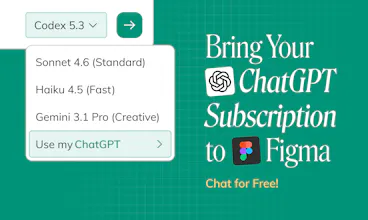
Today, we address the token anxiety coming with vibe coding and vibe design. You can bring your own LLM to power Buddy, we don't charge you for chats. Plug in your existing ChatGPT subscription, and chat for free. No AI credits.
What Buddy does, right inside your Figma canvas:
Chat to generate designs - Screens, flows, components, and variants on the canvas.
HTML to Figma - Paste a link or attach HTML to get editable layers.
Claude design/artifacts to Figma - Turn what you create in Claude into Figma layers.
Image to Figma - Attach screenshots or AI-generated concepts and turn it into Figma layers.
Take actions in Figma - Arrange files, organize layers, run batch edits across screens
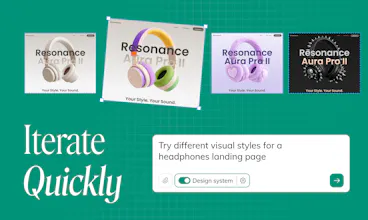
Iterate existing designs - Select a frame and ask for variations, new breakpoints, image swaps, or a new theme
Clone any website into Figma - just paste a link in the chat
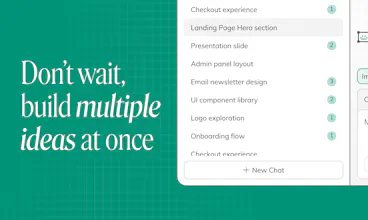
Parallel chats - run multiple agents at once
Design system aware - reuse your components for brand consistency
Image generation and online research - built in
Who it's for: Anyone who wants to design in Figma with AI. Designers, product teams, marketing teams, engineering, and leadership who want AI in the canvas.
Anima has been leading the design-to-code space for 8 years, and we're starting our fight in token anxiety today, opening design and code for everyone.
We'll be here all day - Ask anything, share feedback, questions, and hot takes 👇
What I like most is the “use the AI you already pay for” angle. :) AI credits inside design tools can get annoying very quickly, especially when you are still exploring, iterating, and throwing away half the outputs.
For a product team, the most useful part feels like turning rough ideas, screenshots, or existing pages into editable Figma layers instead of ending up with a static image you have to rebuild manually.
I’m especially curious about the design system awareness. If a team already has components, colors, spacing rules, and brand patterns in Figma, how reliably does Buddy reuse those instead of creating something that looks close but still needs cleanup?
Also, how does plugging in a ChatGPT subscription work in practice? Is it using the user’s existing account directly, or API keys?
@andrasczeizel I agree - AI credits are get expensive fast and limit the value we get from AI, we're trying to change that 🙌
Design system - You can guide it to be strict or loose. By default, it will use whatever is available as a Figma component and generate what's missing to accomplish your task.
How to pair ChatGPT - The plugin will guide you, it's a feature of ChatGPT/Codex, you'll need to turn it on, and you don't need to set a key, but take a code from Buddy and paste to ChatGPT pairing.
Bringing your OpenAI/Anthropic API keysis possible - Some companies are buying bulk tokens, so we allow bringing API keys as well (In Buddy settings)
Bringing your own LLM is a smart move for teams already paying for ChatGPT. Can Buddy work with design systems already set up in Figma, or does it start fresh each time?
The import-anything feature is what got me - tested dropping in a component from a live site and it came through without the usual formatting mess. Bring-your-own-key is the right call too, removes the biggest friction point for anyone who already pays for ChatGPT. Agent still has some rough edges on complex multi-section layouts but the core import flow is genuinely solid. Good launch!
Congrats on the launch! 🎉 So excited someone is finally making AI actually work inside Figma. I’ve been waiting for Figma to solve this themselves, but honestly this looks like it. The bring-your-own-LLM approach is smart too. Trying it now!





Anima App
Hey PH 👋
Avishay here, co-founder of Anima.
Buddy is already the most powerful AI agent for Figma, it is based on all of our knowledge and code around Figma-to-code and agentic coding solutions, serving 2 million users.
Today, we address the token anxiety coming with vibe coding and vibe design.
You can bring your own LLM to power Buddy, we don't charge you for chats.
Plug in your existing ChatGPT subscription, and chat for free. No AI credits.
What Buddy does, right inside your Figma canvas:
Chat to generate designs - Screens, flows, components, and variants on the canvas.
HTML to Figma - Paste a link or attach HTML to get editable layers.
Claude design/artifacts to Figma - Turn what you create in Claude into Figma layers.
Image to Figma - Attach screenshots or AI-generated concepts and turn it into Figma layers.
Take actions in Figma - Arrange files, organize layers, run batch edits across screens
Iterate existing designs - Select a frame and ask for variations, new breakpoints, image swaps, or a new theme
Clone any website into Figma - just paste a link in the chat
Parallel chats - run multiple agents at once
Design system aware - reuse your components for brand consistency
Image generation and online research - built in
Who it's for:
Anyone who wants to design in Figma with AI.
Designers, product teams, marketing teams, engineering, and leadership who want AI in the canvas.
Anima has been leading the design-to-code space for 8 years, and we're starting our fight in token anxiety today, opening design and code for everyone.
We'll be here all day - Ask anything, share feedback, questions, and hot takes 👇
YourSitee
What I like most is the “use the AI you already pay for” angle. :) AI credits inside design tools can get annoying very quickly, especially when you are still exploring, iterating, and throwing away half the outputs.
For a product team, the most useful part feels like turning rough ideas, screenshots, or existing pages into editable Figma layers instead of ending up with a static image you have to rebuild manually.
I’m especially curious about the design system awareness. If a team already has components, colors, spacing rules, and brand patterns in Figma, how reliably does Buddy reuse those instead of creating something that looks close but still needs cleanup?
Also, how does plugging in a ChatGPT subscription work in practice? Is it using the user’s existing account directly, or API keys?
Anima App
@andrasczeizel I agree - AI credits are get expensive fast and limit the value we get from AI, we're trying to change that 🙌
Design system - You can guide it to be strict or loose. By default, it will use whatever is available as a Figma component and generate what's missing to accomplish your task.
How to pair ChatGPT - The plugin will guide you, it's a feature of ChatGPT/Codex, you'll need to turn it on, and you don't need to set a key, but take a code from Buddy and paste to ChatGPT pairing.
Bringing your OpenAI/Anthropic API keys is possible - Some companies are buying bulk tokens, so we allow bringing API keys as well (In Buddy settings)
YourSitee
@avishic Thanks for your reply! :))
Bringing your own LLM is a smart move for teams already paying for ChatGPT. Can Buddy work with design systems already set up in Figma, or does it start fresh each time?
Anima App
@doganakbulut yes, you go to the design system file, turn DS on, click "Sync" and then you can always use it, it will not forget
Dial
The import-anything feature is what got me - tested dropping in a component from a live site and it came through without the usual formatting mess. Bring-your-own-key is the right call too, removes the biggest friction point for anyone who already pays for ChatGPT. Agent still has some rough edges on complex multi-section layouts but the core import flow is genuinely solid. Good launch!
Anima App
@galdayan thanks!
ReplyMind
Congrats on Buddy’s launch 🎉 A free Figma agent sounds super useful & excited to see how it helps designers speed up their workflow!
Anima App
@moon10 Thank you!
theGist
Anima App
@itayd Thank you, let us know how it goes! 🙌
That's amazing! Saves so much time when iterating design ideas