Launched this week
Browser Notes
Your ideas, organized - not uploaded
146 followers
Your ideas, organized - not uploaded
146 followers
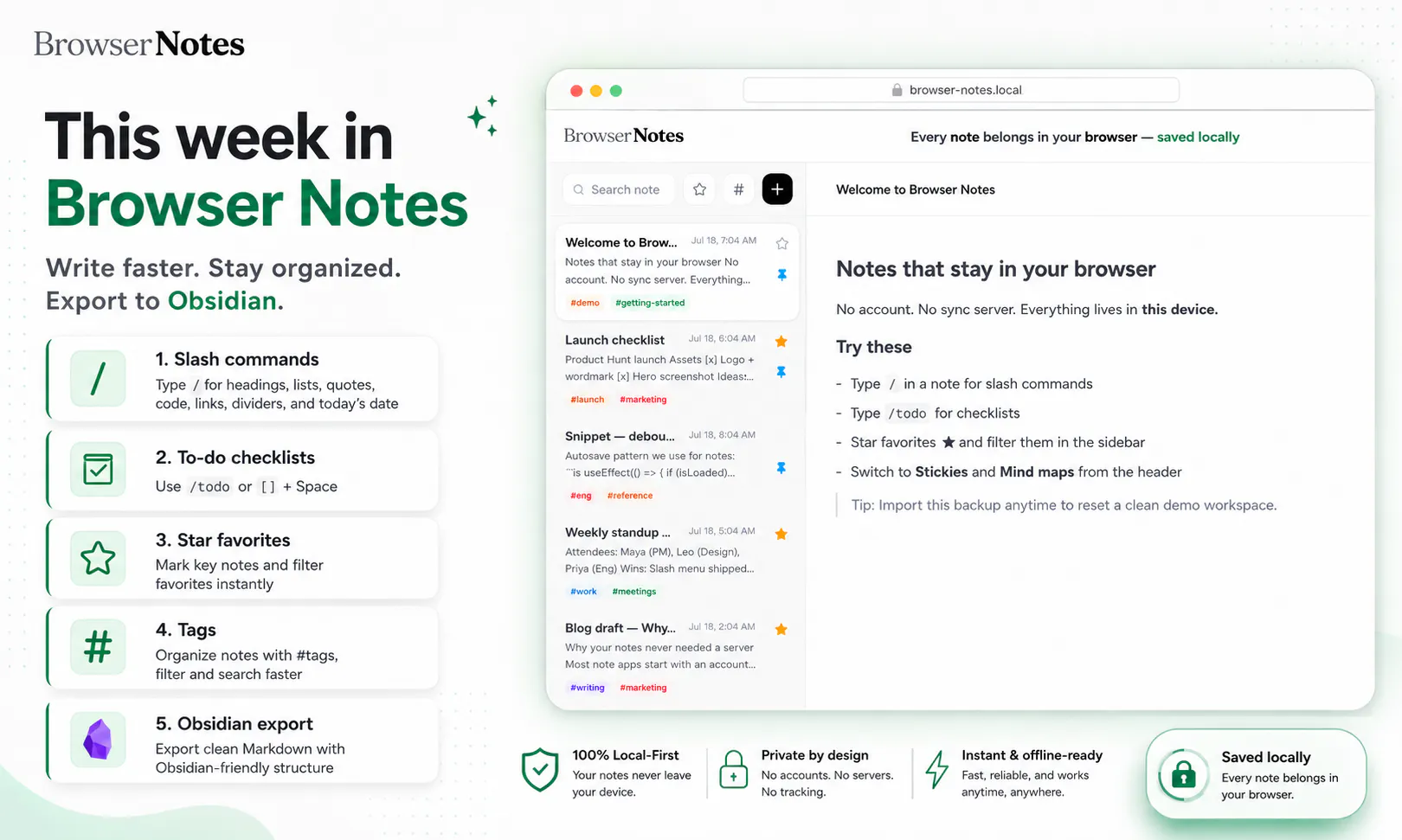
Notes are often scattered across writing apps, sticky boards, and mind-mapping tools, while your private ideas are pushed to the cloud. Browser Notes brings notes, sticky notes, and mind maps into one local-first workspace. No account, no tracking, and no forced sync. It works offline, stores everything in your browser, and lets you back up your data anytime.


How does the export work exactly if I want to move my mind maps over to something like Obsidian later, is it plain markdown or some proprietary format?
Browser Notes
@luzunefe16087 Good question. Right now, the backup export is designed mainly for restoring your Browser Notes workspace, so it preserves the structure of notes, sticky boards, and mind maps rather than exporting everything as plain Markdown.
A dedicated Obsidian-friendly export is on our roadmap. The goal is to make it easy to move your content out in an open, usable format instead of locking it into Browser Notes.
How does the local storage actually hold up if I want to move my notes between browsers or devices without relying on a cloud account?
Browser Notes
@demirel_ye77608 That’s the main trade-off of the local-first approach: your data lives in IndexedDB inside a specific browser profile, so it doesn’t automatically follow you to another browser or device.
To move it, you can export your Browser Notes workspace as a backup file and import it into the other browser or device. There’s no cloud account or automatic sync involved today. We’re exploring simpler private device-to-device transfer options, but we want to avoid introducing hidden cloud storage or account dependency.
Great stuff! Later down the road, would support for NAS (Network Attached Storage) systems be considered? For folks/orgs with more local data infra, this could be helpful for keeping data on-prem and accessible.
Browser Notes
@jacob_galajda That’s a really interesting direction, and it fits well with the local-first philosophy.
NAS support isn’t available today, but we’d definitely consider it for users and teams that want their data to remain on-prem while still being accessible across devices.
We’d need to design it carefully so Browser Notes stays simple for individual users while offering an optional self-hosted storage layer for more advanced setups.
Thanks for suggesting it, adding this to our feature considerations.
How does this handle switching browsers or devices if everything is stored locally in just one browser, is there a simple export import workflow for moving between Chrome and Firefox?
Browser Notes
@aydn24696380943 Yes, the current way to move between browsers or devices is through export and import.
You can export your complete Browser Notes workspace as a backup file, then import it into Browser Notes in the other browser. This preserves your notes, sticky boards, and mind maps without requiring an account or sending the data through our servers.
Automatic cross-browser sync isn’t available today, but we want the manual transfer flow to remain simple and fully user-controlled.
How does the local-first setup hold up if I switch browsers or clear my cache by accident, is there a clear way to restore from a backup without losing the mind map structure?
Browser Notes
@necatipisk53626 Yes, the backup is designed to preserve the full Browser Notes workspace, including the mind map structure, not just the text inside it.
You can export a backup file and import it later in another browser or after resetting your current one. Since the data lives locally in IndexedDB, clearing normal cached files usually shouldn’t affect it, but clearing browser/extension storage or removing the browser profile can. Keeping a recent exported backup is the safest way to restore everything exactly as it was.
love the no-account, no-sync-server approach for something this personal. small edge case I'm curious about - if I have the app open in two tabs at once and edit the same note in both, what happens when I switch back to the first tab, does it overwrite the other one or does it warn me first
Browser Notes
@galdayan Great edge case and definitely something a local-first app needs to handle carefully.
At the moment, both tabs access the same local IndexedDB data, and there isn’t a conflict-warning interface yet. If the same note is edited independently in two tabs, the most recently saved version may overwrite the earlier one.
We’re looking at real-time tab coordination and conflict detection so changes can be reflected across open tabs instead of silently overwriting each other. Thanks for raising this!
How does this handle larger mind maps or note collections once you start hitting browser storage limits, and is there a clear warning before something gets cut off?
Browser Notes
@ayhanargundogan Good question. Browser Notes uses IndexedDB, so the available space is much larger than traditional localStorage, but the exact quota still depends on the browser, device, and available disk space.
For typical text notes and mind maps, users should have plenty of room. Very large collections could eventually approach the browser’s limit, though, and we agree that nothing should fail silently. A clear storage indicator and warning before the limit is reached is something we want to add, along with an easy export option so users can back up or move older work before storage becomes an issue.