Launched this week
Alias Bot

Alias Bot

Replace repeated @mentions in Slack with channel aliases

95 followers

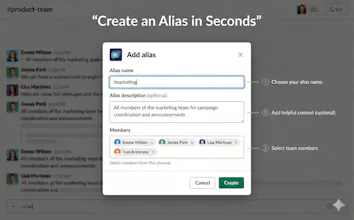
Teams often end up typing long @Alice @Bob @Charlie mentions cluttering the channel. Sometimes, some people get missed or the wrong person gets tagged. This gets worse with rotating or short-lived teams (on-call, releases, incidents). Alias Bot lets you define channel-scoped aliases (e.g. !reviewers, !oncall) so mentions expand to the right people for that channel, without needing to manage org-wide user groups.
Alias Bot gallery image
Free Options
Launch tags:Slackβ€’Productivityβ€’Remote Work
Launch Team
AppSignal
AppSignal
Get the APM insights you need without enterprise price tags.
Promoted

What do you think? …

Sanket Nadhani
Hey Product Hunt πŸ‘‹ We built Alias Bot because we kept seeing the same thing in Slack: - Long @mention chains cluttering channels - Someone always getting missed (or tagged by mistake) - Temporary teams (on-call, releases, incidents) not fitting cleanly into Slack user groups Alias Bot lets you create channel-specific mention aliases in seconds: !reviewers: @alice @bob @charlie After that, anyone in the channel can just type !reviewers and the right people get mentioned, scoped to that channel. No org-wide groups. No admin setup. Works great for rotating or short-lived teams. We’re launching today to get early feedback. Would love to hear: - Where do @mention chains get painful for you? - What would make this more useful in your Slack setup? Happy to answer questions or jump into specifics πŸ™Œ β€” Sanket
Bulama Usman

Slack threads get messy fast with repeated @mentions, especially for rotating teams. Channel-scoped aliases like !on call or !reviewers feel like a simple but huge time-saver and way less error phone.

Kate Ramakaieva

does it work between different workspaces? I need it desperately πŸ™Œ

Sanket Nadhani

@kate_ramakaievaΒ Aliases are channel-specific. So you can set up !reviewers as an alias in multiple channels and they can refer to different people.

Could you elaborate what you mean by working between different workspaces? Thanks!

Kate Ramakaieva

@sanketnadhaniΒ I’m a member of 18 Slack workspaces, so I need constantly switch between them to check mentions

Sanket Nadhani

@kate_ramakaievaΒ You will have to install them individually in every workspace you need. Aliases are channel-specific.

JUJIE YANG

This solves a real pain point. Can you set an alias to dynamically update as team membership changes, or is it static once created?