
Ajar
Lid Angle Sync & Keep Awake for AI Agents on Mac
70 followers
Lid Angle Sync & Keep Awake for AI Agents on Mac
70 followers
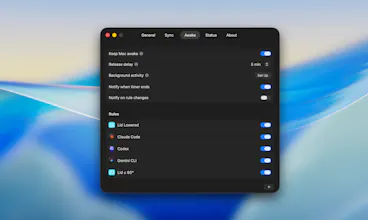
Ajar makes your Mac respond to what you're doing, not what you remember to press. Lid Angle Sync maps your MacBook's lid angle to screen brightness, keyboard backlight, and system volume. Multiple displays are supported, with per-display offsets. Awake keeps the Mac awake when you're actually working. Built-in rules detect Claude Code, Codex, and Gemini CLI sessions. Add your own for apps, Wi-Fi, disks, power, or a closed-lid clamshell.


Free Options
Launch Team / Built With


Framer AI AgentsDesign and publish professional sites with AI
Promoted
Running Claude Code sessions that span hours taught me that the standard "prevent sleep" approach is too blunt. You end up with your screen blazing at full brightness at 2am because you forgot to unset it. The process-aware detection in Ajar solves the right problem: the Mac should know the difference between "idle" and "actively running an agent session." Curious whether the sleep lock releases immediately when Claude Code exits, or whether there's a configurable cooldown for sessions that might restart quickly?
@binu_george Appreciate that. The detection works off the rules you set up, so the moment Claude Code stops being active, Ajar lets the Mac sleep again on its own. You can add your own rules for other workflows.
The "keep awake while a Claude Code or Codex session is running" rule is genuinely clever — caffeinate-by-hand always forgets to turn off. How does it detect an active agent session: process name, CPU, or something that can tell a long-running agent apart from one just sitting idle at a prompt waiting on me? That idle-versus-working distinction is where this either feels magic or annoying.