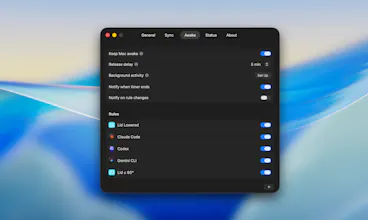
Ajar makes your Mac respond to what you're doing, not what you remember to press. Lid Angle Sync maps your MacBook's lid angle to screen brightness, keyboard backlight, and system volume. Multiple displays are supported, with per-display offsets. Awake keeps the Mac awake when you're actually working. Built-in rules detect Claude Code, Codex, and Gemini CLI sessions. Add your own for apps, Wi-Fi, disks, power, or a closed-lid clamshell.
Hey everyone! I'm the developer behind Ajar. I also built Looq and Mux.
I built Ajar because the lid angle on a MacBook is the most overlooked input. You already change it dozens of times a day, opening it, half-closing it for a quick break, propping it up to read in bed. macOS does nothing with that signal. So I wired it up.
Ajar gives you two things:
Lid Angle Sync β when you lift or lower the lid, your screen brightness, keyboard backlight, and system volume adjust accordingly. Setup is a single draggable anchor on a visual curve: pick the angle where you want everything at a given level, and the rest of the ramp falls into place. External displays can join the sync too, each maintaining its own offset.
Awake β keeps your Mac from sleeping while you're in the middle of something. Built-in rules cover Claude Code, Codex, and Gemini CLI, preventing sleep only while an agent is actively working, not just because the terminal is open. Add your own rules for specific apps, Wi-Fi networks, external drives, power source, or the closed-lid clamshell setup with an external display.
Everything runs on your Mac. 7-day free trial, one-time purchase. macOS 14 and later, optimized for Apple Silicon.
Would love your feedback.
Report
Running Claude Code sessions that span hours taught me that the standard "prevent sleep" approach is too blunt. You end up with your screen blazing at full brightness at 2am because you forgot to unset it. The process-aware detection in Ajar solves the right problem: the Mac should know the difference between "idle" and "actively running an agent session." Curious whether the sleep lock releases immediately when Claude Code exits, or whether there's a configurable cooldown for sessions that might restart quickly?
@binu_georgeΒ Appreciate that. The detection works off the rules you set up, so the moment Claude Code stops being active, Ajar lets the Mac sleep again on its own. You can add your own rules for other workflows.
Report
The "keep awake while a Claude Code or Codex session is running" rule is genuinely clever β caffeinate-by-hand always forgets to turn off. How does it detect an active agent session: process name, CPU, or something that can tell a long-running agent apart from one just sitting idle at a prompt waiting on me? That idle-versus-working distinction is where this either feels magic or annoying.
Looq: Preview Files
Running Claude Code sessions that span hours taught me that the standard "prevent sleep" approach is too blunt. You end up with your screen blazing at full brightness at 2am because you forgot to unset it. The process-aware detection in Ajar solves the right problem: the Mac should know the difference between "idle" and "actively running an agent session." Curious whether the sleep lock releases immediately when Claude Code exits, or whether there's a configurable cooldown for sessions that might restart quickly?
Looq: Preview Files
@binu_georgeΒ Appreciate that. The detection works off the rules you set up, so the moment Claude Code stops being active, Ajar lets the Mac sleep again on its own. You can add your own rules for other workflows.
The "keep awake while a Claude Code or Codex session is running" rule is genuinely clever β caffeinate-by-hand always forgets to turn off. How does it detect an active agent session: process name, CPU, or something that can tell a long-running agent apart from one just sitting idle at a prompt waiting on me? That idle-versus-working distinction is where this either feels magic or annoying.