
Aera Browser
The browser built for automation
378 followers
The browser built for automation
378 followers
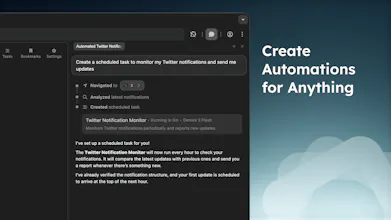
Meet Aera, the browser built for automating real workflows. Create tasks, and Aera runs full workflows in the background, handling context, execution, and reporting automatically. Connect tools like Cursor or Claude Code with MCP so agents can take real action, not just suggest it. Keep your data + history private and local-only. Try for free!



Are you dog fooding your own product to get more users? If so, how are you using it?
Aera Browser
impressive work, want to know how you manage security as its doing automations and i think it will give me report daily if i ask check daily emails at 8AM and give report so credentials how it manages how it make sure sensitive info dont go to LLM, also you build it solo, so what is the base? is it electron or chromium or something else or another existing open source github repo?
but looks great so far. Thanks!
Aera Browser
@tahir_ashraf3 Hey, bit of a late reply, but great questions!
The current iteration of Aera is built on Chromium. It was originally built in Electron, but feature parity for basic browser features was taking too much time away from actual agentic feature development, so the entire project was migrated into Chromium.
For security, the agent never sees your credentials, and relies on you logging in initially to websites to be able to access any of your data. Aera does come with the Chromium password manager, but that exists in a different sandbox and UI layer that Aera cannot see, and has no access to. Of course, once you log into these websites, logins will generally persist if you have set them to.
For security of your browsing information and chats, that is all stored fully locally, and never passes through Aera servers. Only your chats, are passed directly to the provider for inference. Even in these cases, login information is not available from the browser directly to the LLM. It will wait for you to log in if login is required, and will not see your credentials in the process. Additionally, no information is sent to the LLM while you are just browsing, only when you are actively using the chat.
Would love to hear your thoughts if you give it a try! Have some big updates on the way soon
Clipboard Canvas v2.0
As someone who's worked on automation tools, I love the idea of Aera tackling real workflows directly in the browser. The integration with tools like Cursor and Claude Code is a smart move to boost functionality without compromising user data security. How have you ensured Aera can effectively handle complex websites without getting flagged as a bot?
Aera Browser
@trydoff Yep, and that is one of the reasons why forking Chromium became a priority over the original Electron application. Having access to the browser's core functionality at the deepest level allows Aera to perform actions like clicking/typing in a way that emulates human actions, rather than simply programmatically clicking buttons. This is taken a step further for subscription accounts, which can complete most levels of Captchas (there are a few really complex ones that it deals with) without user interaction.
That is one of the things this Chromium version of Aera highly prioritized, as the original Electron build would get flagged as automated behavior due to the limited access to the browser internals.
Automation is easy.
Reliable automation across real workflows is hard.
If this solves context, failures and retries, this gets very interesting.