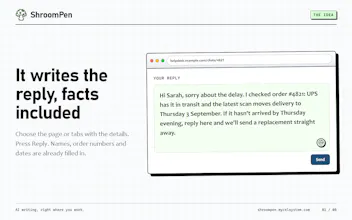
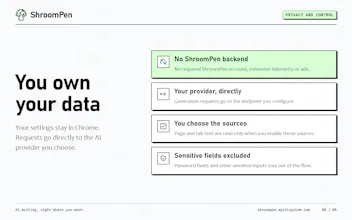
ShroomPen is a privacy-first browser writing assistant that lets you instantly reply, rewrite, fix grammar, or translate text across any website without sending sensitive data to the cloud. Designed to balance AI convenience with absolute data privacy, it keeps all your page, field, tab, and session context securely on your device, giving you complete control over your everyday web workflow.
Like many developers, I found myself constantly frustrated by the privacy trade-offs of modern AI writing tools. Every time I wanted a quick rewrite, grammar fix, or translation in the browser, I had to send sensitive webpage content, form data, and personal context to third-party cloud servers.
I built ShroomPen to solve that exact problem: bringing the seamless convenience of an AI writing assistant directly to the browser while keeping 100% of the data local and private on the user's device.
As I worked on the launch, my approach evolved from trying to build a heavy, feature-bloated extension to focusing tightly on a lightweight, context-aware utility. I realized that users don't want another complex app dashboard - they just want instant, secure help right inside the text fields they're already using, without ever having to worry about where their data is going.
When someone is deciding between ShroomPen and Grammarly/LanguageTool, what are the 2–3 workflow moments where ShroomPen clearly wins—and where do you still expect Grammarly/LanguageTool to be better today?
• You’re replying to something and need context from other tabs, a PDF, or your notes. • You keep using the same background info for applications, outreach, or customer replies. Saved sources save you the copy-paste. • You want to use your own AI provider or a local model and choose what context gets sent.
For everyday grammar checks as you type, I’d still expect Grammarly or LanguageTool to be better today. They’re also strong choices for detailed proofreading and consistent writing style.
ShroomPen’s main advantage is letting you bring your context and your preferred model into the place where you’re already writing.
@grant_w1 You are right, and we might add more optional features like this!
Report
Everyday use I could see myself reaching for this when I’ve written something that technically makes sense but sounds awkward. Being able to fix it right there without opening another tool feels genuinely convenient.
"privacy-first" and "browser extension that rewrites text on any site" don't usually go together, most of these ship your selection to an API somewhere. is the model actually running locally in the extension, or is "privacy-first" here meaning no logging/retention on your servers rather than no network call at all? that distinction matters a lot for anyone pasting client emails into the rewrite box.



ShroomPen
Like many developers, I found myself constantly frustrated by the privacy trade-offs of modern AI writing tools. Every time I wanted a quick rewrite, grammar fix, or translation in the browser, I had to send sensitive webpage content, form data, and personal context to third-party cloud servers.
I built ShroomPen to solve that exact problem: bringing the seamless convenience of an AI writing assistant directly to the browser while keeping 100% of the data local and private on the user's device.
As I worked on the launch, my approach evolved from trying to build a heavy, feature-bloated extension to focusing tightly on a lightweight, context-aware utility. I realized that users don't want another complex app dashboard - they just want instant, secure help right inside the text fields they're already using, without ever having to worry about where their data is going.
Product Hunt
ShroomPen
I’d pick ShroomPen in three situations:
• You’re replying to something and need context from other tabs, a PDF, or your notes.
• You keep using the same background info for applications, outreach, or customer replies. Saved sources save you the copy-paste.
• You want to use your own AI provider or a local model and choose what context gets sent.
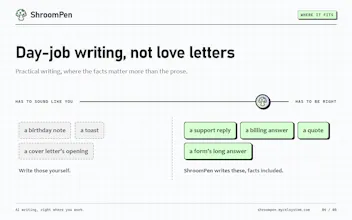
For everyday grammar checks as you type, I’d still expect Grammarly or LanguageTool to be better today. They’re also strong choices for detailed proofreading and consistent writing style.
ShroomPen’s main advantage is letting you bring your context and your preferred model into the place where you’re already writing.
On device is a big plus.
ShroomPen
@aria_taylor You can use your local LLM as the brain model for ShroomPen. Thank you for your thought!
Not having to leave the page is probably the part I’d appreciate most.
ShroomPen
@evan_taft1 Agreed, staying in context makes the whole workflow so much smoother. Thanks for the support, Evan!
Translation built into the same little tool is a nice touch.
ShroomPen
@grant_w1 You are right, and we might add more optional features like this!
Everyday use I could see myself reaching for this when I’ve written something that technically makes sense but sounds awkward. Being able to fix it right there without opening another tool feels genuinely convenient.
Dial
"privacy-first" and "browser extension that rewrites text on any site" don't usually go together, most of these ship your selection to an API somewhere. is the model actually running locally in the extension, or is "privacy-first" here meaning no logging/retention on your servers rather than no network call at all? that distinction matters a lot for anyone pasting client emails into the rewrite box.