Shoulder Tap

Shoulder Tap

Put some manners on your Slack Notifications

1 follower

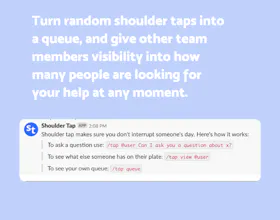
Shoulder Tap is a simple tool to help you manage requests for your time. Turn random shoulder taps into a queue, and give other team members visibility into how many people are looking for your help at any moment.
Shoulder Tap gallery image
Launch Team
Intercom
Intercom
Startups get 90% off Intercom + 1 year of Fin AI Agent free
Promoted

What do you think? …

Ryan Hoover
Request for product: This but for every channel in my life (email, SMS, Twitter DMs, etc.). 😬
Rajiv Ayyangar
Hanna Welch
@rrhoover this would be awesome :)
Zach McCormick
This is great until someone "really needs your help" then just DMs you directly, resulting in the exact same problem that you had before this tool, but now you pay $10/month
Wess Zoghlami
How is this different from pausing notifications on Slack?
Romy Lynch
@wassim_zoghlami2 Hi Wassim, this is quite different as it collects requests for your help and puts them in a list which is visible to other members of your org. This way people can see how busy you are and also answer your help requests themselves (decreasing your work while also making sure their query will be dealt with sooner!)
Patrick Finlay
Hey Everyone 👋 Thanks for taking a look! We build Shoulder Tap in response to seeing some of our co-workers suffering in silence under the weight of dozens of Slack DMs looking for help. Every company has go-to folks that are super helpful, but they are often accidentally punished for this by receiving an inordinate amount of "shoulder taps". Every "quick question" is an interruption that can kill productivity. Shoulder Tap is a small workflow fix that can help manage these inflows, batch notifications, and give other teammates visibility into how much is on their go-to person's plate. For some teams it makes sense to introduce a heavy-weight ticketing process to solve this problem. For other teams, we think a lighter process is the right fit.
Aaron O'Leary
This looks like a fantastic way to manage time within a remote team. It's harder to communicate your time commitments while working remote as compared to working in an office, this looks to do it pretty flawlessly
Laurence Smith
My only issue with this is a privacy based. If someone taps me they can see all of the other taps in my queue (i.e. messages from other users). Is there any way I can turn this off? There is also the public #shoulder-tap channel which broadcasts taps to the entire workspace. Can I turn this off as well?
David Newell
@laurence_smith1 Hi Laurence - David here, one of the makers. Right now there is no way to privately tap a colleague. Part of the reason we built Shoulder Tap was to avoid knowledge silos. We noticed that a lot of the time questions are asked of an individual via DM which means there is no way for others in an organisation to understand how many questions are currently trying to answer or whether there is something that can be answered by someone else instead. There are certainly cases where you might not want a question to be public but still want to tap a person rather than messaging them, it's just not possible yet. We'll keep it in mind as we improve the product
Mike Kopzhassar
cool
123
Next
Last