
Quick Tea
Ask questions, get answers, and chat with multiple tabs
52 followers
Ask questions, get answers, and chat with multiple tabs
52 followers
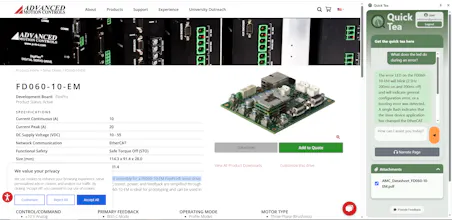
Quick Tea is an AI browser extension answering questions about your open page, highlighting answers, narrating articles aloud, searching attached PDFs, and comparing multiple tabs. Organize bookmarks to revisit your comparisons effortlessly! Launch with Ctrl+Q



Quick Tea
I love the idea of being able to ask questions about page content, and the AI narration is a fantastic touch. Does Quick Tea support multiple languages, or is it currently only available in English?
Quick Tea
@evgenii_zaitsev1
It's only English right now, but if there's a language you'd like to add, I can see what that would entail. Would this be for the chat or ai narration?
ScreenSmooth
What ai model did you use?
(eg. grok, claude)
Quick Tea
@sayyidalijufri
Hey, I used Gemini for it's large context window
💬 Multi-tab knowledge chat? Interesting approach! The tech stack likely includes:
- Real-time cross-tab context sharing 🔄📑
- Query deduplication to avoid redundant processing ❌♻️
- Priority-based answer streaming (fast partial answers first) ⚡🏆
UX challenge: Maintaining coherent conversation threads across tabs.
Quick Tea feels like a true assistant for deep web browsing — smart, voice-friendly, and built for focus. Love the tab comparison and PDF search features especially.
Quick Tea
@supa_l
Thank you!!! Yeah I tried to add features for where I get hung up on researching. Hope it can help others
Quick Tea sounds like a game-changer for browsing efficiency! With its AI-powered capabilities, it answers questions about your open pages, highlights answers, narrates articles aloud, and even searches PDFs and compares multiple tabs. I’m excited to see how it organizes your bookmarks and simplifies comparisons, making your browsing experience faster and more streamlined with just a quick Ctrl+Q!