
Pulse Island
A living island for your Mac's notch
165 followers
A living island for your Mac's notch
165 followers
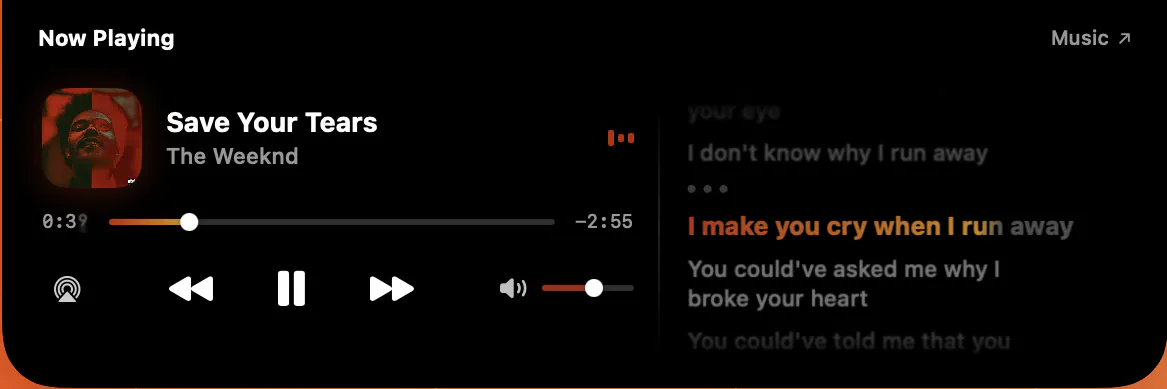
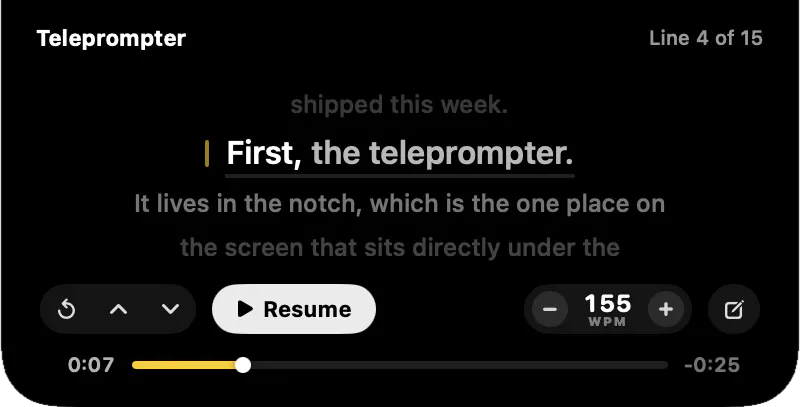
Pulse turns your MacBook's notch into a Dynamic Island: Be it music, meetings, clipboard, weather, focus timers, devices and live system stats, one glance up.


Hey Product Hunt,
Pulse turns the dead space around your MacBook's notch into a Dynamic Island.
Hover it to open, scroll sideways to switch cards.
📋 A clipboard that knows what you copied
- Copy #FF5733 → you get the swatch.
- Copy a screenshot → a thumbnail.
- Copy a link → the host, not 200 characters of UTM.
- Filter by Links / Colors / Images / Code.
🎵 Music from anything
Spotify, Apple Music, and any browser tab: YouTube, YT Music, SoundCloud with artwork and scrubbing.
📅 Meetings
A countdown in the notch that pulls the Zoom/Meet/Teams link, so joining is one click.
🌤️ Weather, Connected devices, CPU, RAM, network
Everything you currently Cmd-Tab or open Control Center for.
The detail I care most about is invisible: the window never animates. It's a fixed transparent panel and SwiftUI springs the island inside it; animating an NSWindow frame can't hold 120fps, animating a view layer can.
It's Native Swift, no Electron. No account, no telemetry. Clipboard history stays in RAM and never touches disk.
Free until 28th July 2026.
One heads-up: Pulse isn't notarized with Apple yet, so macOS will ask you to approve it once on first launch
What would you want your notch to show? A downloads shelf is next on my list.
Hey @thys_beesman
Appreciate you reading it that closely, and you nailed why the panel is a fixed frame. Animating NSWindow geometry at 120Hz fights the compositor, so the window never moves and SwiftUI does all the motion inside it.
On persistence, sleep and reboot differ. Across sleep nothing is lost, the process stays alive so the array is still there. It's a 2Hz poll on NSPasteboard.changeCount (just an int compare), and since I diff the change counter and not the content, anything that landed during sleep gets caught on the first tick after wake.
Across quit or reboot it starts fully clean. No short lived persistence at all: no Core Data, no plist, no cache file. History is an array on the service and it dies with the process. Deliberate, since that blob holds OTPs and tokens, and on disk it also ends up in Time Machine and backups. I also skip org.nspasteboard.ConcealedType, so password manager copies never enter history at all.
Yo, @thys_beesman Pulse 1.0 is Live!
Give it a try here https://www.pulseisland.club
Improved the working of clipboard and a few more iterations for smooth working, do share the feedback
Open to take up feature requests as well
You can connect with me; I'll give you a lifetime Founder's offer to try it out
This is a clever use of space that normally just sits there doing nothing, veru cool. The clipboard previews and meeting countdown are the two parts I’d probably use most. I’m curious how Pulse avoids becoming visually busy once several cards are active. Can you choose exactly what appears and hide everything else? Also, how light is it on battery and memory during a normal workday? A utility like this needs to feel invisible until you need it.
@os_ishmael thank you!
Yes, every card is a toggle in Settings, so you can run Pulse with just clipboard and the meeting countdown and nothing else shows up.
On resources: it's a native Swift app with no background polling loops and it reacts to system events rather than checking on a timer, so a normal workday is very light.
The copy-time classification is the part I keep thinking about. Deciding what a thing is once, at capture, so the row can carry a swatch or a thumbnail or just the host — that's the difference between a clipboard history and a list of strings you have to re-read. And the guard that stops every six-digit order number turning into a color swatch is exactly the kind of detail that only shows up after you've watched it get it wrong a few times.
The deadline-vs-tick point is the one I'm stealing. Anything that derives elapsed time from a running counter quietly breaks the moment the lid closes, and it's the class of bug that never reproduces on the machine you're debugging on. Good that the battery and calendar cards already work that way.
Native Swift, no account, history that dies with the process. This is put together the way I wish more Mac utilities were.
@ryan_davis23 Thanks, and you're right that the swatch guard came from watching it be wrong. Order numbers and hex colours are the same six characters, so the rule ended up being that a bare token needs a letter in it to count.🙌🏻
The heuristic I'm still least happy with is OTP detection, since any bare four to eight digit number qualifies.
@aayu5hgit The letter-in-the-token rule is a good minimal fix — cheap to reason about, and it fails in the direction you'd want it to.
On OTP, the reframe that usually gets me unstuck: it isn't a classification problem, it's a cost-asymmetry one. You're right that digits alone will never separate a code from an order number, because they really are the same string. But their lifetimes are nothing alike — an OTP gets pasted once within a minute of being copied and then never again, while an order number gets re-copied for weeks.
So if what detection buys you is "drop this from history early," you can afford to be aggressive and wrong. Auto-expire anything shaped like a bare four-to-eight digit number after a couple of minutes. A false positive costs someone one re-copy; a false negative leaves a live code sitting in a list. That asymmetry is already pointing the same way as your memory-only decision.
The other signal gets cheap the moment you have bundle IDs: digits out of Messages or Mail carry a much higher prior than digits out of Safari or a terminal. Same string, completely different context.
@ryan_davis23 The cost-asymmetry framing is the part I was missing; I'd been trying to make the classifier right instead of cheap when wrong.🙈
One honest catch on bundle IDs: NSPasteboard doesn't tell you who wrote to it. Best proxy is the frontmost app when the change is noticed, so a copy-then-cmd-tab attributes to the wrong one.
Good as a prior, fine for something that only has to be directionally right. The bit I'd add: an entry vanishing on its own looks like a bug unless the UI said it would. So the OTP card probably needs its own countdown.
@aayu5hgit Fair correction — I'd assumed attribution was available and it isn't.
One thing you can still do with the proxy: capture frontmost at the previous tick as well as the current one. If it changed between the two, you know the attribution is unreliable and can degrade to "unknown source" rather than confidently labelling the wrong app. Same discipline as the expiry — be wrong cheaply instead of precisely wrong.
And the countdown is the better half of this. It isn't only that a silent disappearance reads as a bug; the visible timer is what earns you the right to be aggressive in the first place. Once someone can watch the thing counting down, they can act before it goes, so over-triggering costs them nothing. The UI is what makes the loose heuristic safe to ship.
the memory-only clipboard history with the ConcealedType skip is a genuinely good default, not just a privacy footnote. question that's more about my own setup - I mostly work with an external monitor as primary and the laptop lid open off to the side. does the island only live on the built-in display where the actual notch is, or can it show up on an external screen too for people who rarely look at the MacBook screen itself?
@galdayan thanks!
Right now it sticks to the MacBook screen because that's where the real notch is, so with the lid open it won't move to your external. If you close the lid it does show up on the external as a virtual island at the top.
Letting you pick the display (or apply to multiple displays) is a small change and you're the third person with this setup, so I'll add it in my roadmap.🫡
@galdayan I had the same question, using the external monitor.
@galdayan Pulse 1.0 is Live! Give it a try here https://www.pulseisland.club
Improved the working of clipboard, do share the feedback
Open to take up feature requests as well🙌🏻
Great launch! Do you guys filter on content? Or is the ConcealedType check the only line? Could it be that a fair number of copies that shouldn't be in history still slip through the 2Hz poll?
@artstavenka1 thanks mate!
And fair question, and no, ConcealedType and TransientType are the only exclusions right now. There's no content based filtering, so anything from an app that doesn't mark its copies concealed does land in history, an API key pasted out of a terminal being the obvious one.
The poll rate cuts the other way though. Types are read from the pasteboard in the same tick as the content, so 2Hz doesn't sneak anything past the check, it just means two copies inside 500ms and I only catch the later one.
Backstop is that it's memory only and dies on quit. Next step is per app exclusions by bundle ID plus prefix matching on the usual key formats.
The clipboard card is the clever bit for me. Showing a color swatch, image thumbnail, or cleaned host instead of raw clipboard text makes the notch feel genuinely useful.
@adriancia Glad you enjoyed it, that was the whole reason for building it. Classification happens
once at copy time, so the row can carry the swatch, the thumbnail or the host instead of you parsing a line of text. My favourite bit is the guard that stops every six digit order number turning into a swatch.🙌🏻
@adriancia Hey mate, Pulse 1.0 is Live! Give it a try here https://www.pulseisland.club
Clipboard module has been improved as well with a tons of other improvments;
Do share the feedback
Open to take up feature requests as well🙌🏻