
Mina - Meeting Assistant
Your AI Teammate now responds and executes during your calls
1.4K followers
Your AI Teammate now responds and executes during your calls
1.4K followers
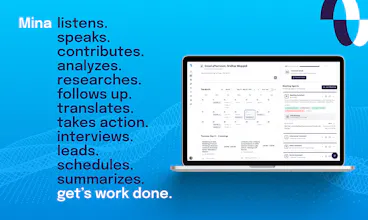
Mina is an AI meeting assistant that actively participates in meetings, responds in real time, pulls context from your tools, and helps move work forward while the conversation is still happening. Unlike traditional meeting tools, Mina can speak during calls, use skills, generate outputs, and support sales calls, interviews, standups, customer conversations, and team workflows before, during, and after meetings.





Hey Product Hunt 👋
I am Sridhar, co-founder of Mina AI.
I’m excited to introduce Mina, an AI Meeting Assistant designed to actively participate in meetings instead of just recording them.
Most meetings today still end the same way: Forgotten decisions, scattered follow-ups, missing context, and hours of manual work afterward. Existing meeting tools mostly act as passive note takers. They transcribe conversations, generate summaries, and stop there.
We wanted to build something fundamentally different. Mina acts like an actual AI teammate inside your meetings.
It can:
respond during meetings in real time
pull live context from your connected tools
capture decisions automatically
generate summaries, proposals, and follow-ups live
assign action items
update CRMs, tickets, and workflows
retain memory across meetings and conversations
What makes Mina different is flexibility.
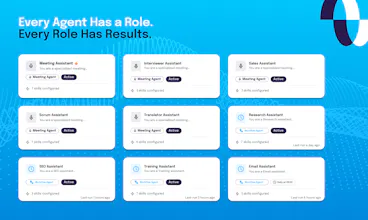
Instead of being a single-purpose assistant, Mina can be configured into different workflow-specific teammates:
a proactive moderator
a quiet assistant
a Scrum facilitator
a customer-facing copilot
or a completely custom workflow assistant
Mina integrates with 200+ tools including Slack, HubSpot, Salesforce, Jira, Notion, Google Meet, Zoom, Microsoft Teams, Linear, GitHub, and more.
Some common use cases:
sales calls & demos
standups & sprint reviews
customer success reviews
hiring interviews
brainstorming sessions
leadership syncs
project discussions
training & onboarding sessions
The biggest shift we noticed internally: Meetings stop becoming documentation exercises and start becoming places where actual work gets done.
We’ve been testing Mina with founders, operators, and teams for months, and today we’re excited to open it up to the broader Product Hunt community.
Product Hunt users also get additional free credits today to explore Mina.
Claim your additional free credits here: https://getmina.ai/
If there’s a workflow, meeting type, or custom assistant you’d like to build with Mina, drop it in the comments. I’d genuinely love to help you set it up and hear your feedback.
Would love your support, feature requests, and ideas ❤️
- Sridhar
@sridharmuppidi congrats on the launch Sridhar. Are responses user invoked or auto? How do you handle selective integration into tools (items 1-4, 8 and not 5,6,7 etc)
@zolani_matebese It depends upon what kind of Mina you have set up: Reactive or proactive.
Reactive one: You have to say "Hey Mina" or "Hey Veda" (or whatever name you've given your assistant), and that's the wake-up call for it to do a task for you.
Proactive one, which is a little bit more expensive, but it's always listening in and can do things without you actually having to invoke or ask it to. It just analyzes the context and then decides whether a certain action needs to be performed in the background. It can also participate in the conversation.
In terms of deciding which tools to invoke, it is entirely based on the skills you have developed and attached to the assitant; these are called in-meeting skills. During a meeting, an individual skill will be called upon for a specific action based on the context of the conversation. Or based on the request. If it is related to the calendar, then it goes to the calendar. If you're tracking a bug or a feature, it could go to Linear or Jira, or to one of the other tools.
@sridharmuppidi Congrats to the launch! Mina sounds exactly like what I've been looking for. Having used Notion meeting transcriptions and other similar tools in the past, they transcribe, create summaries and that's about it.
So my questions would be
1) when you write Mina integrates with meeting tools x,y,z, does Mina "join" a Teams or Zoom call as a "participant" a retain the ability to perform tasks in the background or would it be through active commands during the meeting?
2) if one has confidential meetings and wants to use Mina, how securely is the data stored?
@michael_zorez Yes, it can join Google Meet, Teams or Zoom as a participant, and it will be listening to the conversation and has the ability to perform actions in the background. It depends upon if you have set up a proactive or reactive Mina. The reactive one, only does the job when you ask it, like "Go ahead and schedule a meeting for me" or "Look that information up for me," or things like that. The proactive one is actively looking for tasks it can do without you actually asking it to do so. It depends upon which Mina you set up. We are completely secure. We are SOC 2 Type 2 ready. We are going through an audit process right now and should be compliant, hopefully, within a month.
@sridharmuppidi Congrats on the launch. When Mina responds or pulls live context mid-meeting how do you handle latency, and permission boundaries across 200+ tools?
@swati_paliwal Because it's voice, to be able to come up with an intelligent response, you do need to use a reasoning model. There is definitely a delay that depends upon the request. What we do recommend is to pre-load the context as much as possible before the meeting and use Mina primarily to be able to insert things, right, so that way the response seems more immediate. That said, Mina also is able to fetch information dynamically, so you can look up and ask it to search things and all that. Where it does use a filler, saying "Give me a minute" or "Give me a second to look that up", so on - at the moment, we have outsourced tool integrations to Composio, which is an awesome tool, as you know. We have our own MCP gateway called PRIZM, which is coming up soon that provides audit trails as well as single authentication for all the tools.
@sridharmuppidi congrats on the launch! Very cool idea and I can Mina being helpful. Have you had any pushback with regard to privacy concerns? I ask because often, Propects, Clients, and strategic partners don't even want my Fathom recording the call. Not sure how they'd feel about Mina being there.
@anna_ludwinowski Hi Anna! That's a great question! We totally understand the concern when it comes to privacy – especially when discussing sensitive topics in meetings – which is why we take steps to ensure there should never be any hesitations. With Mina, we take privacy and data protection seriously. We have secure systems in place to protect your information, and said information is only accessible by you (our team doesn't see it).
@anna_ludwinowski Great question. All note-takers have the same problem right now: a percentage of enterprises insist that conversations cannot be recorded. One advantage Mina does provide is that you can ask it not to; you basically say, "Mina, don't record this conversation." "Mina, don't send a transcript or summary to me", so that solves the problem of you know, privacy, yet it can accomplish what it's supposed to do within the call, which is be the assistant ever. Questions like:
Mina, look up that case today and share it with us.
Mina, send them a mutual NDA.
Mina, what does our 50-seat pricing look like? Apply a 10% discount on it.
Mina, draft a proposal with these terms and send it to them.
So on
@sridharmuppidi Good to know - I'll try it out. Thanks!
@anna_ludwinowski thank you!
@sridharmuppidi @rameshpediredla Huge congrats on the launch, Shridhar and Ramesh!
How I met the makers:
Ramesh reached out to me a month ago, and I was blown away by what Mina actually does. This isn't just another passive notetaker, it's a completely different approach to meetings. Mina is actively involved in your meetings.
Also, I learned from Ramesh that Sridhar is an accomplished serial founder so it immediately gave me confidence to hunt this since I know they are here for a long run aiming to be the best in note-taker and agentic AI team member category.
What Mina does:
During the demo Ramesh gave me, Mina spoke action items and pulled some data points aloud in real time while we were on the call. That moment blew my mind, this is the first AI meeting assistant I've seen that doesn't just transcribe, it actively participates and executes while the conversation is still happening.
Mina directly competes with the likes of @Fathom @Shadow @Fireflies.ai 👔. So I am sure the competition will now have to catchup with Mina.
The connections and integrations are even more impressive, it connects seamlessly with your existing tools to pull context and take action without any manual work.
Why I endorse it:
I've tested dozens of AI notetakers, and Mina is genuinely different. It's not waiting for you to go back and review transcripts later, it's doing the work during the meeting.
If you're tired of forgotten decisions, scattered follow-ups, and hours of manual work post-meeting, you need to try this.
Give it a good try; you'll thank me later! ;)
@rohanrecommends Thank you, Rohan. This means a lot to us.
he 'pulls context from your tools' piece is where these products usually have the biggest gap between demo and reality. pulling context from a CRM or a Notion doc in a controlled demo looks seamless. in a real meeting where the context is spread across five tools with inconsistent naming and outdated records it usually surfaces the wrong thing at the wrong moment. what does the failure mode actually look like when the context retrieval gets it wrong mid-conversation
@ansari_adin Good question. There are multiple ways we've solved this. You can pull the context pre-meeting using a skill ( this would be similar to a memory skill). Now this skill can go to multiple tools/integrations to fetch the information, make sense of it, and organize it in a format that your meeting orchestrator can easily understand. The same thing can be done during the meetings too - though we would recommend using a single tool call to ensure a timely response. For multi-tool workflows, please create a detailed set of evals to test different possibilities. Skill creator gives you flexibility, allowing you to generate them dynamically.
I have a real use case: can you assign goals to your AI? For example, we often interview people: I need the AI to be present on these calls and 1) ask specific questions, 2) listen for forbidden topics and stop the interviewee if they start talking about them. Right now we have to send a real person, who in an hour of such interviews speaks for a maximum of 1–2 minutes. It’s very inefficient!
@natalia_iankovych It would be quite easy to set it up. Create a proactive assistant instead of a reactive one. That way, it doesn't need to be invoked; it's always listening, it's always analyzing. You set up your guardrails in the primary prompt for topics that need intervention. Please reach out to support from the dashboard if you need any assistance. We're happy to walk you through the process.
How do you keep Mina from interrupting people or talking at the wrong time, is there a push to talk or strict turn taking?
@thamibenjelloun We have proactive and reactive modes. Depending upon what kind of assistant you want to use, usually the default meeting assistant is a reactive one. It only talks or jumps in when you say "Hey Mina" or when you explicitly ask it something. A proactive one would be the one which can take charge, your scrum master or your interviewer and others. You also have the ability to set how proactive or reactive your system can be by editing the system prompt. We have two prompts: The primary prompt(role) and The system prompt(behavior) - you can edit both of them.
Since Mina creates action items live, how do teams stop tentative ideas in a call from becoming assigned work too early?
Does Mina have it own Tasks tracker or can add them to notion?
@bengeekly Great question. There are multiple ways to interact with Mina:
Inside a meeting, while you are in a live call, you can interact and ask her to summarize action items and so on. You can then say, "Go ahead and log these." You can actually prompt it to enter things after you approve those action items.
The other way is post-call. There could be a skill that has access to the whole transcript. A good reasoning skill can deduce what tentative items are versus what are actual items that need to be assigned to people, and then they can be logged into your Linear, Jira, or other tools. We also have a default skill set for the scrum master and interviewer that you can try; everything is stored in a simple Excel sheet. You can go ahead and tailor those skills to suit your kind of assistant.
What does "Skills" mean here in practice: user-defined templates, or pre-built integrations?
@fabriziowexare Great question.
Integrations give Mina access to different systems. Skills are reusable capabilities that Mina and its specialized meetings and workflows agents can use.
For example, an Interviewer Assistant(agent) might use skills like Resume Analyzer or Rubric Tracker. A Sales Assistant might use skills like Case Study Finder or Proposal Builder.
Mina comes with a small library of pre-built skills, but the bigger idea is that users can create their own. If your team has a specific process, playbook, or workflow, you can turn it into a skill and make it available to Mina, your assistants, or the rest of your organization.
So integrations provide access to tools, skills define how work gets done, and users can extend Mina by creating their own skills without writing code. Please try it out, and would love your feedback.
Congrats on the launch.
Does it collect information from previous meetings about any particular topic and remind the team if we are going off course?
@m_d_p Assuming you have a memory management skill setup so that, pre-meeting, it loads the previous meeting's context, and post-meeting, it saves it back. This is designed so that it saves it to your Google Drive or whatever tool you want it to save. We would never save it on our servers. You need to give enough context to the skill creator when you are creating a new skill along with information on who would be the assistant, who would use it. If you look at one of my comments below about a homework helper assistant, where the context is different, there you want to keep some basic information about the student and what they know and what they're good at. Usually, for memory management, we recommend you save data in three levels:
Universal biographical information along with some key facts.
A rolling summary of all the conversations so far.
A condensed version of a couple of recent sessions.
If you have sophisticated enough memory management skill as described above then you need to set up your agent, either proactive or reactive, to be able to leverage the information the skill provides to it as part of the prompt. Right now, there are enough templates in the system. You can just use them or duplicate them or edit them for what you need.