
Littlebird
The AI assistant that already knows your work
5.0•10 reviews•1.2K followers
The AI assistant that already knows your work
5.0•10 reviews•1.2K followers
Littlebird is an AI assistant that already knows your work. Every answer, draft, and plan is more relevant because it has the context behind it. It sees what's on your screen and transcribes your meetings, building a private memory of your projects and priorities. Littlebird connects the dots across all your apps and conversations, giving you answers grounded in your actual work. No integrations required. If you've seen it on your desktop, Littlebird has too. Just ask.






Osaurus
I got connected to the Littlebird team through @joshconstine. Their approach to the never-ending pursuit of obtaining more context for AI is bold...!
Unlike Instagram after 15 years, most AI tools struggle to know things about me. I do use some memory tools here and there, but until Apple revamps Siri, what has the most digital context about me (besides my phone)? My laptop, duh!
Which is why Littlebird "sits" on my shoulder, reading my screen (capturing only text, not screenshots) and listening to my meetings, so that when I ask it something, it already knows what I've been working on.
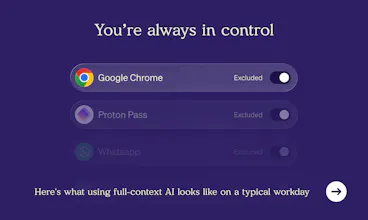
And before you ask: yes, you can exclude specific apps if you don't want Littlebird nosing (beaking??) into all your stuff. In fact, you control exactly which apps it can see, and can pause or delete any data it's collected. It’s SOC 2 certified, if that's important to you. And unlike GitHub, they never train on your data.
Give it a few days and ask it “what have I been working on this week?” Come back and tell us how much Littlebird knows!
CartHook
Been using Little Bird for a couple months. Love it! So helpful. Personally, filled the gap of Limitless' "Rewind" product after Meta acquired them.
Product Hunt
Littlebird
@curiouskitty great question! yep - Littlebird actually shows its work right in the UI. Responses also include links to the sources used (web pages, chats, meeting notes). On the verbosity and UX tradeoff: we lean into minimalism. But since Littlebird is your personal assistant, the best part is you can just ask. "where did you get that?" or "show me your reasoning" - it'll open right up.
Hallway Chat #24
Would love a little "context" setting on what you think Rewind/Limitless, Highlight, etc got wrong - or at least where you feel you want to focus that scratches an itch for you all in particular.
And personally, I'd be much more inclined to use this with an early MCP/API so I feel like i can use your surface area but you'll earn my continued usage vs locking me in immediately.
Littlebird
@nabeel API is coming.
as for "context", prev tools focused on either building better search or just helping with current screen context. "find that thing you saw" is seldom useful on its own. what we care about is synthesis - connecting things across meetings, docs, messages, and your life to understand you, what you're working on and why.
we don't think capture alone is a product. it needs to feed into something you actually use every day, otherwise it's a novelty that you would loses interest in after week one.
Littlebird
@nabeel so much to say on what rewind and highlight got wrong. neither of them at all delivered on the product promise, rewind >>> highlight, but rewind didn't even have semantic search, much less agentic search, over your data! (agentic search wasn't possible then ofc but semantic was)
we will launch MCP in the next few weeks! working on it now
@nabeel the much bigger question is that when Claude offers screen monitoring in the same way (will likely happen soon) why would I care about this? With Littlebird's tools they have a real opportunity to be bold and different. Improve people's lives in a completely new and original way. This rewind path seems like a dead end to me.
Littlebird
Hey Product Hunt 👋
We built Littlebird because every AI tool we tried had the same problem: it doesn’t know what you’re working on. So you spend half your time catching it up, copying context, pasting notes, explaining your project.
I’m Alex, co-founder and CPTO of Littlebird. My co-founders @alapshah1 and @namanshah previously built Sentieo (acquired by AlphaSense), so we’ve been obsessing over how to make knowledge work faster for a long time.
Littlebird is an AI assistant that already knows your work. It pays attention to what’s on your screen and transcribes your meetings, building a private memory of your projects and priorities. No copying and pasting. No catching it up. Just ask for what you need.
How it works:
Install and forget. Littlebird runs quietly on your Mac (Windows coming soon), watching your screen and transcribing your meetings in the background.
It learns your work. Over time, it builds a private memory of your projects, priorities, and conversations. It’s connecting dots you didn’t even know were there.
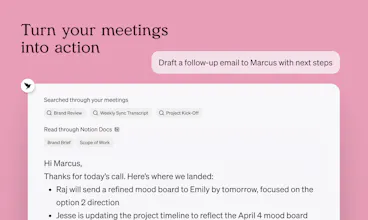
Just ask. Summarize a meeting, draft a follow-up, prep for a call. Every answer is grounded in what you’re actually working on.
What makes it different:
No integrations required. If you’ve seen it on your desktop, Littlebird already has too. No connectors, no setup, no API keys.
Help without switching apps. Double-tap the option key and Littlebird appears over whatever you’re working on.
Your data, your control. Pause anytime, exclude apps, delete anything. SOC 2 compliant. Encrypted. We never use your data to train models.
We just announced our $11M raise led by Lotus Studio, with backing from @Lenny’s Podcast Lenny Rachitsky, Scott Belsky, Gokul Rajaram, Justin Rosenstein, and Russ Heddleston. Several of them are daily users.
We’re here all day — ask us anything about how context capture works, how we handle privacy, or just tell us what your biggest AI frustration is. We built Littlebird to fix it. 🐦
🎉 Get 50% off 3 months of Littlebird Plus with code “PRODUCTHUNT”
Coda
@alapshah1 @namanshah @alexander_green1 what other prebuilt templates or features do you want to build?
Littlebird
@alapshah1 @namanshah @joshconstine We're just getting started! coming soon: full integrations support so you can connect any app directly as well as use our unique screenreading approach. Open Claw like computer use. Working in folders on your computer. Mobile meeting notes. Improved memory so that Littlebird reliably understands all the relevant people in your life and doesn't confuse your 3 friends named Daniel. and much more!
PixelBin.io
I've been using Littlebird for a while now, and it's become an essential part of my day.
Here's one of my use cases: I've set up a routine that pulls all support emails related to the features I own, from the past 24 hours, and surfaces them with relevant context(a duplicate, something already fixed, or tied to a different issue I'm working on). I get up to speed in under a minute every morning. It's the first AI tool that feels like it's working with my day instead of asking me to manage it.
Congratulations on the launch! 🎉
ShipFast.AI
This is so GOOOD!
How are you managing the data though. Access to this much applications and settings would mean data learning, what are your data governance policies and ideas?
Littlebird
@baruns hi we're writing a full blog post about privacy soon. but: PII filtering on client side, detailed granular user controls for what gets captured, you can delete anything at any time, no training on user data, data encryption, and more.
here is more about our vision - https://littlebird.ai/blog/littl...