Launching today

FastRouter.ai
Route requests to the right LLM for cost, latency & quality
464 followers
Route requests to the right LLM for cost, latency & quality
464 followers
FastRouter is a unified AI gateway and control plane for developers and enterprise teams building with LLMs. It routes every request to the right model across 200+ LLMs through one OpenAI-compatible API, optimizing for cost, latency, quality, and reliability. With intelligent routing, failover, observability, and governance, teams can scale AI apps without vendor lock-in or code changes.




Free Options
Launch Team / Built With


Framer AI AgentsDesign and publish professional sites with AI
Promoted
Hey Product Hunt! I’m RP, part of the team behind FastRouter.ai.
We built FastRouter because running AI in production meant too much plumbing and too much guesswork: multiple SDKs, scattered dashboards, fragile failover, and no clear answer to “How do we make this cheaper without making it worse?” when all the logs are scattered all over the place.
⚡ One integration. Less provider juggling.
FastRouter gives you a unified API across major models and providers, with support for OpenAI, Anthropic Messages, and Gemini-compatible interfaces.
Claude models, for example, are available through Anthropic, Amazon Bedrock, and Google Vertex AI. FastRouter routes requests to healthy upstreams, so you don’t have to maintain separate SDK integrations and failover logic yourself.
Routing is the starting point. Routing Intelligence is what makes FastRouter different.
Most gateways show you traffic and spending. FastRouter helps you figure out what to change:
Proactive cost insights: Weekly recommendations based on real traffic. Find cheaper models, prompt caching opportunities, and workloads suited to flex pricing. Model-switching recommendations include evals so you can compare quality before switching.
Early warning signs: Spot latency drift, error spikes, and cost anomalies, with alerts delivered to Slack or PagerDuty.
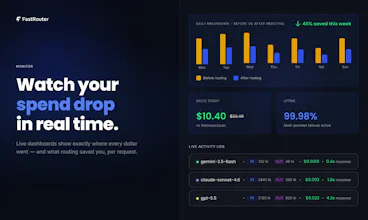
Request-level visibility: See which upstream served each request, allocate costs with tags, and inspect logs, including multimodal outputs.
Evals beyond text: Evaluate production traffic and datasets, including images and video. A successful API response doesn’t always mean a usable output.
Multimodal response caching: Reuse cached image and video responses for matching prompts or cache keys instead of calling the model again.
Better prompt management: Keep prompts in a shared, versioned library, with optimization and compression tools to improve them.
Our production customers are already saving $10K+ per month by acting on FastRouter’s recommendations.
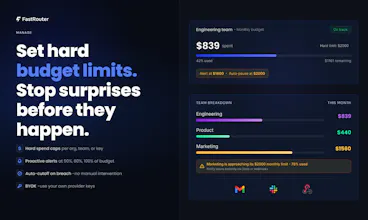
Available as SaaS or fully on-prem, with budget caps, alerts, and access controls built in.
We built this to spend less time maintaining integrations and investigating bills, and more time shipping things that work.
Claim 2 months free: https://fastrouter.ai/product-hunt
What’s your biggest AI production headache right now: reliability, cost, integrations, or quality? Let us know in your comments.
@ritprasad Many congratulations, Ritesh, Andrej and team! 😊
How I met the makers: Andrej reached out to showcase FastRouter, and I was immediately impressed by the product design, clarity of the mission, and the real developer pain point it addresses. It’s a well-timed solution for teams building AI applications at scale.
We worked together for polishing their launch assets, product positioning and messaging before the launch.
What FastRouter does: FastRouter is a unified AI gateway and control plane that routes requests across 200+ LLMs through one OpenAI-compatible API. It helps teams optimize for cost, latency, quality, and reliability, while providing failover, observability, governance and actionable insights without vendor lock-in.
Why I endorse it: Teams often struggle with managing multiple model providers, fragile fallback logic, unpredictable costs, and unclear quality trade-offs.
FastRouter turns that complexity into a single intelligent layer, with proactive recommendations, request-level visibility, and evaluation tools that make model choices easier to trust.
I’m confident FastRouter will see strong adoption among developers and enterprises looking to scale AI products more efficiently. ✨
@rohanrecommends Huge thanks, both for hunting FastRouter and for your feedback.
You’ve captured exactly why we’re building this: teams should spend more time building their AI products and less time managing providers, fallback logic, and cost surprises. What matters is driving meaningful outcomes be it in terms of cost, quality or performance for the AI products we build.
Grateful for your support and for hunting us today!
@ritprasad Looks like a great product. I signed up through the above link, but there is no way to claim the 2 months free. Can you please help or point me in the right direction.
@terry_yodaiken Thank you for signing up. The limits for the 2 months plan are automatically enabled from the backend. Please do send us a note on support@fastrouter.ai if you'd like a detailed product demo.
How do you handle privacy and data logging when prompts pass through the gateway?
@alira_salu We do not use your logs for training if that is a concern. That said, there are two options with regards to your specific query:
Disable content logging per API key: FastRouter won’t store the prompts or responses passing through the gateway for that key. The trade-off is that those requests won’t be available for AI Evals / Insights / Prompt Optimizations and more, since those features rely on replaying the original requests or importing logs with the original prompt, taking the user feedback on the responses and using the feedback to improve the original prompt.
Deploy in your own environment: Our enterprise offering supports running FastRouter on-premises / in your own cloud.
Sidenote: Apart from disabling content logging, you can also route to providers with documented zero data retention (ZDR). Our ZDR documentation has more details on the same.
Congrats on the launch. Can I set my own routing policies in settings on top of the default logic?
@iamanantgupta Thanks, Anant! Yes, you can configure your own routing policies using Virtual Model Aliases: https://docs.fastrouter.ai/explore-features/virtual-model-aliases
Options include Random Shuffle, Lowest Latency, Highest Throughput, Lowest Usage, Lowest Price, Priority Routing, and Category-Based Routing. For example, you can prioritize a specific provider and fall back to the next only if a request fails, or choose the lowest-cost option from a selected set of providers.
In the next couple of days, we’re also launching Optimization Settings, through which you’ll be able to assign a setting to individual model choices within an alias - e.g. try the flex tier always for a particular model within an alias; use prompt compression with one of choices; etc. Stay tuned!
really smooth execution. being able to set rate limits across multiple models in one place saves a lot of hassle.
@margret_rhyme Thanks, Margret! Yes—you can set rate limits at both the API key and project levels, plus configure custom alerts for latency, errors, and spend. The goal is to help you stay on top of what your users are experiencing without having to build all that monitoring yourself.
What type of alerts and rate limit settings are key to you? Happy to add anything we are missing.
How does FastRouter handle the situation where a model which used to be the cheapest is now starting to experience latency and quality issues?
@iamanantgupta Great question.
1. AI Evals (which you can run via our Custom Evaluations feature) ought to be run systematically and not as a one off. And hence, our Insights feature (with model switch recommendations if turned on) also runs periodically, not once.
2. On every periodic run we track not just cost but also latency and quality scores (LLM-judge based) for the models serving your traffic -- along with other system suggested options.
This way, you know when it's time to switch and are also able to compare against newly launched models.
The failover part caught my attention. Sometimes a model is fine one day and suddenly gets slow or start failing. Does is automatically switch when that happens?
@isaac__ Yes. FastRouter.ai automatically fails over to another provider when a request fails, so you don’t have to build that retry logic yourself. This can happen with any provider. Here’s a real outage example we wrote up: https://fastrouter.ai/blog/posts/anthropic-went-down-fastrouter-didnt-150-requests-one-live-outage-zero-downtime
Importantly: we also group all attempts under the original request in the Activity Log, so you can see whether the request ultimately succeeded and the total time your user waited, not just the latency of the successful attempt.
i would love to see integrated caching options so identical prompts dont hit the LLM APIs twice.
@jabari_zuriGood news. Response caching is already supported. Identical prompts return the cached response instead of hitting the provider again so you save both cost and latency. It works for text as well as image and video outputs.
Docs here:
Text response caching: https://docs.fastrouter.ai/explore-features/response-caching
Image & video (async) caching: https://docs.fastrouter.ai/explore-features/response-caching-images-and-video-async
Do give it a try or if anything's unclear or you need additional features, let us know at support@fastrouter.ai.
Always happy to hear what would make it more useful!