
DCP
Give your AI agents encrypted permission and keys
112 followers
Give your AI agents encrypted permission and keys
112 followers
Today, many agents read keys and sensitive info from dotenv files, configs, or memory. One bad prompt or compromised tool can drain your wallet, API bill, or private data. DCP makes agents safe for real work: your wallets and API keys stay encrypted on your own machine. Give each agent only the scopes it needs; it asks, you approve from Telegram or App. Daily budgets, logs, and instant revoke keep you in control. Open source, non-custodial, and works with Claude, Cursor, OpenClaw, and Hermes.




Hey PH! I’m Iftakhar, building DCP.
AI agents are moving from answering questions to executing real work: signing transactions, using API keys, making payments, and calling tools across apps.
But there’s a problem: agents should not hold private keys, raw credentials, or sensitive information.
DCP is my attempt to solve that. It is a local permission vault for AI agents.
The flow is simple:
agent asks
you approve on Telegram or in the app
DCP signs locally
secret never enters the model context
What works today:
- desktop app
- local encrypted vault
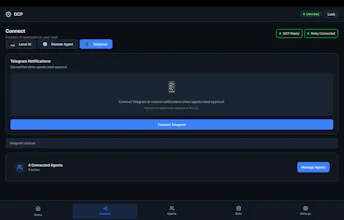
- Telegram approvals
- Solana wallet signing
- API credential storage
- budgets and approval limits
- MCP-compatible agent flow
- open source repo
I built this because I think the next bottleneck for agents is not intelligence. It is permission.
If agents are going to act for us, they need a safe way to use wallets, credentials, and sensitive tools without taking custody.
Would love feedback from people building agents, wallets, MCP tools, x402 apps, or anything around agent commerce.
Website: https://dcpagent.com
Docs: https://dcpagent.com/docs
Download: https://dcpagent.com/#download
GitHub: https://github.com/1lystore/dcp
@iftakhar_rahmany Congrats on the launch Iftakhar 🎉
Permission as the next bottleneck rather than intelligence is the right framing.
Question on the deployment model: the vault is a local desktop app and signs locally, which is clean for an agent running on my own machine. But a lot of agents now run server-side or in hosted environments, not next to a desktop. How does DCP work when the agent lives on a remote host? Does the vault need to run on the same machine, is there a daemon/relay pattern, or is the local-desktop model an intentional scope choice for now? Asking because "non-custodial + local" and "my agent runs in the cloud" are in tension, and that gap is where permission tools usually have to make a hard architectural call.
@artem_fedorovich Thanks Artem, I’m glad you asked this.
The vault does not need to run on the same machine as the agent.
For remote/server-side agents, DCP uses a sidecar + encrypted relay model.
DCP Desktop lets you connect both local and remote agents. For a remote agent, the user creates a remote invite in DCP Desktop and runs one install command on the server. That installs `dcp-agent` as a service, pairs it with the user’s vault, and exposes a private HTTP MCP endpoint locally on the server, usually:
http://127.0.0.1:8420/mcp
Then the cloud agent, OpenClaw, Hermes, or any MCP-capable runtime talks to that local MCP endpoint.
The request path is:
remote agent → local `dcp-agent` sidecar → encrypted relay → user’s DCP Desktop vault → policy / approval / signing → result back to agent
The relay is transport only. It routes encrypted envelopes. It does not hold wallet keys, approve requests, or sign.
So yes, DCP is designed to work with any agent that uses MCP, remote or local. The remote machine gets a permissioned interface to the vault, not custody of the vault itself.
@iftakhar_rahmany That's a clean design, the sidecar plus transport-only relay keeps the trust model tight without forcing the vault onto every host. Makes sense.
Thanks for the detailed breakdown Iftakhar, this is one of the clearer takes on agent permission I've seen ship. Good luck with the launch 🤝
@artem_fedorovich Thanks Artem, really appreciate that.
That trust model is the part I care about most: agents can ask, but the user keeps custody and final control.
Glad the design came through clearly.
@curiouskitty Great question. The difference is custody and authority.
Secrets managers are great at storing and rotating secrets. But in most agent setups, the dangerous moment is when the secret leaves the manager and enters the agent runtime.
At that point, the agent can leak it, misuse it, log it, pass it to a tool, or keep using it until you rotate/revoke.
Per-agent wallets reduce blast radius, but they still make the agent the custodian of that wallet.
DCP takes a different path: the agent does not get the wallet key; it asks for the outcome.
Example:
agent: “sign this Solana transaction”
DCP: checks scope, budget, session, and approval policy
vault: signs locally
agent receives: signed tx / signature
agent never receives: private key
DCP decides whether that action is allowed, under which policy, for which agent, and at what limit.
You also get one permission layer across multiple agents: Claude, Cursor, OpenClaw, Hermes, VPS agents, etc. Set DCP once, then grant each agent its own permissions, budgets, approvals, and audit trail.
That means the permission boundary stays with the user, not the model, prompt, toolchain, server, or relay.
Tradeoff: there is an extra permission layer. But for sensitive actions, that is the point.
Secrets managers protect secrets at rest.
DCP protects authority at the moment an agent tries to act.
Scoped permissions for agents feel important. Can teams issue temporary task-level keys that expire or revoke automatically after an agent run, instead of giving the agent broad credentials?
@cyrus_elmtalabDCP supports per-agent permissions, budgets/limits, approvals, logs, and instant revoke.
We don’t yet support automatic time-based revoke after a run, but it’s on the roadmap. The direction is exactly what you described: temporary/task-level scopes that can expire automatically.
For now, teams can revoke access instantly when an agent should no longer have that permission.
That's definitely sounds like one of the most useful products I've seen launched in some time. I've wanted to build something with OpenClaw for some time now, but always stopped myself because of the fear of possible leaks. Would you say it is a good use case for your vault?
@haldavaroman Yes, this is exactly the kind of use case we had in mind.
If OpenClaw or any agent needs access to sensitive credentials, DCP can keep those secrets in the vault and let the agent request permissioned access instead of exposing raw keys.
So the agent can act, but only within the limits you approve — reducing the risk of leaks or over-permissioned automation.
The Telegram approval flow is a clever UX choice for mobile-first teams. Curious how DCP handles permission scoping for design tool APIs specifically — if an agent is accessing a design system's token API, can you define read-only vs. write permissions per tool, or is it a single permission gate per service? Granular scoping seems key for preventing over-permissioned agents.
@sunnyallan For DCP, permissions are scoped per tool/action, not just one broad gate per service.
So in a design tool flow, you could allow an agent to read tokens while requiring approval for writes, publishing changes, or anything that affects shared assets.
That granularity is the point: agents should get only the permissions they need for the task, not blanket access to the whole service.
Telegram approval is smart for security but it breaks fully autonomous agent flows. How do you handle scheduled or headless tasks where no one is around to approve?
@nelly_orlova Great question. We separate the policy from the approval moment.
For scheduled or headless tasks, users can set rules per agent — such as a daily budget and an auto-approve threshold for amounts under a certain amount. So if a task is within those limits, the agent can continue without waiting for Telegram approval.
Telegram approval is mainly for anything outside those rules: higher amounts, new permissions, or actions the user hasn’t pre-approved.
The goal isn’t to manually approve every step. It’s to let agents run autonomously within user-defined limits, while still keeping the user in control when something meaningful changes.
FYI, I REALLY want to try DCP, but downloading the installer (made sure it's the right version for my Apple silicon Macbook Air 15") it does install, but then gives me a "DCP is damaged; you should move it to trash" which I cannot get around - tried re-downloading and reinstalling, tried a few different things (running as admin, etc.) - nothing works.
This is exactly and precisely the solution I need, so, I hope I can figure it out... congrats on the launch, regardless!
@grey_seymour thank you for flagging this — and sorry you hit it.
This is the macOS unsigned beta/Gatekeeper issue. We added a note on the site for it, but clearly it needs to be more visible.
Please try this in Terminal:
xattr -cr /Applications/DCP.app
Then right-click DCP in Applications and choose Open.
We’re working on notarization so this step goes away. Really appreciate you wanting to try it — and please let me know if that command doesn’t fix it for your Mac.