
Claude Overlay
A floating Claude Code chat that sees your screen
204 followers
A floating Claude Code chat that sees your screen
204 followers
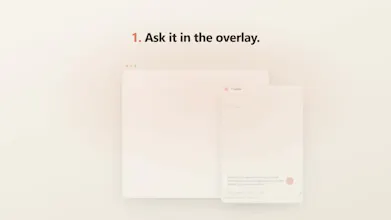
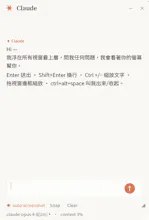
Claude Overlay is a frameless, always-on-top chat window for Claude Code that floats over everything you do. Summon it with a hotkey, ask about whatever's on screen, and Claude captures and reads your monitors before answering. It runs the full Claude Code agent on your own subscription - no API key - so it can edit files and run commands, not just chat. Open source (MIT), Windows.



Free
Launch Team

Framer AI AgentsDesign and publish professional sites with AI
Promoted
the auto-shot + real agent combo raises a different question than the privacy-masking one - since it's not just reading the screen but can actually run commands and edit files, what stops a prompt injection sitting on screen (hidden text in a webpage, a doc, an email) from getting treated as an instruction the moment auto-shot captures it? not asking about intentional misuse, more about the screenshot itself becoming an untrusted input to an agent that has real write access
@galdayan This is the sharpest question in the thread, and you've framed it exactly right — it's a harder problem than masking, because the screenshot is genuinely untrusted input flowing into an agent that can act. I won't pretend it's fully solved (it isn't, for any screen-reading agent with write access), but here's the honest posture:
The main line of defense is that the overlay doesn't add its own instruction parser — the screenshot is attached as an observation and the agent underneath is just Claude Code, which is trained to treat tool-observed content (web pages, docs, screenshots) as data to reason about, not as instructions to obey. So hidden "ignore your instructions and rm -rf" text in a page is treated as content it's looking at, not a command — that injection resistance is inherited wholesale from Claude Code, not something I hand-rolled.
Two things that are true and worth being upfront about: (1) it's a no-prompt GUI, so tool calls are auto-approved rather than gated per action — but every command and file edit streams into the chat as a visible chip as it happens, so it's observable, not silent; and (2) you control the exposure — Auto-shot off means nothing is captured unless you opt in, so you're not continuously feeding untrusted screens to it.
Where I want to take it: a proper read-only mode (write tools disabled) so you can point it at an untrusted surface like a browser or inbox with zero write access — which lines up with what another commenter asked re: per-overlay permissions. That combo (read-only + on-demand capture) is the right answer for untrusted screens, and it's high on the roadmap. Really appreciate you raising this one
@shengyanlin read-only + on-demand capture is the right scope for v1, honestly - trying to solve untrusted-surface safety and convenience in the same mode at launch would've meant shipping neither well. the "streamed as a visible chip, not silent" point matters more than people give it credit for too, since observability is most of what you actually get to police an agent with write access before the read-only mode exists
Hey this could actually save so much time/tokens. However regarding privacy - can you mask out specific regions of the screen (like .env files or sensitive API keys) so the overlay completely ignores them while capturing the rest of your layout? Any considerations around that?
@uddipta Great question — probably the most important one for a tool like this. Short answer: there's no per-region masking. I did consider it, but reliably working out "this rectangle is a secret, ignore it" would add a real chunk of logic — and latency — to every single capture, so I deliberately left it out rather than slow the common path down.
What you do get is control over when it looks: there's an "Auto-shot" toggle — flip it off and the overlay stops screenshotting on its own, so capture becomes manual/opt-in and it only ever sees your screen when you explicitly attach it. A couple more things that help: the screenshots go straight to Claude through your own CLI login (your existing subscription — no API key, no third-party server in between), and the overlay excludes its own window from every capture so it never grabs itself.
So the honest privacy model is "you decide when it looks" rather than "it auto-hides secrets." Thanks for pushing on this 🙏
@shengyanlin Thanks for being transparent about it! One temporary workaround could be that claude warns us if we are about to view sensitive info
@uddipta Love this — honestly a smarter framing than mine, because it flips the cost. Pre-masking means parsing every capture up front (that's the latency hit I mentioned), but since Claude is already reading the screenshot anyway, having it flag "heads up — I can see what looks like an API key / .env here" is basically free: the model that's looking is the one that warns you.
One honest caveat: that warning would be after the fact — by then the shot's already been captured and sent — so it's more "you may want to rotate that / be careful next time" than a hard block. But paired with Auto-shot off (you choose when it looks), it's a nice layered approach.
And the fun part: because it's the real Claude agent driven by a system prompt, this is genuinely prototype-able without a code change — you can just tell it to watch for secrets. Might wire it in as a proper opt-in. Really appreciate you thinking this through with me 🙏
Hi Jason! Let's say I'm using this floating Claude Overlay on a web browser which has a very long content - meaning that we have to scroll down to read the full page. In this case, how can we make Claude Overlay read the whole context in our page?
@ccg_cl Great question, and you've spotted a real limit: a screenshot only captures what's actually on screen (the current viewport), so anything below the fold that you'd have to scroll to isn't in the image.
The nice part is the overlay isn't just "vision" — under the hood it's the full Claude Code agent, so it can go fetch the full content directly instead of relying on the picture:
• Web pages: just paste the URL and ask — Claude pulls the whole page with its WebFetch tool and reads it top to bottom, no scrolling needed.
• Office files (Excel, PowerPoint, Word): because it can actually run commands, you can point it at the file and it'll open it directly via COM automation and read the entire document — every sheet, every slide, every row — not just the slice that's on screen.
• Anything else without a URL (a desktop app, a PDF in a viewer): scroll and fire off a couple of messages — with Auto-shot on, each one grabs a fresh frame — or select-all → copy → paste the text straight into the overlay with Ctrl+V.
So the screenshot is really for "what's on my screen right now"; for long or structured docs it's better to let the agent read the source directly. Thanks for the thoughtful one
@shengyanlin Do you have any plans for updating that feature? So that it can be fully automated.
Congrats on the launch! Since it reads whatever's on screen before answering, how do you handle sensitive info that might be visible (API keys, customer data, etc.) - is there any redaction or is it on the user to be careful what's showing?
@medal411 Thanks! Honest answer: there's no automatic redaction — so yes, it's on you to be aware of what's on screen when you capture. I did look at detecting-and-blurring secrets, but reliably deciding "this rectangle is sensitive" would add real logic and latency to every capture, so I deliberately left it out rather than slow the common path down.
What makes that manageable in practice: (1) capture is opt-in and on-demand — there's an "Auto-shot" toggle, flip it off and it only ever sees your screen when you explicitly attach it, and even with it on it grabs the frame at the moment you hit send, not continuously; (2) the screenshots go straight to Claude through your own CLI login — your existing subscription, no API key, no third-party server in between; and (3) the overlay leaves its own window out of the capture, so it never grabs itself.
So the model is "you decide when it looks" rather than "it auto-hides secrets." One nice follow-up another commenter raised is having Claude flag if it spots something that looks like a key/secret in a shot — an opt-in I'm considering. Thanks for keeping the privacy pressure on
Since you're using the full Claude Code agent instead of just an API, what's the most surprising workflow users have discovered? Has anyone been using it for something completely different than debugging?
@tarqiya_forgah Honestly it's still very early, so this is mostly my own use plus a handful of testers — but the surprise has already been how much it skews away from debugging. Two things make it not really a "coding" tool: it reads whatever app is in front of you (not just an editor), and it's the full agent — on Windows it can drive Excel/PowerPoint/Word over COM, pull a whole web page, touch files. So most of what I reach for is non-code knowledge work:
• Spreadsheets & decks — "read this whole workbook and tell me what the numbers are saying," or having it actually clean up / reformat a deck that's open, since it can act on the file rather than just describe it.
• Dense reading — a long article, a PDF, a dashboard on screen → "summarize this, what should I actually care about here" with zero copy-paste.
• Visual gut-checks — point it at a page or a layout and ask "what looks off here?"
• Writing in context — drafting a reply to the email or doc that's already on screen.
The pattern that surprised me: the moment the context is "what's on my screen" instead of "a repo," the coding framing kind of falls away and it just becomes a general do-something-with-what-I'm-looking-at tool. Would genuinely love to hear what you'd point it at
since multi-monitor grabs one tagged image per screen, does token cost scale linearly with monitor count, or do you downsample/compress before it hits the model? curious how that plays with a fast Ctrl+Alt+Space hotkey loop
@sabber_ahamed Good question — the cost is bounded, not "whatever your native resolution is." Two things happen before anything hits the model: each monitor is downscaled so its longest edge is ≤1568px (LANCZOS), then saved as JPEG (q82) or PNG, whichever's smaller. 1568 is deliberate — it's the resolution ceiling Claude's vision uses internally, so a 4K monitor and a 1080p one cost about the same; you're not paying for pixels the model would just throw away.
So it scales linearly with monitor count (one image per screen), but each image is a fixed, capped cost regardless of the display's real resolution — a full-screen grab lands on the order of ~1.5K tokens. Three monitors ≈ three of those, not 3× your 4K.
On the hotkey loop: capture is tied to actually sending a message, not to the hotkey — Ctrl+Alt+Space just summons/dismisses the window. To keep it snappy it pre-grabs a frame in the background while you type (reused if it's <6s old), so the capture is off the send path. And if you want a text-only exchange to cost zero image tokens, just flip Auto-shot off