Chronos for Jira

Chronos for Jira

Time tracking made easy

82 followers

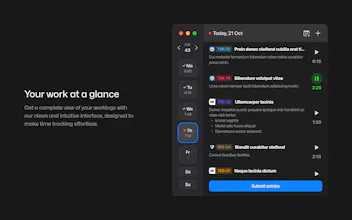
Chronos is a time tracking app for Jira, designed to make managing your daily worklogs simple and intuitive. With features like real-time tracking, manual submission, and support for multiple accounts, Chronos is the perfect companion for your Jira workflow.
Chronos for Jira gallery image
Payment Required
Launch Team
Anima - OnBrand Vibe Coding
Design-aware AI for modern product teams.
Promoted

What do you think? …

Adrian Fahrbach
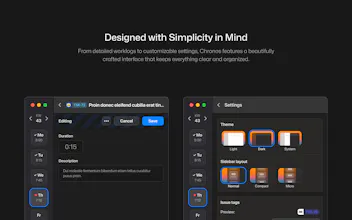
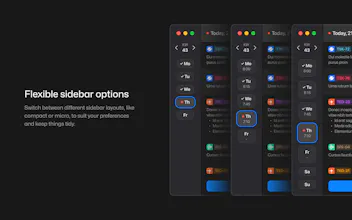
I used to track my time with Harvest and really liked how smooth and intuitive it was. But when I had to switch to Jira, I was frustrated—time tracking suddenly felt clunky, slow, and just got in the way of my work. That’s why I built Chronos for Jira! With Chronos, you can: - Start/stop timers in real time in a clean, focused desktop app. - Manage multiple Jira accounts seamlessly (super useful for freelancers and agencies). - Switch between light, dark, compact, and micro themes to fit your workflow. - Take advantage of shortcuts, smart search, reminders, and widgets to speed things up. - Even fill in gaps Jira leaves behind, like giving every workspace a proper header logo. My goal was to bring the simplicity I loved in Harvest to Jira’s ecosystem without the headaches. I’d love to hear your thoughts, especially from anyone who’s also struggled with Jira’s time tracking!
Ivan Saverchenko

Congrats on the launch, Adrian! 🚀 Chronos looks like a really smooth way to bring back that Harvest-like simplicity inside Jira. I have a quick question: how does the integration with Jira work technically? Since Jira usually requires add-ons to go through the Atlassian Marketplace and often admin approval for installation, I’m curious how Chronos connects directly - especially if someone just downloads the app outside the Marketplace. Does it work with personal API tokens, or is there another approach?

Adrian Fahrbach

@ivan_saverchenko It uses the regular oAuth login from Jira. To do that you will have to connect a Jira app to your Jira account, but that happens automatically when logging in. That's basically it.

We didn't have issues with permissions yet, so it seems most people should be able to just use it. I can imagine that there are a few workspaces though where stricter security rules prohibit access.

If you’re a Jira admin, I strongly recommend reviewing your workspace permissions. By default, any user or app can access the worklogs of all members in the workspace. This not only poses a potential security risk but also created performance issues on our side, since we need to dig through everyone’s worklogs just to retrieve those belonging to a specific user (no filtering available on that API).

Lina Huchok

@adrnf This sounds awesome! I love that Chronos focuses on speed and workflow customization.

How does Chronos handle reporting across multiple Jira accounts? Is it easy to get a quick overview without jumping between projects?

Adrian Fahrbach

@lina_huchok In the background, we log you into two Jira accounts/workspaces and keep their data separate.

In your overview, you’ll see worklogs from both and for search you can switch between them.

Your total tracked time (including reminders) can come from one account or from both combined.

Debarghya Roy
really innovative and useful. congratulations team on the launch
Nikita Savchenko

Useful! Any other integrations planned for later? Maybe Google Calendar?

Adrian Fahrbach

@nikitaeverywhere We were thinking about a SAP Fiori integration, since that is what we are working with right now. We also have an unpolished Windows version and could add a Linux build as well. For now this project is done though (except some macOS 26 adjustments), since we would like to focus on new ideas.

Nika

Does it also "differentiate" in which tab you are working? I also know that some trackers use screen recording to see whether you really do what you should. Is this the case?

Adrian Fahrbach

Hey @busmark_w_nika!

Chronos doesn't have automatic tracking. We used a few of time trackers with that feature before and always came to the conclusion that the automatic tracking isn't accurate enough for our use case. Automatic tracking was also outside of the side-project scope that we had.

Michael Vavilov

I like the concept. For me, the home page is missing a pricing section.

Adrian Fahrbach

@michael_vavilov I See. Good point!

We are only selling on the macOS App Store for now though, since we didn't add our own licensing logic.

12
Next
Last