
ccshare
multiplayer claude code
109 followers
multiplayer claude code
109 followers
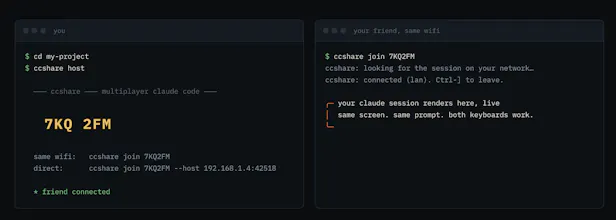
share your live Claude Code session with a 6-char code, AirDrop-style. your friend joins from their terminal - or just opens a link in their browser, nothing to install - sees your exact screen, and both of you can type. works over your wifi with zero setup, or anywhere through a free tunnel.



ccshare
@unworld11 the teaching use case feels underrated here. watching someone drive an agent is how most people actually learn this stuff, screen share always made it passive. can the second person type from the start or does the host grant access? congrats on shipping Vedanta 👏
ccshare
@artem_fedorovich they can type from the start
Dial
the pairing UX is the fun part but the thing I'd actually want answered before using this on a real project: if someone joins mid-session, do they just see the full scrollback, including anything that got printed or typed before they connected? things like env vars getting echoed, an api key pasted into a prompt earlier, secrets in a stack trace. screen sharing at least you can mute your screen for a second, a shared terminal session feels harder to un-leak once someone's in
ccshare
@galdayan they see a smaller window for now, like the last few prompts. also yes the otp is meant so we only share it with trusted users
The “multiplayer Claude Code” framing makes me wonder how collaboration is handled in practice. Is ccshare more about sharing a live coding session, handing off Claude Code context between teammates, or keeping a shared history of prompts and edits? Those are pretty different workflows for engineering teams, so I’d be interested in where you’re focusing first.
ccshare
@crystalmei it is more like a live coding session , or where a non tech member can handoff his session to another technical user. i was focusing on just a terminal for now, but i want to scope it out to a point where people can communicate with each other and prompt together
Foyer
multiplayer claude code is obvious the second you see it, and the airdrop-style 6 char pairing is what makes it actually get used. genuinely curious how you handle two people typing into the same session at once
ccshare
@fberrez1 like google doc does, but i am looking for feedback
Multiplayer for Claude Code is such a clever angle — the AirDrop-style 6-char join is slick. Curious how you handle input when two people type into the same session at once — free-for-all, or is there any turn-taking? Congrats on the launch!
ccshare
@rajasimon no turn taking, we can see when the other is typing.
Congrats on the launch! I've spent way too much time in the running-multiple-Claudes rabbit hole, so this is a fun one to see. How do you handle shared context across people, does everyone see the same working state, or is it parallel sessions over a shared repo?
ccshare
@bryanlparker they see the same working state. i could do paralel sessions too in future releases
Dial
separate from the leaked-secrets question below, I'm curious what happens when two people both type a prompt/response into the same session at close to the same moment. does one person's input just get queued behind the other, or is there some kind of lock so only one person can actually be "driving" the agent at a time?
ccshare
@omri_ben_shoham1 hi no locks but it acts more like a shared keyboard, i planned so these could be opened and hosted over a slack huddle. but i am taking note of next features. i am putting out releases pretty fast