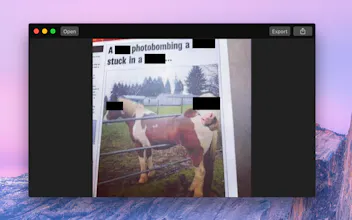
Black Out is a macOS app that lets you quickly hide sensitive parts of an image. This can be useful when you want to post a screenshot or photo on the web that contains some information you don't want revealed.
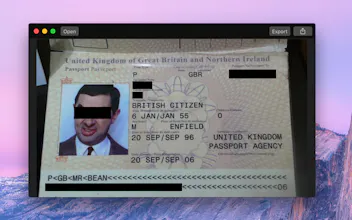
I often post screenshots on Twitter and sometimes I need to hide some private information. I could fire up Pixelmator or Photoshop, but it feels overkill, and they don't remove metadata. This app is a single-purpose app to make the task super easy. You can read more about the development process in my blog post.
Answers to some common questions:
Can you support blurring and pixelation?
Blurring and pixelation are intentionally not supported as they can sometimes be reversed. The only reliable way to redact something is to put a black box over it.
I can already do this in the Preview app!
You can do this in any graphics app. The point of this app is to make it super easy to do. Most graphics apps, like Preview, Pixelmator, and Photoshop, preserve metadata, which means you could accidentally leak information like the capture location. Black Out strips out all metadata.
Does it support PDF?
You can open a PDF document, but you have to export it as a PNG image. It’s almost impossible to reliably export redacted PDFs.
Black Out is my 5th macOS app this year. Previous ones are Battery Indicator, Touch Bar Simulator, Lungo, and HEIC Converter. I started learning macOS app development and Swift at the beginning of the year. My goal is to do 6 macOS apps in 2017 to get better at Swift and learn to ship. I plan to do a beta launch of my 6th app, Shareful, very soon.
Report
Considering the fact that 90% of images are posted from our phones, Why would they build an app like this only for mac? 🤔🤔
Black out seems to be a great app that does simply what it promises: An easy way to black out content on images and save / share the images afterwards. The interface is clean, and easy to use and the most important things are always visible and built-in. I will continue to use it in future and it saves me doing the same task in more complex, slow to load image editors.
Pros:
It’s a very simple app that does exactly what it should and does it very well
Cons:
There currently are no settings for the export which is not a big deal but may leave room for later improvements.
Sometimes “no settings” is a feature. What settings would you have liked to see?
Report
I'm fairly new to doing graphics, and usually use Preview for this. It works but Black Out is much easier and no metadata worries. Thanks! I'll be recommending to friends.
Pros:
Incredibly easy. Just draw the box, export or share, and you're done.
Similar to @soffes' Redacted which I use (albeit infrequently) and love. LOL @ the Mr. Bean example in the image. 😂
Report
Slick idea to unbundle this popular feature from graphic editors. One other thought about stripping metadata: using a tool like Snagit to take a screenshot of a photo is another way to remove the original metadata like photo location or date/time.
Scratchpad
Scratchpad
Black out seems to be a great app that does simply what it promises: An easy way to black out content on images and save / share the images afterwards. The interface is clean, and easy to use and the most important things are always visible and built-in. I will continue to use it in future and it saves me doing the same task in more complex, slow to load image editors.
Pros:It’s a very simple app that does exactly what it should and does it very well
Cons:There currently are no settings for the export which is not a big deal but may leave room for later improvements.
Scratchpad
I'm fairly new to doing graphics, and usually use Preview for this. It works but Black Out is much easier and no metadata worries. Thanks! I'll be recommending to friends.
Pros:Incredibly easy. Just draw the box, export or share, and you're done.
Cons:None
Product Hunt
Pilcro