
Dual Shades
Keep your subject in color, fade the background to B&W
94 followers
Keep your subject in color, fade the background to B&W
94 followers
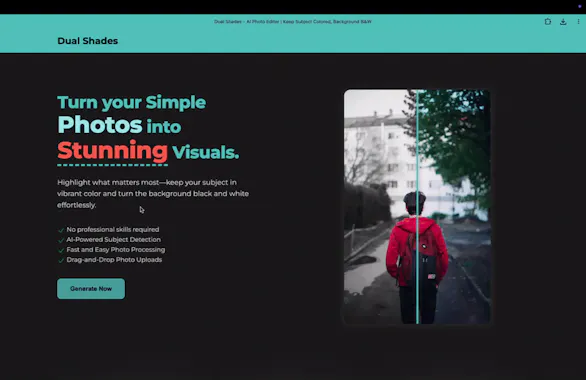
Dual Shades lets you highlight what matters most in your photos—keep your subject in vibrant color while turning the background black & white. It’s fast, free, and requires no editing skills.


Hey PH fam! 👋
I’m Anmol, and I built Dual Shades as a weekend project to help creators easily get that “color-pop” effect without Photoshop. Originally, I wanted to add monetization and authentication, but decided to go lean and launch first — just to see how it resonates.
I’d love your feedback, ideas, and support! 🙌
Try it out at dual-shades.anmolagrawal.dev and tell me how you’d use it or improve it!
– Anmol
Interesting, I am trying it now because I used to work in the Photography field.
I can see that colours are very subtle in the BW. Usually, when we wanna leave something to pop up, we have the part of the image in more saturated, vibrant colours. Will there be any customisation like increasing saturation / vibrant level?
@busmark_w_nika Thanks so much for trying it out — and great to hear that you have a photography background! 🎯
You’re absolutely right — boosting the subject’s saturation or vibrancy can really enhance that “pop” effect. I kept it subtle by default to avoid overprocessing, but yes — adding a customization slider for saturation/vibrancy is something I’m actively considering.
Appreciate the feedback — it really helps shape what comes next 🙌
@anmol53 Thank you for considering this improvement :)
Who knew a weekend project could out-edit my hours in Photoshop? This is the cheat code for instant cinematic shots. ✨ (Though fair warning - garbage in, garbage out! Quality photos = stunning results.) Huge congratulations on your launch!
@rani_zagita Haha I love this! 😂
“Cheat code for instant cinematic shots” is officially my favorite description now. Totally agree - clean inputs make all the difference.
Thanks a ton for the kind words and support! Means a lot 🙌✨
Wow... such an amazing and useful tool.
Please attach https://www.patreon.com/ link so that we can support your efforts.
@himanshu_jain33 Wow, thank you so much, that truly means a lot! 🙌
Wasn’t expecting this kind of love for a weekend project. I hadn’t thought about adding a support link yet, but your comment makes me seriously consider it.
Might just spin up a Patreon or Buy Me a Coffee soon, and I’ll definitely update the site if I do.
Thanks again! 💛
Just tried DualShades and I'm seriously impressed! The way it turns the background black and white while keeping the subject in color really makes the photo pop. Super easy to use and the results look professional. Great job to the team behind this! 👏🎨
@gopal_kumar13 Thank you so much! 🙌
Really glad you enjoyed using it, keeping things simple but visually striking was exactly the goal.
Appreciate the kind words and support, means a lot coming from someone who actually tried it out! 🧡
This tool is amazing! I used to manually apply a black-and-white effect to the whole image and then erase it from the subject to create portraits or YouTube thumbnails. Now, it takes just seconds to upload and download—saving tons of time! ❤️👌😁
@bunny_221b This makes me so happy to hear! 🙌
That manual process is exactly what I wanted to eliminate, it’s awesome to know Dual Shades is already saving you time on things like thumbnails and portraits.
Thanks a ton for sharing your experience, seriously means a lot! ❤️😊
@anmol53 Love the 'build first, monetize later' approach! This is exactly how great products start. The color-pop effect is so popular, but usually requires expensive software. You've made it accessible to everyone. Already bookmarked this, excited to see how you evolve it based on feedback!