I’ve dictated tens of thousands of words by now, and honestly, there is no going back to manual typing for me. It’s easily one of the best tools in my stack.
One thing that absolutely blew me away is how it handles code-switching. My native language is Czech, but like many marketers, I use a lot of English terms. Wispr is smart enough to keep those English words in English even when the rest of the sentence is in Czech. It’s seamless.
The macOS app is perfection. The "hold Fn button to dictate" flow is exactly what I needed. If you want to stop typing and start actually creating at the speed of thought, this is it.
Wispr Flow
For two years, people kept asking me one question: When is Flow coming to Android?
We didn't want to ship a "checkbox" Android app. We waited until we could ship something that genuinely replaces typing.
📱 Nearly 4 billion people are on Android, yet voice on Android has always felt like a second citizen. Slow. Error-prone. Something you keep fixing.
Today we're changing that.
Wispr Flow floats above every app. No keyboard switching. No rewriting your own words to make them sound like you. If you can speak, you can stop using your keyboard.
⚡ We also just completed a major infrastructure rewrite that made Flow 30% faster across the board. And we now support 100+ languages, including Hinglish for people who naturally switch between English and Hindi mid-sentence. 🌍
This isn't a "mobile version" of Flow. It's the same intelligent system across Android, iPhone, Mac, and Windows. One experience. Every device.
🎁 We're offering unlimited free dictation on Android for a limited time at launch. Try it. Push it hard. Tell us where it breaks.
We've been obsessing over latency and accuracy for years. Today is the first time we feel like voice on Android is ready to be the primary interface, not the fallback.
Excited to finally ship this. Now it's your turn to just talk instead of type, and send without needing to edit ❤️
@tanaykothari Congrats on the launch of the Android version of Wispr Flow. :)
A few quick questions on mobile optimization, features, and integrations:
Battery & Performance: Since the app runs in the background, how do you optimize for battery life? Any plans for deeper mobile OS integration to avoid constant background drain (like many current apps)?
Privacy: How do you ensure user privacy with always-on functionality?
Text Expanders/Templates: Will it support saving text expanders and templates (similar to @Text Blaze) soon?
Custom Brand Voice: Any plans to let users create custom brand voices based on their own prompts/instructions?
Prompt-Based Replies: Support for prompt-driven actions like “reply to this email” or “write an OOO message”?
Auto-Formatting: Options for platform-specific auto-formatting (e.g., emojis, paragraphs) tailored to email, messengers, or social apps?
Wispr Flow
@rohanrecommends
Thanks for the kind words and great questions! Taking them one by one:
Battery & Performance: Flow doesn't run in the background constantly. It only activates when you're in a text field, and the floating bubble disappears when you're not typing. So there's no persistent background drain. We've been obsessive about keeping it lightweight.
Privacy: Audio is processed in real time and not stored. We're SOC 2 Type II and HIPAA compliant. Nothing is retained after your dictation is transcribed.
Text Expanders/Templates: Yes! We already have Snippets on Desktop (reusable voice shortcuts). It's on the Android roadmap and will carry over from your existing library once it ships.
Custom Brand Voice: Flow already matches your natural tone and writing style automatically. You don't need to configure it. It learns from context. Custom prompt-based voices are an interesting idea though, noting it.
Prompt-Based Replies: Not yet, but this is the direction we're heading. The foundation is there with our voice command system on Desktop. Bringing more intelligent actions to mobile is something we're actively working on .
Auto-Formatting: We have Styles on Desktop that adapt formatting per app (punctuation, capitalization, structure). Coming to Android in a future update. The goal is exactly what you described: context-aware formatting depending on whether you're in email, a messenger, or social.
Great questions. A lot of what you're asking about already exists on Desktop and is making its way to Android over the coming months.
Clueso
@tanaykothari Definitely makes everyone a super human!
Wispr Flow
This is the launch I've been most excited about since joining Wispr.
Android has been our #1 most requested feature for over two years. Every week we'd get messages asking when it was coming. We could have shipped something basic early on, but the team wanted to make sure the Android experience was on par with what we'd built on Mac and iOS.
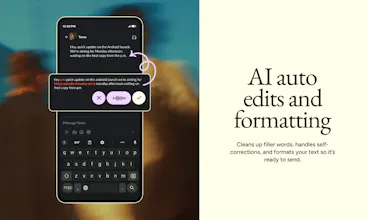
What makes this different from other voice-to-text apps on Android: Flow floats above every app. You don't switch keyboards or change modes. You just tap, speak, and it writes in your voice. It matches your tone, cleans up filler words, and formats everything so you can send without going back to edit.
We also built support for 100+ languages, including mixed-language dictation. If you switch between English and Hindi (or any other combo) mid-sentence, Flow handles it natively. That was a hard problem to solve and I haven't seen another app do it well on Android. I switch between English and Polish very often, and the ability to switch between the two without issue is crazy useful every day.
Over a million people already use Flow daily across Mac, Windows, and iPhone. We're offering unlimited free dictation on Android at launch because we want as many people as possible to push it hard and tell us what they think.
Try it: https://wisprflow.ai/android
Would love to hear how it feels compared to whatever you're using now.
Akiflow
@mswulinski Congrats on the launch!
Wispr Flow
@nunziomartinello I personally love Akiflow. Keep up the great work there!
Clueso
@mswulinski Was waiting for this!!
Wispr Flow
@ashutosh_raj We really took the time to make the experience as close to desktop as possible. Thanks to the flexibility of Android OS, I think we were able to do that. I'd love to know what you think!
Clueso
@mswulinski definitely, will give it a try!
Superhuman
This team ships 💥
Cloudthread
Congrats! Nice to see wispr flow power for android users as well
Wispr Flow
Building Wispr Flow for Android was one of my favorite projects for the year -- and I'm so excited for all of you to try it. We've built a truly native experience that lets you speak anywhere you use your phone. Please share any feedback you have and we'll keep making it better and better!
I was lucky enough to be in the alpha and beta for the app. It was amazing to use even before the team added the additional product features. I've been dictating text messages and notes while on runs, alarm descriptions, todos, and all sorts of other things I always assumed I'd have to use a keyboard for. I'm excited to see other people using it too!
Product Hunt
Very excited for the Android launch, even though I don't have an Android phone. I've been using Wispr Flow on iOS for a while, and it's really changed the way I think on the go. I often have ideas or realizations when I'm on the go and write them down in personal notes using Bear. With Wispr Flow, I can dictate long, complex ideas on the go.
While I love the iOS functionality, it is a bit high-friction to get into Wispr Flow because of limitations on iOS's side. I'm really intrigued (and envious of Android users) to see what Wispr built in Android with less system restrictions!
Product Hunt
@rajiv_ayyangar I really want the cross-app, floating Wispr Flow UI on iOS!