Quicktion

Quicktion

Save or forward any email to Notion, Sheets, Drive & 3 more

78 followers

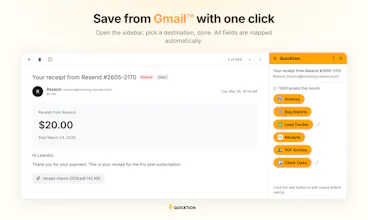
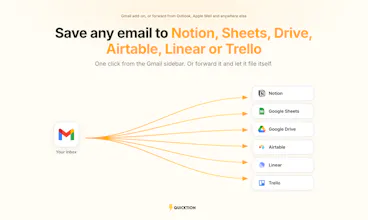
Quicktion saves emails to the tool you already use: Notion, Google Sheets, Google Drive, Airtable, Linear or Trello. Two ways in. Hit save from the Gmail sidebar, or forward the email to your own Quicktion address and it files itself. That part works from Outlook, Apple Mail, anywhere. Subject, sender, date, body and attachments are mapped for you. On Pro, the AI reads the body and any attached PDFs and fills in the fields you asked for. Free plan covers 25 emails a month, no card.
This is the 2nd launch from Quicktion. View more

Quicktion 2.0

Launching today
Six destinations and a forwarding address for every email
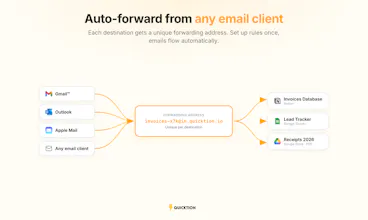
Quicktion started in 2023 as a Gmail add-on that saved emails to Notion. It now saves to Notion, Google Sheets, Google Drive, Airtable, Linear and Trello, and every destination gets its own forwarding address, so emails from Outlook, Apple Mail or anywhere else file themselves on arrival. On Pro, write a prompt and the AI pulls the fields you want out of the body and any attached PDFs. Invoice numbers, totals, dates, whatever you asked for.
Quicktion 2.0 gallery image
Free Options
Launch Team