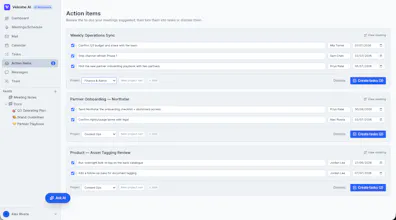
Veloshe brings your meetings, email, calendar, tasks & docs into one workspace β with an AI that doesn't just chat, it acts. ποΈ Meetings: record, transcribe, auto-summarize + action items π¬ Unified Gmail/Outlook: AI triages, drafts replies, turns mail into tasks (reads PDFs) ποΈ Calendar, β tasks & π docs, connected π€ Ask AI searches your workspace + the web (cited) and acts It never makes things up.
Hey Product Hunt π I'm Brian, the maker of Veloshe.
I run a few businesses, and my day was scattered β few inboxes (Gmail + Outlook), back-to-back meetings, a calendar I never checked, and tasks in five places. I didn't want another tool. I wanted an assistant that actually does the work.
So I built Veloshe: one workspace where meetings get transcribed & summarized, your inboxes are unified and triaged by AI, and calendar/tasks/docs live together. The Ask-AI assistant can "catch me up on ", draft a reply, read a PDF attachment, or prep me for my next meeting β and take the action, not just talk about it.
The one rule it follows: it never makes things up. If it can't verify something, it tells you.
Would love your honest feedback β what would make this a daily driver for you? π
Report
How does the AI handle conflicting tasks when it pulls action items from both an email and a meeting transcript for the same deal?
Report
Maker
@harunvhsΒ Great question! that overlap is exactly where it earns its keep. When the assistant extracts action items from both an email thread and a meeting transcript for the same deal, it doesn't blindly create duplicates: it looks at what you already have and reconciles, matching on the deal/people/subject, so you get one task with the fullest context (e.g. the meeting adds the "who owns it + due date" that the email left vague), not two half-tasks. And it's HITL (human-in-the-loop) by design: it proposes the merged action item and you confirm before anything lands in your task list, so you stay in control when the two sources genuinely disagree. Would love your take once you try it on a real deal. that cross-source reconciliation is the part I care most about getting right.
Report
The AI action items pulling directly from my recorded meetings actually worked, which surprised me. Also nice that it reads PDFs from email attachments without me having to download them first.
Report
Maker
@mahmut1q6dΒ Glad you try it, the "reads the PDF attachment so you don't have to download it". And yeah, action items straight from recorded meetings is where it feels a bit magic π. Appreciate you giving it a real try! ππ»
Report
Gmail triage alone is worth the switch, the AI actually pulls action items out of meeting threads and drops them into my task list without me babysitting it.
Report
Maker
@aynur1857675Β Love hearing this! Gmail triage was my own daily pain (I run a few businesses across way too many inboxes), so pulling action items straight out of threads is the feature I use most myself. Thanks for the kind words, Aynur π
Report
No reviews yetBe the first to leave a review for Veloshe AI Workspace
How does the AI handle conflicting tasks when it pulls action items from both an email and a meeting transcript for the same deal?
@harunvhsΒ Great question! that overlap is exactly where it earns its keep. When the assistant extracts action items from both an email thread and a meeting transcript for the same deal, it doesn't blindly create duplicates: it looks at what you already have and reconciles, matching on the deal/people/subject, so you get one task with the fullest context (e.g. the meeting adds the "who owns it + due date" that the email left vague), not two half-tasks. And it's HITL (human-in-the-loop) by design: it proposes the merged action item and you confirm before anything lands in your task list, so you stay in control when the two sources genuinely disagree. Would love your take once you try it on a real deal. that cross-source reconciliation is the part I care most about getting right.
The AI action items pulling directly from my recorded meetings actually worked, which surprised me. Also nice that it reads PDFs from email attachments without me having to download them first.
@mahmut1q6dΒ Glad you try it, the "reads the PDF attachment so you don't have to download it". And yeah, action items straight from recorded meetings is where it feels a bit magic π. Appreciate you giving it a real try! ππ»
Gmail triage alone is worth the switch, the AI actually pulls action items out of meeting threads and drops them into my task list without me babysitting it.
@aynur1857675Β Love hearing this! Gmail triage was my own daily pain (I run a few businesses across way too many inboxes), so pulling action items straight out of threads is the feature I use most myself. Thanks for the kind words, Aynur π