No reviews yetBe the first to leave a review for ChurnLock
Maker
📌
Hey Product Hunt! 👋
Churn is the silent killer of SaaS. You spend months and money acquiring a customer, only for them to quietly click "Cancel Subscription" without giving you a chance to fix their problem.
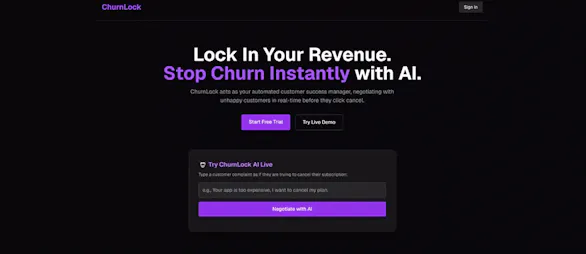
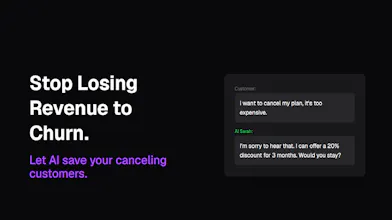
That's why I built ChurnLock. It acts as your automated 24/7 Customer Success Manager. The moment a customer wants to cancel, our AI intercepts them, analyzes their complaint, and negotiates in real-time—offering custom discounts, onboarding help, or solutions based on your specific retention strategy.
🔥 I highly recommend trying the Live Demo right on the landing page! Just type a fake customer complaint (e.g., "Your app is too expensive, I want to cancel") and watch the AI negotiate with you in real-time.
I built this to help founders protect their MRR (Monthly Recurring Revenue) without needing to hire a huge Customer Success team.
I’d love to know—what is the biggest reason your customers usually cancel? Let me know in the comments, and I’d be happy to hear your feedback on the AI's negotiation skills! 🚀
Report
Does it actually have authority to offer discounts or credits on its own, or does it just flag the case for a human to handle the negotiation?
Report
Maker
@egemenmaz6 ChurnLock doesn't just flag cases for humans—that defeats the purpose of real-time interception. The client has full authority to define what the AI is allowed to offer in the Settings page (e.g., "Offer a 20% discount for 3 months" or "Offer a free 1-on-1 onboarding session"). The AI negotiates directly within those exact boundaries.
Currently, the AI executes the conversation, and the client applies the approved discount. We are currently building direct webhook integrations so the AI can auto-apply these credits/discounts directly through the client's billing system. We are building this to be gateway-agnostic—meaning it will support major platforms like Stripe, Paddle, and Lemon Squeezy, so it works regardless of where the company processes their payments.
Report
How does the AI handle edge cases where the customer is asking for something way outside normal policy, like a full refund past the window?
Report
Maker
@arife364310 The AI is strictly instructed to adhere to the client's retention strategy. If a customer asks for something way outside policy (like a full refund past the window), the AI is programmed to politely enforce the boundary, de-escalate the frustration, and pivot back to the approved solutions.
If the customer absolutely refuses the standard offers and insists on the impossible, the AI concludes the conversation gracefully, marks the negotiation status as 'Pending' (or 'Lost') in the dashboard, and flags it for a human CSM to step in.
The goal is to let AI handle the 80% of standard, saveable churns instantly, while leaving the complex 20% to the human team. Let me know if you'd like to see how the custom strategy settings work!




Does it actually have authority to offer discounts or credits on its own, or does it just flag the case for a human to handle the negotiation?
@egemenmaz6 ChurnLock doesn't just flag cases for humans—that defeats the purpose of real-time interception. The client has full authority to define what the AI is allowed to offer in the Settings page (e.g., "Offer a 20% discount for 3 months" or "Offer a free 1-on-1 onboarding session"). The AI negotiates directly within those exact boundaries.
Currently, the AI executes the conversation, and the client applies the approved discount. We are currently building direct webhook integrations so the AI can auto-apply these credits/discounts directly through the client's billing system. We are building this to be gateway-agnostic—meaning it will support major platforms like Stripe, Paddle, and Lemon Squeezy, so it works regardless of where the company processes their payments.
How does the AI handle edge cases where the customer is asking for something way outside normal policy, like a full refund past the window?
@arife364310 The AI is strictly instructed to adhere to the client's retention strategy. If a customer asks for something way outside policy (like a full refund past the window), the AI is programmed to politely enforce the boundary, de-escalate the frustration, and pivot back to the approved solutions.
If the customer absolutely refuses the standard offers and insists on the impossible, the AI concludes the conversation gracefully, marks the negotiation status as 'Pending' (or 'Lost') in the dashboard, and flags it for a human CSM to step in.
The goal is to let AI handle the 80% of standard, saveable churns instantly, while leaving the complex 20% to the human team. Let me know if you'd like to see how the custom strategy settings work!