Hey all solo maker here, just shipped the feature I'm most excited about.
You know the problem with most TTS tools: they free up your eyes, but your brain still can't keep up. Hit a dense doc or a hardcore explainer and the voice just drones on word for word by the end your head's mush and you're rereading it yourself anyway. Slow and exhausting.
That's the part I wanted to fix, so CastReader now has a Read & Explain mode. Instead of reading verbatim, it explains as it goes all in sync with the audio. Three things I'm proud of:
It explains, not just narrates it breaks down the convoluted bits and says them in plain language, so dense or obscure writing clicks by ear.
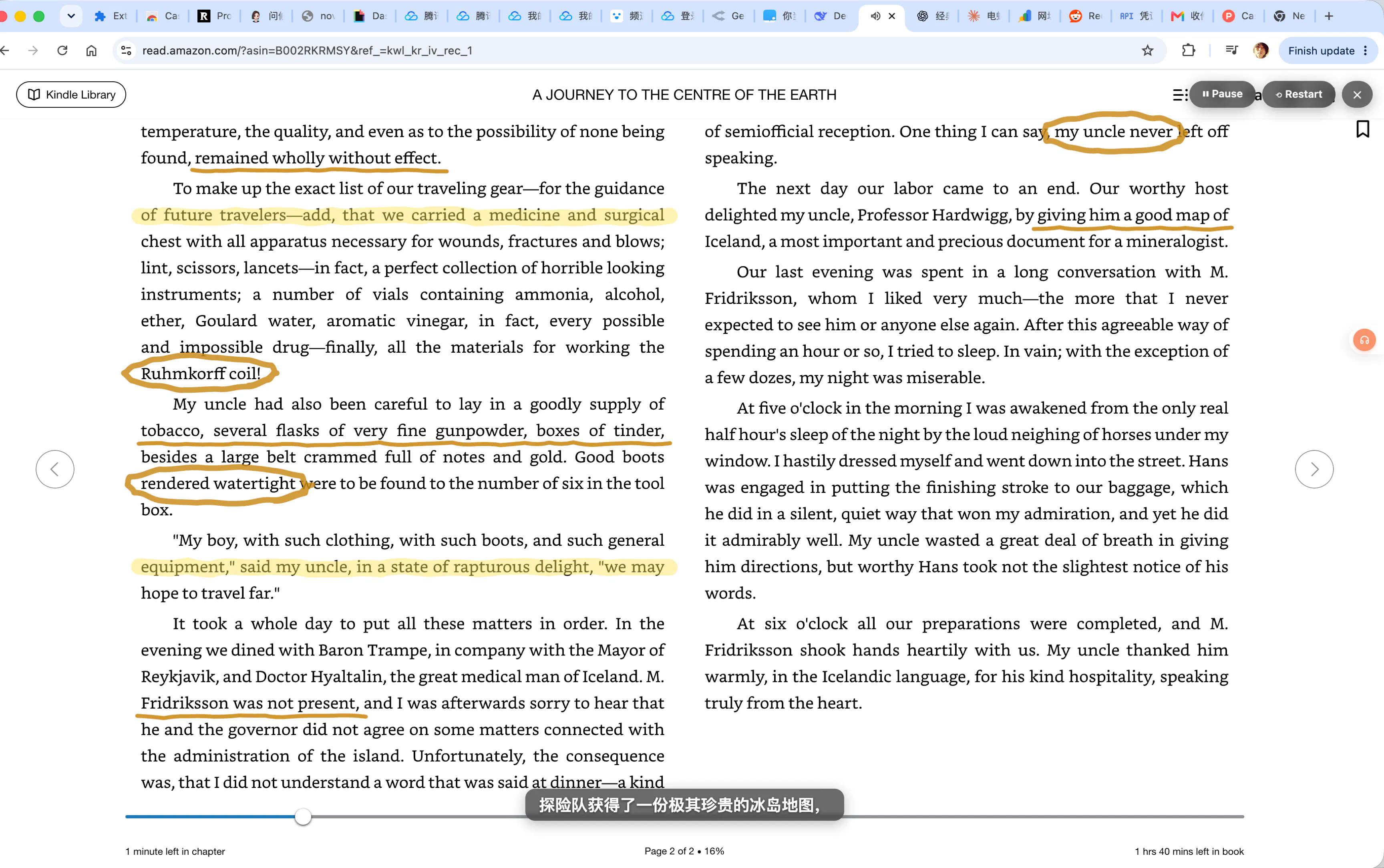
It marks up the page as it talks (my favorite part) a virtual pen moves across the original text in sync with the voice, circling and highlighting the key info, like taking notes by hand. Light touch, never covers the text; your eyes follow the pen, so you stop drifting off mid-listen.
Synced subtitles every line of explanation shows up word-by-word, so you read and listen at once.
CastReader
Hey everyone — Vin here, solo maker behind CastReader. Today's launch is the feature I'm most excited about: Read & Explain.
You know the problem with most read-aloud tools — they free up your eyes, but your brain still can't keep up. Hit a dense doc or a hardcore explainer and the voice just drones on word for word; by the end your head's mush and you're rereading it yourself anyway.
So I built Read & Explain into CastReader. Instead of reading verbatim, it explains as it goes — all in sync with the audio:
It explains, not just narrates — breaks dense, convoluted passages into plain language so they click by ear.
It marks up the page as it talks (my favorite part) — a virtual pen moves across the original text in sync with the voice, circling and highlighting the key bits, like notes by hand. Light touch, never covers the text; your eyes follow the pen, so you stop drifting off mid-listen.
Synced subtitles — every line of explanation shows word-by-word, so you read and listen at once.
The way I think about it: it's not an AI summary that hands you a detached block of text — it's more like a tutor sitting next to you with a pen, explaining while you both stay on the same page. You're anchored to the source, not a summary that floats off on its own.
It works on web articles, Kindle, and PDFs, in 40+ languages.
One thing I'd genuinely love your take on: when something's dense, do you want it explained inline like this — or do you just want a clean summary and move on? Happy to answer anything in the comments.