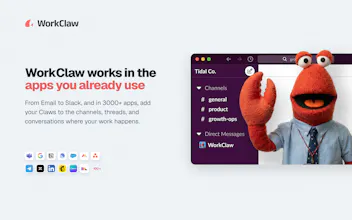
Meet the AI team for your team. WorkClaws are collaborative, proactive AI coworkers who work in Slack and Microsoft Teams just like every other colleague. They're fully customizable to get work done your way by learning skills and routines. Unlike most AI products that pair one person with one assistant, WorkClaws can collaborate 24/7 with your whole team. Each Claw has a job title, a manager in your org chart, and a cloud-hosted ClawOS computer with the ability to access more than 3,000 apps.
No reviews yetBe the first to leave a review for WorkClaw
@willruben The challenge with AI teammates isn’t creating them, it’s managing them.
If I create 10 Claws, who is responsible when something goes wrong? For example, one Claw researches, another executes, and a third communicates the result. How do customers track accountability and understand why a decision was made?
I’m asking because I’ve seen teams struggle with ownership even between humans. Adding multiple AI workers seems powerful, but also introduces a new layer of management complexity. Have you found customers naturally adopting several specialized Claws, or do most end up relying on only a few core ones after the initial setup?
@willruben@moh_codokiai Great question. It is actually a mix of both. A lot of customers will create a few specialized Claws and then one orchestrator Claw who is responsible for synthesizing their outputs and reporting to the customer.
Many of our more successful implementations have specialized claws isolated from each other who can only interact with their orchestrator claw, but the human can set up the org chart however they like and choose which claws and humans on the team can talk to each other.
@moh_codokiai Great question. Many of our most successful claws are very specialized to the way their managers and companies like to get work done. You can also create a claw manager to help with the overhead of coordination since they can all talk to each other in the ClawChat app.
Report
The proactive part is the exciting and scary part in the same breath. A coworker who waits to be asked is safe; one that acts on its own across 3,000 apps can do the wrong thing at scale before anyone notices. I'd want to know what the approval and rollback model looks like for actions that touch money or customers, because that's the line between a helpful coworker and a very fast liability.
@hunter_upscale You connect each app separately to each claw, so they can have their own set of apps that are just the ones they need to get their work done.
You can also choose whether they are proactive or just respond when they are spoken to AND you can choose which channels they should be lurking in claw by claw.
How do two Claws avoid stepping on each other if they're working the same task?
Also curious how long it takes to train one before it's actually useful day-to-day.
@abod_rehman Great question. They each run in a VM, so they are isolated to two separate tasks, but they can coordinate through chat and ClawMail, a backend messaging system. When they are working in Slack, you can control the Slack channels they are in and if two are in a channel, you invoke them by name and they can coordinate with each other there, too. In addition, they would typically not be assigned the same task, as you can control who can give each Claw tasks. We also recommend making them specialists - BloggerClaw, RecruiterClaw, etc.
@abod_rehman we have a skill library to help make training easy. We also help our customers with setting up claws, so feel free to reach out!
Report
The idea of having AI handle repetitive work is compelling, but what caught my attention is the focus on actual workflows rather than just chat. Curious…what's the most common task users automate first when they start using WorkClaw?
@harini_mukesh It's hard to pin down just one task, but a lot of people do email triage, go to market, content writing and social media monitoring. Lots of task management and engineering work as well.
@harini_mukesh, most common tasks are research (news summaries, market research), analysis (connecting internal data sources), marketing (social media, blogging, ad management), and project management (making sure things get done).
Report
@willruben@ammonbrown Interesting that research and project management seem to be common starting points. I guess those are areas where people immediately feel the impact of saving time. Thanks for sharing, and all the best with WorkClaw!
Report
This feels like it's solving for team level AI adoption rather than individual productivity which is a much harder go to market. How are you handling the internal champion problem i.e. who inside a company actually owns hiring and managing a Claw?
@antonio_manuel1 That can actually be different for each Claw. There are multiple levels of admin controls. You can control who is on the team, which Claws they can access, and which Claws their Claws can access. In many cases, there will be multiple shared Claws as well as a personal Claw for various team members. I have access to five or six on our team, and I have one that is just my own.
@antonio_manuel1, sometimes it happens bottoms up within a company and other times it's more top down where we get in touch with a leader or IT manager who is attracted to our admin and security controls to help roll out AI in a safe way to the whole org.
Congrats on the launch! Do WorkClaw agents only do what they're told or do they feel like part of the team too, brainstorm, push back, have fun with people?
@mcarmonas They feel like they're part of the team in a lot of ways. When they interact on Slack, they can be proactive and are very conversational. You can define their personality and tone, and so they can be as goofy as you want them to be!
@mcarmonas Honestly, they mostly do what they are told. They can be amusing and goofy and we are working on refining their tone and allowing users to define it a bit better.
Thanks@zachary_dewitt! Most common use cases are research (news summaries, market research, writing reports how you like them), analysis (connecting internal data sources or accessing public data via subscriptions), marketing (social media, blogging, ad management), and project management (making sure things get done).
@zachary_dewitt Social media, GTM, content creation, task management, and email triage, I would say. Although users keep coming up with new use cases all the time!




WorkClaw
@willruben @moh_codokiai Great question. It is actually a mix of both. A lot of customers will create a few specialized Claws and then one orchestrator Claw who is responsible for synthesizing their outputs and reporting to the customer.
Many of our more successful implementations have specialized claws isolated from each other who can only interact with their orchestrator claw, but the human can set up the org chart however they like and choose which claws and humans on the team can talk to each other.
WorkClaw
@moh_codokiai Great question. Many of our most successful claws are very specialized to the way their managers and companies like to get work done. You can also create a claw manager to help with the overhead of coordination since they can all talk to each other in the ClawChat app.
The proactive part is the exciting and scary part in the same breath. A coworker who waits to be asked is safe; one that acts on its own across 3,000 apps can do the wrong thing at scale before anyone notices. I'd want to know what the approval and rollback model looks like for actions that touch money or customers, because that's the line between a helpful coworker and a very fast liability.
WorkClaw
@hunter_upscale we have a ton of security controls. you control which apps each claw gets and who can talk to each claw.
WorkClaw
@hunter_upscale You connect each app separately to each claw, so they can have their own set of apps that are just the ones they need to get their work done.
You can also choose whether they are proactive or just respond when they are spoken to AND you can choose which channels they should be lurking in claw by claw.
Triforce Todos
WorkClaw
@abod_rehman Great question. They each run in a VM, so they are isolated to two separate tasks, but they can coordinate through chat and ClawMail, a backend messaging system. When they are working in Slack, you can control the Slack channels they are in and if two are in a channel, you invoke them by name and they can coordinate with each other there, too. In addition, they would typically not be assigned the same task, as you can control who can give each Claw tasks. We also recommend making them specialists - BloggerClaw, RecruiterClaw, etc.
WorkClaw
@abod_rehman we have a skill library to help make training easy. We also help our customers with setting up claws, so feel free to reach out!
WorkClaw
@harini_mukesh It's hard to pin down just one task, but a lot of people do email triage, go to market, content writing and social media monitoring. Lots of task management and engineering work as well.
WorkClaw
@harini_mukesh, most common tasks are research (news summaries, market research), analysis (connecting internal data sources), marketing (social media, blogging, ad management), and project management (making sure things get done).
@willruben @ammonbrown Interesting that research and project management seem to be common starting points. I guess those are areas where people immediately feel the impact of saving time. Thanks for sharing, and all the best with WorkClaw!
This feels like it's solving for team level AI adoption rather than individual productivity which is a much harder go to market. How are you handling the internal champion problem i.e. who inside a company actually owns hiring and managing a Claw?
WorkClaw
@antonio_manuel1 That can actually be different for each Claw. There are multiple levels of admin controls. You can control who is on the team, which Claws they can access, and which Claws their Claws can access. In many cases, there will be multiple shared Claws as well as a personal Claw for various team members. I have access to five or six on our team, and I have one that is just my own.
WorkClaw
@antonio_manuel1, sometimes it happens bottoms up within a company and other times it's more top down where we get in touch with a leader or IT manager who is attracted to our admin and security controls to help roll out AI in a safe way to the whole org.
Humalike
Congrats on the launch! Do WorkClaw agents only do what they're told or do they feel like part of the team too, brainstorm, push back, have fun with people?
WorkClaw
@mcarmonas They feel like they're part of the team in a lot of ways. When they interact on Slack, they can be proactive and are very conversational. You can define their personality and tone, and so they can be as goofy as you want them to be!
Humalike
@ammonbrown That's great to hear, I'll give it a try :)) Next week we are launching humalike(.ai), might be interesting for you!
WorkClaw
@mcarmonas That looks great! The personality layer for agents. Following!
WorkClaw
@mcarmonas Honestly, they mostly do what they are told. They can be amusing and goofy and we are working on refining their tone and allowing users to define it a bit better.
Notorious PLG
WorkClaw
Thanks@zachary_dewitt! Most common use cases are research (news summaries, market research, writing reports how you like them), analysis (connecting internal data sources or accessing public data via subscriptions), marketing (social media, blogging, ad management), and project management (making sure things get done).
WorkClaw
@zachary_dewitt Social media, GTM, content creation, task management, and email triage, I would say. Although users keep coming up with new use cases all the time!
Also... Notorious PLG... 🤣