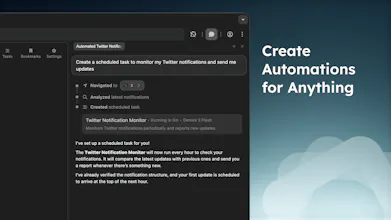
Meet Aera, the browser built for automating real workflows. Create tasks, and Aera runs full workflows in the background, handling context, execution, and reporting automatically. Connect tools like Cursor or Claude Code with MCP so agents can take real action, not just suggest it. Keep your data + history private and local-only. Try for free!

Hey Product Hunt! 👋
I'm Andrew, and I built Aera to address the core issue with current agentic browsers: they just don't help me get any real work done.
Aera does.
Instead of just helping you browse, Aera lets you automate real workflows in your browser, even while you’re away.
Here's how it works:
• Create a task (or just ask the sidebar!)
• Schedule it to run automatically
• It executes, tracks context across runs, and generates reports
• You get notified when it’s done
If you can do it in a browser, you can automate it.
But with Aera, I wanted to take this a step further. Agentic tools can be helpful in their own right, but are even more useful when connected to other agentic systems. So Aera ships with MCP. You can connect tools like Cursor, Gemini CLI, OpenClaw, and Claude Code directly to Aera so that they can use the browser's automation toolkit to actually execute tasks, not just suggest them.
On privacy:
• Your browsing + chat history stays local-only.
• Inference handled directly by model providers and never passes through Aera servers.
• All subscription models use ZDR (Zero Data Retention).
Aera comes with a free tier, with higher performance models and vision tools that greatly increase capabilities available in subscription plans.
Aera is still in early access, and is developed solely by me for the time being. I'd genuinely love to hear your feedback and see what you automate as Aera continues to scale!
Report
@arivers Hey Andrew, super intrigued by Aera's MCP integration. What's one quick-win automation you've seen users pull off that blew your mind?
@swati_paliwal The best use case that I’ve seen so far is non-technical users deploying their agent-coded applications. They will connect to Aera via MCP, and it will set up databases, GitHub repositories, and deployment environments automatically for the project they are working on, and then deploy it for them. Solves a very big issue which is getting their product to market
Report
@arivers when will you be making it available for mobile?
@mykyta_semenov_ Yep, absolutely. And I have scheduled tasks running in the background that monitor pricing on Amazon and make purchases when items drop below a certain price.
Report
@arivers But that’s one request every few hours. What if there are many requests at once—like analyzing multiple products, comparing prices, etc.? Amazon might detect it as a bot and block it. Are there any mechanisms to handle this?
Report
The Aera browser looks promising. Congrats on the launch 🎉
@basharath Yep! It was originally built in Electron, but feature parity was becoming a major issue, so to move focus back into building agentic features, the project was rebuilt in Chromium
@ermakovich_sergey Aera already supports simultaneous tasks. If you run them in background mode, they will have their own isolated background tabs, but in foreground mode they can share tabs together while simultaneously running.
Report
Congrats on the launch @arivers , does it have an MCP?
@alielastal Aera doesn't get access to autofill or password information for security reasons as otherwise prompt injection could cause your credentials to be exposed. Right now, it expects that you are logged in on any given site. If it sees that you need to provide your log in information, it will prompt you to do so and wait for you to complete. Otherwise, it could absolutely make its own account for these services as well
Report
@arivers That makes sense — keeping credentials out of the automation layer is the right call. Smart approach!
Report
This is exceptional, there are so many simple but important tasks I always wanted to automate, this will surely help me do that, but how well it can handle mimicking the human behavior because if websites get a feel that its not a real person, it will be blocked?
@nayan_surya98 Thank you, and great question! Because Aera is built as a browser and not just an extension, the interaction engine has been built into the browser itself so that automated events appear as human inputs to the web page. Interactions like clicking/typing, etc. all have various internal processes to emulate virtual mouse movement and clicks, instead of being purely programmatic. This also means (on the subscription version) that it can solve captchas visually, which is a major blocker for agentic browsers otherwise, especially for background automated tasks.
Aera Browser
@arivers Hey Andrew, super intrigued by Aera's MCP integration. What's one quick-win automation you've seen users pull off that blew your mind?
Aera Browser
@arivers when will you be making it available for mobile?
Aera Browser
@uzzi29 Mobile app is on the roadmap. Currently a few months out
Can your service go to an online store, find a product, and purchase it using my account? Is that possible without human involvement?
Aera Browser
@mykyta_semenov_ Yep, absolutely. And I have scheduled tasks running in the background that monitor pricing on Amazon and make purchases when items drop below a certain price.
@arivers But that’s one request every few hours. What if there are many requests at once—like analyzing multiple products, comparing prices, etc.? Amazon might detect it as a bot and block it. Are there any mechanisms to handle this?
The Aera browser looks promising. Congrats on the launch 🎉
Btw, is it based on Chromium?
Aera Browser
HasData
Do you plan to support running multiple tasks at the same time, or does Aera handle them one by one?
Aera Browser
Congrats on the launch @arivers , does it have an MCP?
Aera Browser
Automation browsers are getting popular. How does Aera handle sensitive data like saved passwords during automated workflows?
Aera Browser
@alielastal Aera doesn't get access to autofill or password information for security reasons as otherwise prompt injection could cause your credentials to be exposed. Right now, it expects that you are logged in on any given site. If it sees that you need to provide your log in information, it will prompt you to do so and wait for you to complete. Otherwise, it could absolutely make its own account for these services as well
@arivers That makes sense — keeping credentials out of the automation layer is the right call. Smart approach!
This is exceptional, there are so many simple but important tasks I always wanted to automate, this will surely help me do that, but how well it can handle mimicking the human behavior because if websites get a feel that its not a real person, it will be blocked?
Aera Browser