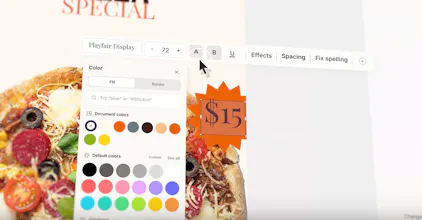
Kodo is an AI design tool that generates fully editable posters, slides, menus and social graphics from a simple prompt. Unlike other AI design tools that output flat images, Kodo creates structured, layered designs you can edit instantly - text, colors, layouts, spacing, everything. You can generate, refine, and export in minutes - no templates, no locked layouts.
Hey Product Hunt 👋 I’m Michael, the founder of Kodo.
I built Kodo because I was frustrated with AI design tools that generate beautiful images… but you can’t actually use them. They’re flat, locked, and impossible to edit properly.
As someone building projects constantly, I needed something that could generate real posters and slides I could tweak, refine, and export - not just admire.
So we built Kodo differently.
Instead of outputting images, Kodo generates structured, layered designs. That means everything is editable - text, spacing, colors, layout. You can even draw a region on the canvas and tell the AI exactly where to make changes.
The first versions were rough. Designs looked generic. Layouts broke. The AI didn’t “understand” the canvas. Over the past few months we rebuilt the engine, improved parsing, optimized prompts, and focused heavily on making outputs production-ready.
This launch is the result of me locking in.
Would love your feedback - what works, what doesn’t, and what you’d want next 🙌
A lot of teams care less about one-off generations and more about brand consistency. How does Kodo use a brand kit (fonts/colors/logos) during generation and iteration—and what’s your approach when the prompt conflicts with brand rules?
@curiouskitty our approach is quite simple actually. we inject into the prompt when brand kit is selected, and we have in the main system prompt that the brand kit always overrides regular prompts.
Report
Hey Michael, congrats on your launch! How do you plan to compete with big players that have sort of unlimited budgets and teams and offer similar tools, for example Nano Banana? P.S- I find the editing bar on top of the image convenient and also the UI looks familiar to what we are used to use on a daily basis which is a good thing
@viktorgems hey! Thanks for your support.
I think for nano banana, they are focused on image editing using an image model. So our core method is different. However I think I’ll need to keep pushing, keep marketing and get feedback to be better than nano banana!
Report
Hey @mg272011 , I tried Kodo and I love the fact that you can generate layers. Great work! As a suggestion: I think the elements design would be better on the left, like Canva, so it's less out of the way of the design itself
@daniel_hughes4 we automatically save all the changes immediately, so it doesnt break. its saved as cordinates so very easy to do.
Report
Congrats on the launch,@mg272011! The core problem you are solving here is real. Every content team I have worked with has hit that wall where AI-generated designs look great in preview but fall apart the moment you try to edit text spacing or swap a color palette. The flat-image output model was always a workflow dead end for anyone doing production-level work. Trust me! Hahaha, even Gemini and Canva sometimes mess up when we try to edit the pictures!
A few things I am curious about:
How does Kodo handle brand kit enforcement during generation? If a team uploads brand fonts, colors, and logo lockups, does the AI respect those constraints even when the prompt conflicts with them?
What does the export pipeline look like for teams that need to hand off to print vendors? Are you outputting structured SVGs, or is there a path to layered PDFs with bleed and trim marks?
On the spatial awareness side, when users draw a region and give instructions, how granular can those edits get? For example, can someone select just a text block and say, "Make this hierarchy clearer," without the AI rearranging the entire layout?
The fact that you rebuilt the engine from scratch after the early versions broke tells me you're building for longevity here. Rooting for Kodo, Michael. All the best!
Kodo
Product Hunt
Kodo
@curiouskitty yeah for sure! so we have a brand kit option, and you can just toggle it on and itll auto use it!
Kodo
@curiouskitty our approach is quite simple actually. we inject into the prompt when brand kit is selected, and we have in the main system prompt that the brand kit always overrides regular prompts.
Hey Michael, congrats on your launch! How do you plan to compete with big players that have sort of unlimited budgets and teams and offer similar tools, for example Nano Banana?
P.S- I find the editing bar on top of the image convenient and also the UI looks familiar to what we are used to use on a daily basis which is a good thing
Kodo
Hey @mg272011 , I tried Kodo and I love the fact that you can generate layers. Great work! As a suggestion: I think the elements design would be better on the left, like Canva, so it's less out of the way of the design itself
Kodo
When someone changes text length or moves elements around how does Kodo keep the spacing and alignment from breaking?
Kodo
@daniel_hughes4 we automatically save all the changes immediately, so it doesnt break. its saved as cordinates so very easy to do.
Congrats on the launch, @mg272011! The core problem you are solving here is real. Every content team I have worked with has hit that wall where AI-generated designs look great in preview but fall apart the moment you try to edit text spacing or swap a color palette. The flat-image output model was always a workflow dead end for anyone doing production-level work. Trust me! Hahaha, even Gemini and Canva sometimes mess up when we try to edit the pictures!
A few things I am curious about:
How does Kodo handle brand kit enforcement during generation? If a team uploads brand fonts, colors, and logo lockups, does the AI respect those constraints even when the prompt conflicts with them?
What does the export pipeline look like for teams that need to hand off to print vendors? Are you outputting structured SVGs, or is there a path to layered PDFs with bleed and trim marks?
On the spatial awareness side, when users draw a region and give instructions, how granular can those edits get? For example, can someone select just a text block and say, "Make this hierarchy clearer," without the AI rearranging the entire layout?
The fact that you rebuilt the engine from scratch after the early versions broke tells me you're building for longevity here. Rooting for Kodo, Michael. All the best!
Pixel
Cheers on shipping a cool product. Best of luck 👍🏻
Kodo