

Try the fully feature free webn version - unfckr.app - feedback appreciated
Fully featured web version of the app is available for a limited at unfckr.app - try the log analyzer - paste any giant logs, instant parsing and keyword detection. The only thing it can't do is the terminal command and pipeline run over local folders, that's what the app is for.
data workbench - profile, clean, transform, and export CSV, JSON, and SQLite - the full suite (this page)
JSON flattener - nested JSON or NDJSON to flat columns, arrays and objects unrolled
CSV PII scrubber - find emails, phones, SSNs, and card numbers - mask, hash, or drop them
JSON to CSV - convert JSON or NDJSON to CSV with full column control
CSV to JSON - convert CSV to JSON or NDJSON, streamed at any size
Excel to CSV - read .xlsx workbooks and export CSV, sheets and all
CSV to Excel - write a real .xlsx where leading zeros and dates survive
SQL on CSV - real SQL over your files: joins, GROUP BY, a read-only console
CSV to SQLite - drop several files, get one .sqlite database with discovered foreign keys
CSV to SQL - CREATE TABLE and INSERT statements for Postgres, MySQL, SQL Server, SQLite
JSON to TypeScript - TypeScript interfaces and JSON Schema derived from your real data
large CSV viewer - open files past Excel's 1,048,576-row limit without loading them into RAM
regex painter - highlight example matches, get a verified regular expression back
encoding fixer - detect windows-1252/UTF-16 and repair garbled text (José → José)
log parser - read log files as events: layouts detected, stack traces kept whole, timestamps normalized, and a volume-over-time strip drawn in SQL across every row
visualize - chart any table you have open - bar, line, area or point - drag across it to filter, and export svg, png, or the vega-lite spec that drew it
theme builder - design, test, and export custom color themes with live previews, palette derivation, and contrast diagnostics
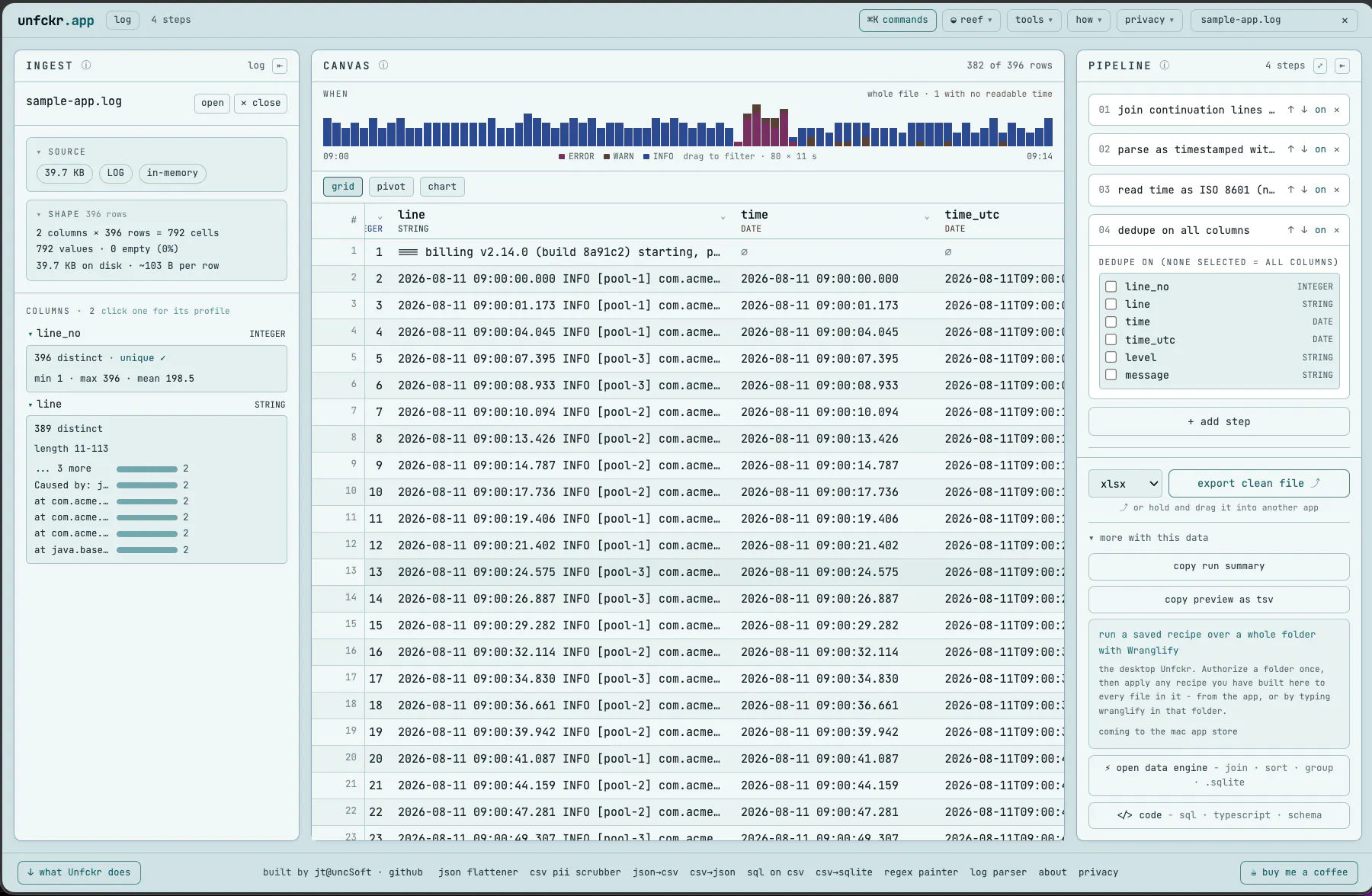
unfckr: a free, private data workbench that runs entirely in your browser
Drop a CSV, JSON, NDJSON, or SQLite file and work on it right here - nothing is uploaded, because there is nowhere to upload it to. Files stream through a transform pipeline, so size is limited by your disk, not your RAM: multi-gigabyte CSVs open fine, well past Excel's 1,048,576-row ceiling.
how to use it
Drop a file anywhere on the page, or paste a table straight from Excel, Sheets, or a SQL client. Nothing uploads - there is nowhere to upload it to.
Read the ingest panel: what actually came in, and a watchlist of what will fight you later - empty columns, case collisions, duplicate headers. Where there is a safe fix, one click adds the step.
Build up a pipeline. Every step is visible, reorderable, switch-off-able, and undoable, and clicking a column header offers the steps that make sense for it. Several steps can be open at once, and the ⤢ button at the top of the panel opens the whole chain full-screen.
Export - CSV, JSON, NDJSON, or a .sql script, with the pipeline running over every row on the way out. Or open the ⚡ engine for joins, GROUP BY, full-text search, and a real .sqlite file.
what it does
Profile every column from the whole file, not a sample: distinct counts, top values, min/max/mean, date ranges, null share, proven uniqueness.
Clean and transform: flatten nested JSON, scrub PII (mask, hash, or drop emails, phones, SSNs, cards), filter, dedupe, sort, rename and drop columns, split one column into several at a delimiter, extract new columns with regex, fix individual cells - every step recorded, reorderable, and undoable.
A real data engine: SQLite compiled to WebAssembly. Join across several files, group and aggregate, sort the full file, run read-only SQL in a console, build a full-text index over a text column and search millions of rows instantly, scroll the whole result rather than a first page of it, see a relationship map with discovered foreign keys - each candidate join measured before you build it, so you know whether it drops rows, multiplies them, or matches cleanly, and export a genuine .sqlite database.
Developer artifacts: CREATE TABLE, INSERT, SELECT, and UPDATE statements for PostgreSQL, MySQL, SQL Server, and SQLite - column types suggested from your actual data - plus TypeScript interfaces and JSON Schema.
Regex painter: highlight two or three examples of what you want to match and get back a regular expression that is verified against your own highlights.
Streaming exports: CSV, JSON, NDJSON, or a .sql script of your entire file - the pipeline runs over every row on the way out. CSV writes on your terms: comma, semicolon, tab or pipe, LF or CRLF, and an optional UTF-8 BOM so accented characters open correctly in Excel instead of as José.
JSON that isn't already a table: paste or drop pretty-printed JSON, NDJSON, or an API response - the records inside an envelope ({"data": [...]}, results.items) become the table, other arrays in the document stay one click away, and columns still holding a blob prompt you to flatten them.
A grid you can actually read: drag a column edge to resize it, double-click that edge to fit the column to its content, or fit every column at once from the header menu - which matters most on logs, where one column holds the whole line.
Sorting, two ways: click a column header to sort the preview instantly (display only), or add a sort step - multi-key, nulls last - so the exported file itself comes out in that order.
See what one step did: the step studio (⤢, or the commands palette) opens the chain full-screen and shows the rows entering a single step beside the rows leaving it, with the cells that step rewrote marked. Cells are left unmarked where a step drops or reorders rows, because the two sides are then not the same rows. In the engine, the same view carries a sql tab: the one statement your visual steps compiled into, ready to paste into any SQLite client.
Your steps stay with the file: reopen a file and its cleaning pipeline comes back, even after switching tools. A different file with the exact same columns is offered those steps instead of having them applied silently, because steps address columns by position.
Repairs broken text: José back to José. Non-UTF-8 files are detected when you drop them, and each mojibake repair is proven by a byte roundtrip first, so words that only look wrong are left alone.
Recipes and history: save or share a pipeline as a link (the recipe lives in the URL fragment, never sent to a server), and reopen recent files from an on-device list that follows you between tools.
Two sample databases, one click: a real 11-table database (Chinook, MIT) where every declared foreign key measures clean and the two nobody declared are the ones that would have hurt you, plus a small deliberately messy one where a join drops rows, another multiplies them, and a third matches nothing at all.
"CSV" is a loose term here, and paste means paste anything: TSV, semicolon and pipe delimited files, ranges copied from Excel or Google Sheets, SQL client result grids, even tables copied off a web page (they arrive tab-separated) - the delimiter is detected automatically. One delimiter is chosen for the whole file; if a column turns out to carry its own separator inside it, click that column's header and choose split at delimiter to break it into real columns.
every tool in the box
Like every unfckr tool, this runs 100% in your browser: no upload, no servers, no signup, no analytics. A Content-Security-Policy header blocks every programmatic network channel, so not even malicious code could phone home - and you can watch it happen: the privacy page runs six live escape attempts and shows the browser refusing each one.
Replies
Be the first to reply
Have a question or a thought to share? Add a comment above to start the conversation.