

🚀 RyzenZPilot - ⚡ Your intelligent autopilot for AMD Ryzen performance & efficiency! 🎯
🔥 Your all-in-one solution for dynamic power management – right from your system tray! 💪
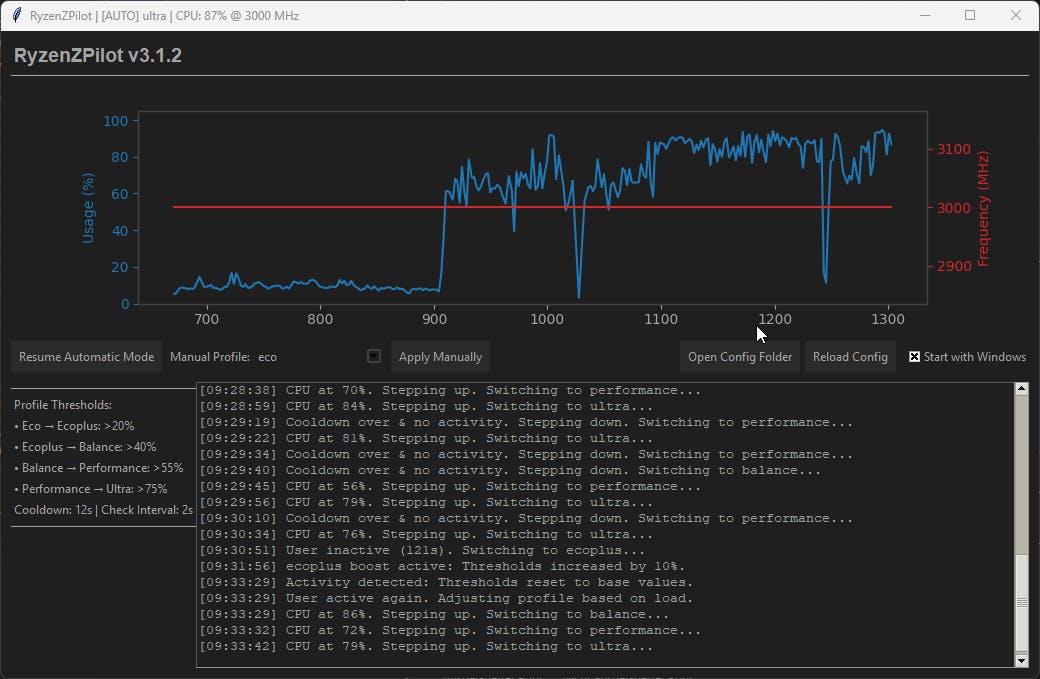
Boost your productivity and save energy: RyzenZPilot automatically switches between optimized power profiles based on your active applications. Whether gaming 🎮, video editing 🎬, or office work 📊 – your Ryzen system always runs in the perfect mode!
🤖 What is RyzenZPilot?
RyzenZPilot integrates intelligent power management functionality to enhance productivity and efficiency for AMD Ryzen users. It allows automatic power profile switching based on active processes, manages system performance dynamically, and provides seamless system tray integration. The tool runs completely in the background and intelligently controls your AMD Ryzen processor's energy settings. 🧠 Forget about manual profile switching in Windows power options – RyzenZPilot monitors your active processes and automatically selects the optimal profile!
⭐ Core Features
`System Tray Integration` for full power management,
`Worker Thread Architecture` for region-specific performance optimization, and
`Automatic Profile Detection` to intelligently switch power modes. This allows for operation that is 100% invisible to other applications.
🎯 Intelligent Autopilot: Automatic switching between "Silent" 🤫, "Balanced" ⚖️, and "Performance" 🔥 profiles
📍 System Tray Integration: Runs invisibly in the taskbar – one click gives you full control!
⚡ Multi-Threading Architecture: Responsive GUI + separate worker thread for optimal system performance
🔧 Easy Configuration: Define which applications trigger which power profiles
🚀 Autostart Options: Starts minimized or visible – exactly as you prefer
🔍 Debug Mode: Advanced analysis tools for power users and developers
💾 Minimal Resource Usage: Runs efficiently in the background without system impact
🎯 Who is RyzenZPilot Perfect For?
RyzenZPilot is designed for AMD Ryzen users who need a reliable tool for automatic power management, performance optimization, and energy efficiency. It integrates seamlessly with various applications, enhancing productivity by allowing intelligent profile switching without manual intervention. 💯
🎮 Gamers: Full power as soon as a game starts – automatically back to energy saving when finished
🎬 Content Creators: Maximum performance for rendering, video editing, and streaming
💼 Professionals: Perfect balance between performance and energy efficiency for productive work environments
🏠 Everyday Users: Quiet, cool system for daily tasks + instant power reserves when needed
⚙️ How Does It Work?
🎪 Fully automatic & invisible! RyzenZPilot runs silently in the background and:
👁️ Monitors active processes in real-time
🧠 Recognizes application types automatically (Gaming, Office, Multimedia)
⚡ Switches power profiles without delay or interruption
📊 Continuously optimizes performance vs. temperature vs. noise
🔧 Can be individually configured for your specific needs
📋 System Requirements
💻 CPU: AMD Ryzen processor (all generations)
🪟 OS: Windows 10/11 (64-bit)
💾 RAM: Minimum 50MB (runs extremely resource-efficiently)
💽 Storage: ~15MB disk space
⚡ Permissions: Administrator privileges for power management
It comes with 2 premade profiles for the new Ryzen AI MAX+ 395 and the Ryzen 8745HS !
Link: RyzenZPilot
Mirror: RyzenZPilot
Replies
Oh this is neat, manually switching power profiles in Windows is one of those tiny annoyances I never bother fixing so I just leave it on balanced forever. Having it auto-flip when a game launches is genuinely the kind of thing I'd set and forget.
The part I'm curious about: how does it actually know what an app is on its own? Like you mention it recognizes gaming vs office automatically, but does that work out of the box for any random new game, or do I still have to manually tell it "this .exe is a game" for it to do the right thing? Trying to figure out how much setup there really is before the autopilot part kicks in.
gonna give it a try