

RoshanOS 4 Pro Qalandari – Linux + Android + Windows
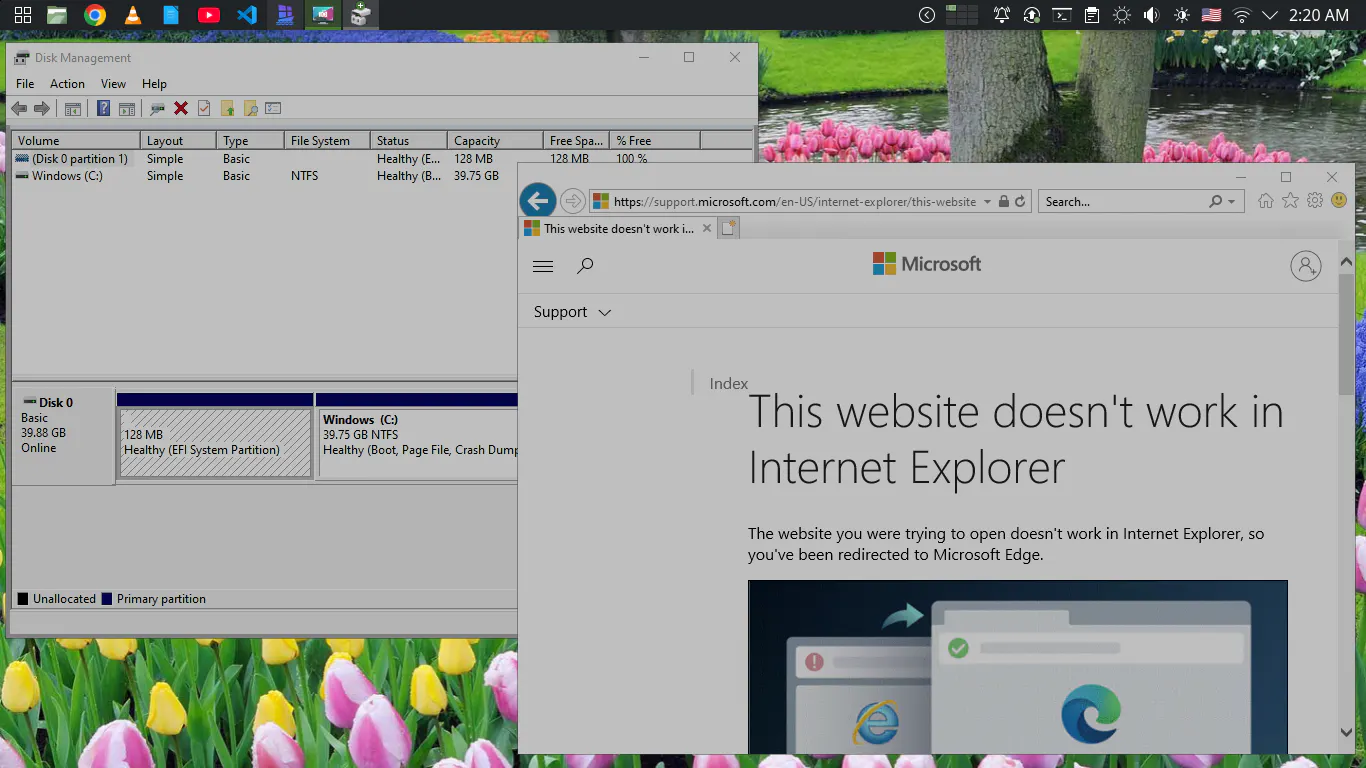
RoshanOS 4 Pro Qalandari brings Linux, Android, and Windows capabilities together on one PC. Built on MX Linux and Debian, it offers a familiar KDE Plasma desktop with integrated Android app support, Windows virtualization, and a ready-to-explore “Tryouts” coding environment. Enjoy the freedom of Linux while keeping access to the applications you need for work, learning, development, and everyday computing.
One Desktop. Three Worlds.
RoshanOS 4 Pro Qalandari is a premium Linux desktop distribution designed to bring together the freedom of Linux, the versatility of Android, and the familiarity of Windows.
Built on MX Linux 25, with a Debian 13 foundation, RoshanOS 4 Pro provides a familiar and easy-to-use KDE Plasma desktop while adding carefully integrated tools for Android applications, Windows environments, and software development.
Whether you’re a developer, student, professional, home user, or someone moving away from Windows, RoshanOS 4 Pro gives you a practical Linux desktop without forcing you to give up every application you already depend on.
🚀 Why RoshanOS 4 Pro?
RoshanOS 4 Pro is designed around a simple idea:
Use Linux as your main desktop while keeping access to the applications you need from Android and Windows.
Instead of maintaining separate computers for different tasks, RoshanOS 4 Pro brings multiple computing environments together on one PC.
What you get
🐧 A complete Linux desktop based on MX Linux 25
📱 Integrated Android application support
🪟 Windows environment integration
👨💻 Ready-to-use programming examples and development tools
🎨 Customized KDE Plasma desktop experience
🖥️ Multiple virtual workspaces
📁 Convenient file sharing between Linux and Windows
🔧 Easy setup guides for advanced features
💰 One-time purchase — no monthly subscription
RoshanOS is also listed on DistroWatch, one of the well-known websites covering Linux and open-source operating systems.
🐧 A Powerful Linux Foundation
RoshanOS 4 Pro is built on MX Linux 25, which itself is based on Debian 13.
This gives RoshanOS a mature Debian-based foundation while allowing RoshanTech to provide its own desktop customization, tools, documentation, and integrations.
You get the flexibility of Linux together with a desktop environment designed to be approachable for users coming from Windows.
📱 Run Android Apps on Your Linux Desktop
One of the key features of RoshanOS 4 Pro is its integrated Android environment.
Android support is provided through a container-based approach, allowing Android applications to run alongside your normal Linux applications rather than requiring a separate physical Android device.
Android features include:
Run compatible Android applications on your PC
Open Android applications in desktop windows
Use Android applications alongside Linux applications
Optional Google Apps environment
Keyboard and mouse support for compatible applications
Access Android applications on a larger desktop display
Google Play support
RoshanOS 4 Pro provides an Android with Google Apps setup option.
Depending on the Android environment, device compatibility, Google certification, and application requirements, some Google Play applications may require additional configuration or may not work correctly.
This means RoshanOS gives you the opportunity to use Android applications on your desktop while being transparent about compatibility limitations.
🪟 Windows Applications on Linux
Still need Windows for a particular application?
RoshanOS 4 Pro can integrate a Windows environment with your Linux desktop using virtualization technology.
This allows compatible Windows applications to be used alongside your Linux applications.
Windows integration includes:
Windows 10/11 virtual-machine support
Windows applications alongside Linux applications
Shared folders between Linux and Windows
Convenient access to files from both environments
Optional application-style integration for compatible Windows programs
Windows integration depends on your computer’s hardware, virtualization support, Windows version, drivers, and the application being used.
Important: Windows License
RoshanOS 4 Pro does not include a Microsoft Windows license.
If you install Windows, you are responsible for obtaining and activating Windows legally in accordance with Microsoft’s licensing terms.
🔄 Your 3-in-1 Desktop Experience
RoshanOS 4 Pro brings three computing environments together:
🐧 Linux
Use Linux applications normally for programming, office work, browsing, multimedia, development, and everyday computing.
📱 Android
Run compatible Android applications through the integrated Android environment.
🪟 Windows
Use a Windows virtual environment when you need Windows-specific applications.
The result is a flexible desktop where you can choose the right environment for each task.
👨💻 Developer Ready
RoshanOS 4 Pro isn’t only designed for everyday users.
It also includes a “Tryouts” folder containing ready-to-run programming examples and experiments.
Explore examples for:
Python
PHP
C++
Java
Web development
And more
It’s useful for students learning programming as well as developers who want a collection of examples available immediately after installation.
⚡ Simple, Practical Desktop Experience
RoshanOS 4 Pro is customized to reduce unnecessary complexity.
Instead of requiring users to perform every customization from the terminal, many features can be accessed through the graphical desktop environment and the documentation provided with the system.
The goal is simple:
Install it, explore it, and start using it.
Advanced Linux users can still use the terminal and customize the system however they like.
🎨 Intelligent Workspace
RoshanOS 4 Pro includes several desktop customizations designed to make everyday work more organized and enjoyable.
🖱️ Screen Corners & Edges
Use different screen corners to access frequently used desktop actions:
Top-left: Menu
Top-right: Workspaces
Bottom corners: Hide windows
🖥️ 9 Virtual Workspaces
Organize different activities across 9 virtual desktops.
For example:
Workspace 1 — Programming
Workspace 2 — Browser
Workspace 3 — Office work
Workspace 4 — Communication
Workspace 5 — Testing
And more
🌄 Daily Desktop Refresh
RoshanOS can automatically change your wallpaper and system accent colors, giving your desktop a fresh appearance over time.
🛡️ Security & Privacy
RoshanOS benefits from the security model and software ecosystem of its Debian/MX Linux foundation.
However, no operating system can guarantee complete protection from malware, viruses, or security threats.
For best security:
Keep your system updated
Install software from trusted sources
Use strong passwords
Avoid suspicious files and websites
Keep important data backed up
RoshanOS is designed to provide a practical and secure Linux desktop, while leaving security decisions and responsible computing practices in the user’s hands.
🛠️ Hardware Requirements
RoshanOS itself can run on relatively modest hardware, but Android and especially Windows virtualization require additional resources.
For the best RoshanOS 4 Pro experience, we recommend:
Component | Basic / Functional | Recommended |
|---|---|---|
Processor | Intel Core i3 (6th Gen+) / Ryzen 3 | Intel Core i5 (10th Gen+) / Ryzen 5 |
RAM | 8 GB | 16 GB or more |
Storage | 64 GB SSD | 256 GB NVMe SSD or more |
Graphics | Intel HD/UHD or compatible GPU | Modern Intel/AMD/NVIDIA GPU |
Virtualization | VT-x / AMD-V | Required for Windows virtualization |
For Windows integration
Your processor must support hardware virtualization and VT-x/AMD-V must be enabled in BIOS/UEFI.
Windows virtualization also requires sufficient free disk space and memory.
Our recommendation
If you only want the Linux desktop, modest hardware can be sufficient.
If you want to regularly use Linux + Android + Windows together, we strongly recommend 16 GB RAM or more and an SSD/NVMe drive.
⚠️ Important Compatibility Information
RoshanOS 4 Pro combines several technologies, and not every computer or application will behave identically.
Android and Windows compatibility can depend on:
CPU architecture
RAM
GPU and graphics drivers
Hardware virtualization
BIOS/UEFI settings
Linux drivers
Android application compatibility
Windows application requirements
Some Android applications may not work correctly on a desktop environment.
Some Windows applications may require a particular Windows version, additional drivers, or hardware features.
For the best experience, use the recommended hardware configuration.
🌱 Open Source at Its Core
RoshanOS is part of our effort to make Linux and open-source software more accessible to everyday computer users.
The project combines established open-source technologies with RoshanTech’s own configuration, customization, documentation, and integration work.
RoshanOS is developed independently by Aamir Shahzad / RoshanTech.
🇵🇰 RoshanOS – Empowering Pakistan with Open Source
RoshanOS is more than another Linux distribution.
It is our attempt to make modern open-source computing easier and more practical for ordinary users, students, developers, and professionals.
If you want the freedom of Linux but still need Android or Windows applications from time to time, RoshanOS 4 Pro Qalandari gives you a flexible way to bring them together on one desktop.
Replies