

What if your Mac’s camera or mic turns on and you miss it?

Hey Product Hunt,
I just shipped Privacy Watch in Room Service 1.4.0.
The problem I wanted to solve is simple: sometimes your camera or microphone becomes active in the background, and it is not always obvious which app caused it or whether you missed the moment it started.
Privacy Watch makes that signal harder to miss.
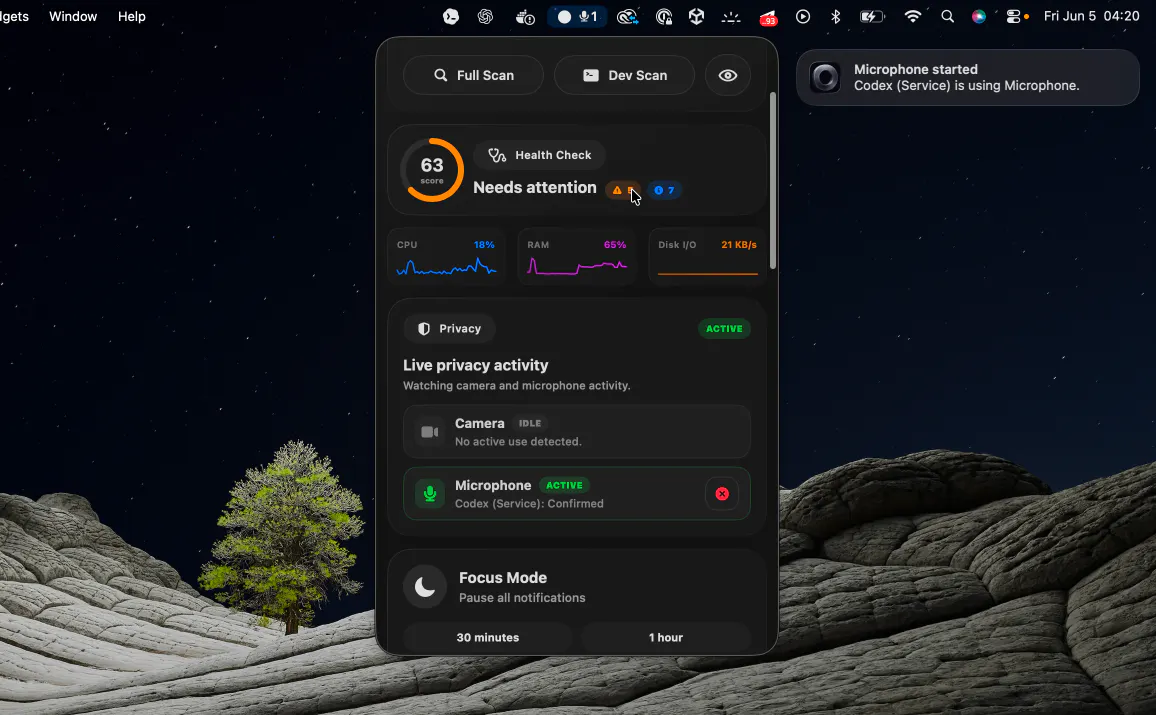
It shows realtime camera and microphone activity across the menu bar, title bar, Health Check, Settings > Privacy, notifications, and Ops Feed.
When available, it can also show which app is using the microphone, and likely camera attribution when macOS exposes enough information.
You can also enable notifications when camera or microphone activity starts.
Would love feedback from macOS users who spend a lot of time in calls, recordings, demos, or shared workspaces.
Full changelog:
https://roomservices.pro/changelog
Replies
Be the first to reply
Have a question or a thought to share? Add a comment above to start the conversation.