

New Feature - AI notes
We just shipped record notes in OSTRATA.
A CRM note should be the thing you remember about a person or a deal: the call, the follow-up, the thread that actually happened. It should not be a Description field you keep overwriting, and it should not be a dump of “please summarize the emails” sitting on the contact.
That is what this is.
What notes are
Notes are a timeline on the record, same idea as Attachments. Open a contact, a deal, or any custom object. Notes sits next to Attachments. Newest first. Your name on what you type.
They are not a field you add in Setup. You do not create a Notes column. If you can open the record, you can read its notes. If you can edit the record, you can add or delete them. View-only guests can read, not write. You cannot edit a note after posting — add another one.
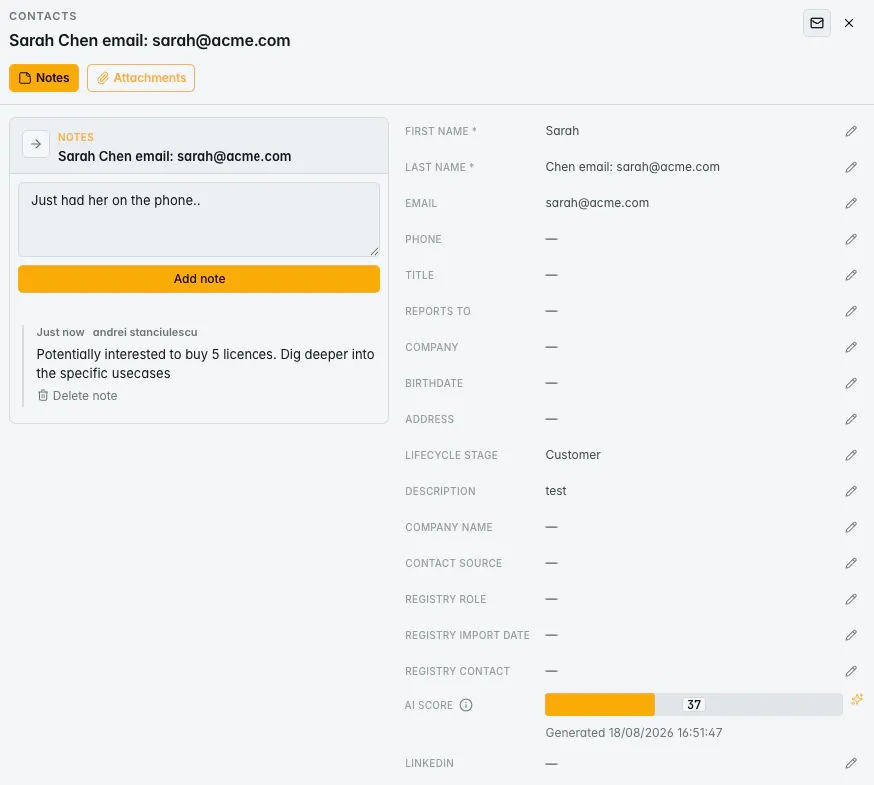
The AI part
Talk to Pilot in Operations, in French or English:
“Create a note on Sarah Chen with a recap of the email exchanges.”
Pilot finds the contact, reads sent and received Gmail (from / to / cc), writes a plain-language recap, and saves it as a timeline note. It does not paste your prompt into Description. It does not paste raw headers and quoted mail.
You can also ask Pilot to read notes, search note text, or save a recap you already have as a note instead of a field update.
Also in the product
Operations and Standard views: same Notes button, side panel, first-line preview
REST API: list / create / delete under the record
MCP: agents and tools can list, search, and create notes
Meeting tools and integrations can post notes as System, so they are not mixed up with a teammate’s name
Why we built it this way
Sales context dies in two places: a long Description nobody trusts, and a mailbox nobody wants to re-read before a call. Notes keep the write-up on the record, in order, with an author. Pilot’s job is to pull the real mail and write the recap you would have written if you had time.
Docs: ostrata.io/features/notes
If you use OSTRATA, try it on a contact you actually email. If you do not, the feature page above is the walkthrough.
Happy to answer how permissions, API, or the Gmail recap path work.
Replies