

Mac Duo 1.2: A more native Mac Duo


Mac Duo 1.2 is out, with a broader visual refresh focused on making the whole app feel more at home on the Mac.
What's new:
• One interface
The main window, Settings, About, Onboarding and What's New now share the same visual language, spacing and controls.
• Suited to your macOS
Mac Duo now adapts its interface to the macOS version you're running, with a refined look on newer systems and a properly native experience on earlier supported versions.
• Light and Dark
The entire Mac Duo interface follows your Mac's appearance, with both Light and Dark Mode properly supported.
• A calmer preview
The Settings preview now plays through once when you open it, then stops. You can scrub it yourself, press Play to loop it, or Pause to hold a frame.
• Cleaner when you're not using it
The preview doesn't keep rendering when the Settings window is closed, keeping Mac Duo lighter when you're simply using your Mac normally.
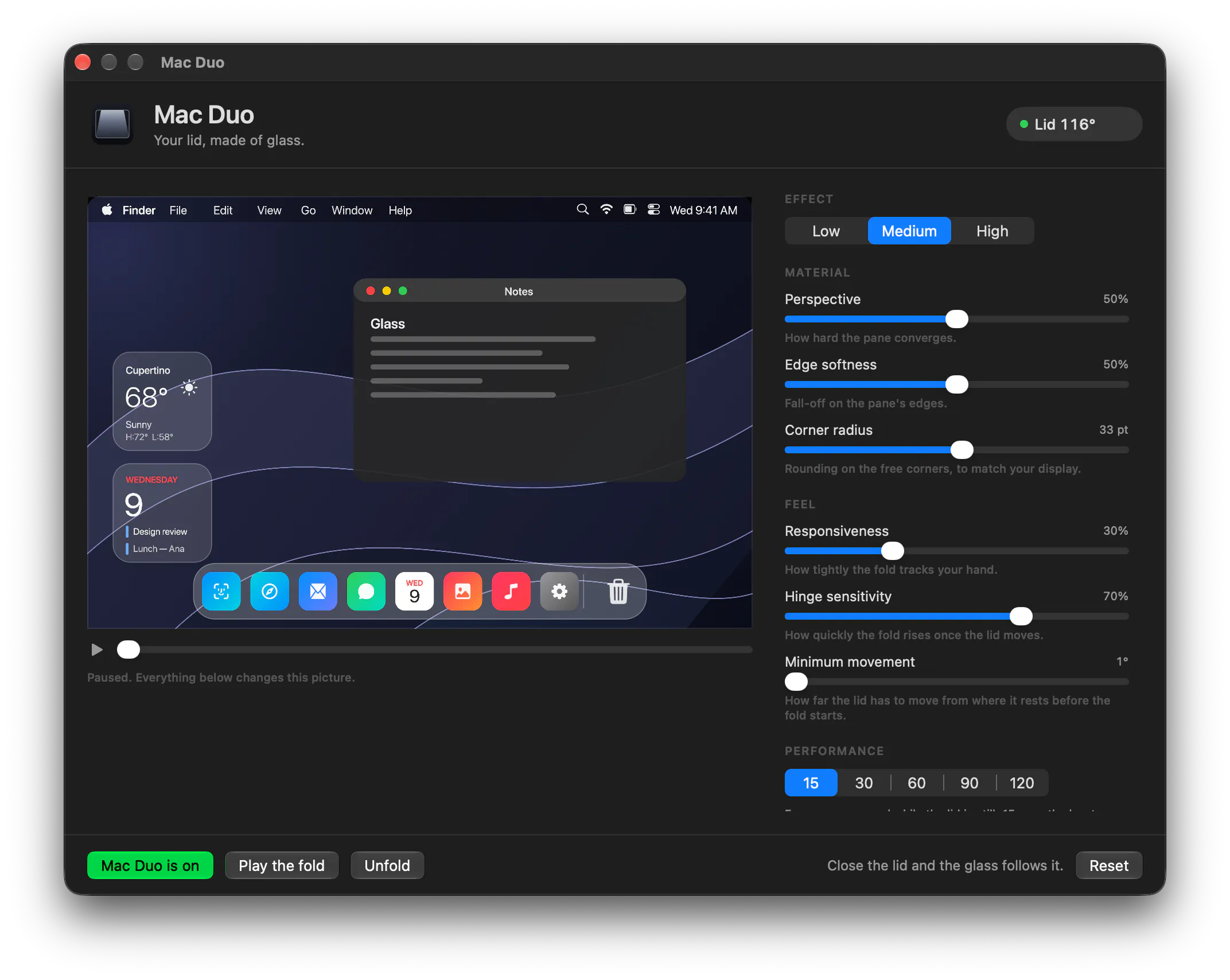
The idea with 1.2 was less about adding more controls and more about making everything that already exists feel like it belongs together.
Mac Duo is still the same tiny macOS app that recreates the iPhone Duo-inspired fold effect on MacBook.
Mac Duo 1.2 is now available:
If you've been using Mac Duo, I'd love to hear what you think of the new interface. And if you're trying it for the first time, I'd love to know how the fold feels on your MacBook.
Replies