

You Don't Need to Be a Jira Admin to Build a Jira App Anymore
If you've ever come up with an idea for a custom Jira app but got stuck when it was time to deploy, this update is for you. We've just released a new feature in AI Apps Builder that takes away one of the last manual steps between building your app and making it live in Jira. Here’s why we built it and how it works.
The Problem: Building Is Easy, Deploying Still Needs an Admin
Here's a scenario that plays out constantly on Jira teams. A product owner, PM, or business analyst has a clear idea for a custom dashboard, a report, or a small automation. With a no-code app builder, they can now actually build it themselves, in plain language, without a developer.
But deployment is a different story. In Jira, only a site administrator can install or reinstall a Forge app on a given site. That hasn't changed, and it's not something a builder tool can or should work around. This is simply how Jira permissions are set up.
So if you're not an admin, the old path looked like this: build your app in your own instance or a sandbox, open the Dev Console, generate an installation link, and send it to your admin so they can install it on the target Jira site. It works, but it's several steps before your admin can even see what you've built.
The Idea Behind AI Apps Builder
AI Apps Builder is a no-code platform where you describe what you need, like a report, an admin tool, an AI agent, or a skill, just as you would explain it to a colleague. The AI then generates the app's specification, code, UI, and configuration. It's designed for people who know the problem best because they use Jira every day, but who don't write code: POs, PMs, BAs, and other stakeholders.
As one Product Owner said: "Excellent app — it truly accelerates custom app development for business users like POs, PMs, BAs, and other stakeholders." This tool is meant to close that gap. It doesn't replace developers, but it lets the people closest to the problem build the solution themselves.
What's New: Sharing Your Chat for Deployment
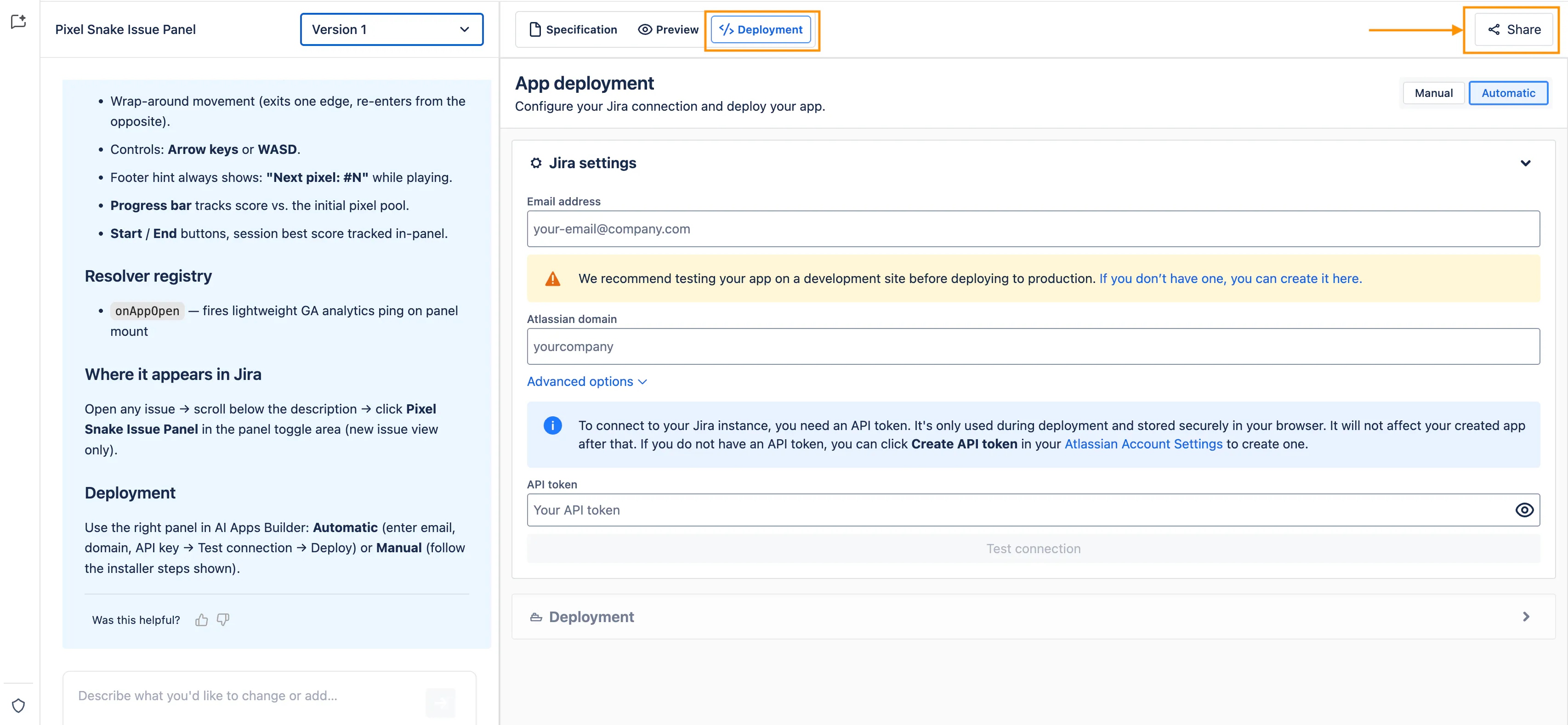
The feature we're launching solves that last-mile problem directly. If you're not a Jira admin and you've built an app or AI agent in AI Apps Builder, you can now add your admin directly to your chat at the deployment step. Here's what that looks like in practice:
1. Open the Share modal. On the deployment page, click Share. This opens a modal where you invite teammates to review, edit, or deploy the app.
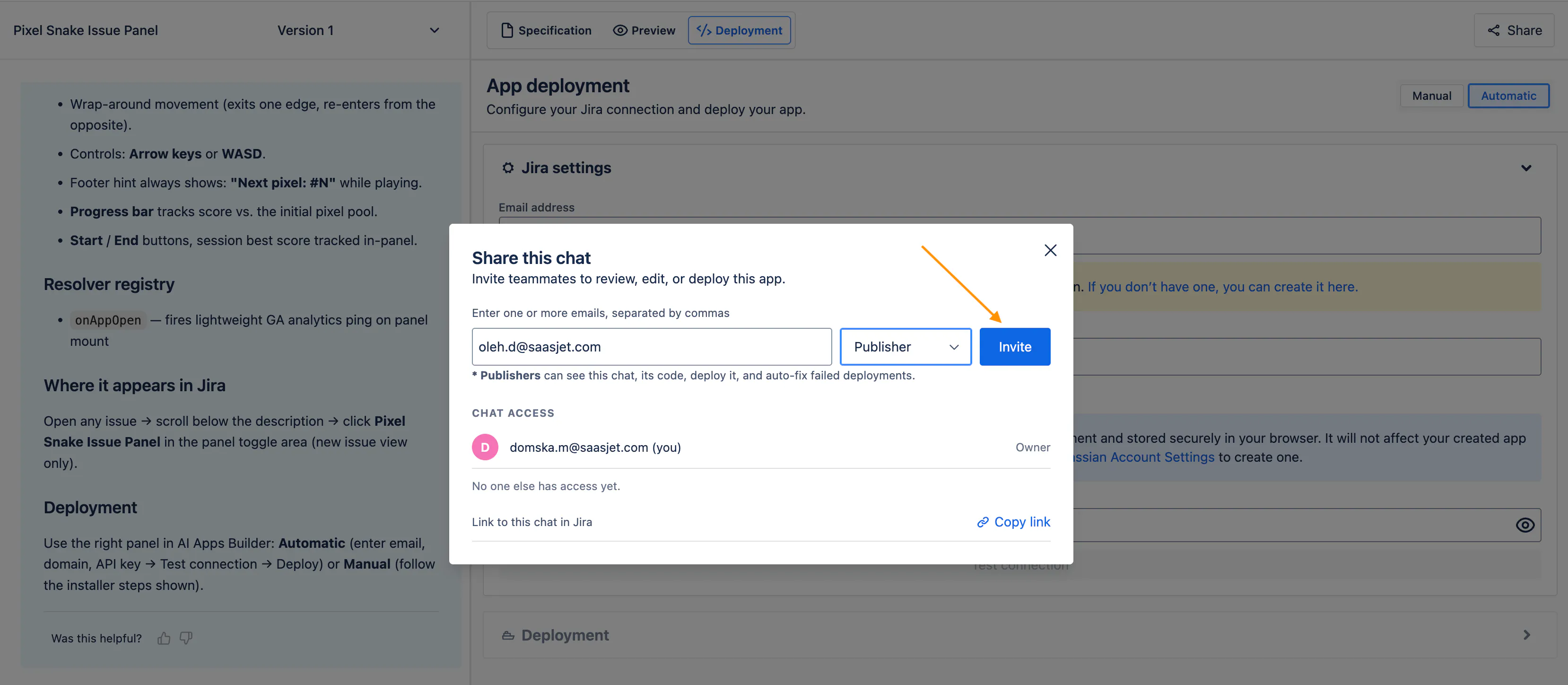
2. Add your admin's email and pick a role. Enter one or more emails, separated by commas, and choose a role:
Publisher — can see the chat and code, deploy it, and use the auto-fix feature.
Editor — can view and deploy the app, and also send messages to change it. Any changes they generate use their own credits.
3. Send the invite. Click Invite. The admin gets access based on the role you picked and receives an email with a link to your chat. You can also copy the link and send it yourself.
What excites us most isn't just the invite itself, but what your admin can actually do once they join. They're not just there to click "deploy." They can open the Specification tab to see exactly what the app does and which scopes it uses, check the Preview to see it in action, and if you added them as Editor, they can make changes themselves. It works as a shared workspace, not just a handoff.
What You Can Build With AI Apps Builder
AI Apps Builder supports 31 Jira modules, so the range of what you can build is fairly wide:
Rovo agents and custom skills
Dashboards and gadgets for better visibility
Custom pages, portals, and internal tools
Reports tracking workload, capacity, and team performance
Tools monitoring SLAs, incidents, and service health
Reports combining data from multiple sources
Custom actions to automate everyday tasks
Tools enhancing the Jira issue view and in-context experience
Apps to manage and audit Jira configuration.
It also supports third-party integrations, including public APIs, APIs secured with an API key, and OAuth 2.0. This means you can connect Jira to tools like Slack, Gmail, Google Drive, Google Calendar, HubSpot, and Notion.
Who AI Apps Builder Is For
If you're a developer, this probably won't replace your stack, but it might save you from being the bottleneck for every small internal request. If you're a PO, PM, BA, or any Jira power user without a coding background, this tool is made so you can turn "someone should build this" into something real, without waiting on a backlog.
Why Vibecoding in Jira Actually Matters
The real cost of slow custom development isn't just the waiting. It's also the ideas that never get tried at all. When building something takes 30-50 developer-hours, teams usually only build what they're sure they need. But if you can build a working Jira app in under 30 minutes, you can test smaller, more specific ideas, like a dashboard for one sprint ritual, a report for a recurring question, or an automation for a repetitive task nobody wanted to own.
A Few Ways Teams Are Using This
To make this concrete, here's the kind of thing this replaces:
Instead of downloading five different Marketplace apps and combining together the few features that actually match your workflow, you describe the one thing you need and build a single app for it.
Instead of a developer writing a custom dashboard from scratch, a PM describes the metrics and views they want and iterates on it directly.
Instead of someone manually checking for missing story points or tickets close to breaching an SLA every week, an AI agent is set up to watch for the pattern and flag it.
Try It and Tell Us What You Think
We built this feature to fill a real gap between building and deploying. If you've never tried building your own app because you thought you needed a developer, we’d really like to know if AI Apps Builder helps.
AI Apps Builder for Jira: Build custom Jira apps with AI — no coding needed
If you're checking out the launch, we'd appreciate your support. Even more, we'd love your honest feedback. Try AI Apps Builder, share what worked and what didn't, and let us know.
Replies
Be the first to reply
Have a question or a thought to share? Add a comment above to start the conversation.