


Forums


"Vibe coding" for non-coders
Recently I've worked with a group of non-corders trying to "vibe code" their apps with AI.
While knowing code is clearly not a must these days, it helps to get technical.
People who were familiar with basic software engineering concepts were 10x more likely to success and get better results.
So, with the hope of providing value to the non-coders people, I've created a quick roadmap for the basic terms and concepts you should be familiar with.
Requirements: Building apps with AI is all about being able to clearly guide AI and express your app features and requirements.
You need to be able to express those ideas and explain them as you d explain to a human developer. Think like a Technical Product Manager.Frontend: The face of your app.
It's what your users see and interact with. It could be a website, a mobile app, or a desktop app. Most popular frontend libraries and frameworks are React, Next.js.UIs: They are the buttons, the forms, the modals, the tooltips, etc. In React, the UI is built with components. For design & styling, Tailwind CSS is the most popular library.
For animations, Framer Motion is the most popular library.-
Packages & npm: Apps are not built from scratch.
They are built on top of existing libraries and frameworks, like lego blocks.The most popular package manager is npm. For example, "react-hook-form" is a famous package that helps you build forms.
-
Backend: The backend is the part of your app that runs on the server.
It's where you store your data, your business logic.
e.g: If you want to send an email, or process payments - this is where you'll do it.
Vibe tip: Use minimal backends with serverless functions.
-
Database: The database is where you store your data.
It's where you store your users, your projects, your tasks, etc. Think of it as a big spreadsheet.
I recommend using a database that is integrated with your frontend.
For example: Fine, or Supabase.
-
API: Real-life apps almost always need to integrate with other apps.
For example: if you want to send email, or get weather data, or integrate with AI - it's all done through APIs.
-
Hosting & Deployment: For your app to be accessible to the public, you need to host it.
The code is usually hosted on GitHub, and deployed to platforms like Fine, Vercel, Netlify.
Finally, being comfortable with code is helpful - even if not a must.
AI often makes minor mistakes (like importing a wrong package), and if you re not afraid of reviewing code - you will get better results faster.


If you could request one feature from the Product Hunt team — what would it be?
Software serves a purpose it helps people get things done. But everyone s needs are different, and the features that matter most can vary a lot.
I work here @producthunt and feel lucky to be able to build tools that solve problems I care about. Now I d love to hear from you:
What s one feature you d love to see on Product Hunt that would actually help you?
Big, small, wild encourage everyone to share their own
"Vibe coding" for non-coders
Recently I've worked with a group of non-corders trying to "vibe code" their apps with AI.
While knowing code is clearly not a must these days, it helps to get technical.
People who were familiar with basic software engineering concepts were 10x more likely to success and get better results.
So, with the hope of providing value to the non-coders people, I've created a quick roadmap for the basic terms and concepts you should be familiar with.
Requirements: Building apps with AI is all about being able to clearly guide AI and express your app features and requirements.
You need to be able to express those ideas and explain them as you d explain to a human developer. Think like a Technical Product Manager.Frontend: The face of your app.
It's what your users see and interact with. It could be a website, a mobile app, or a desktop app. Most popular frontend libraries and frameworks are React, Next.js.UIs: They are the buttons, the forms, the modals, the tooltips, etc. In React, the UI is built with components. For design & styling, Tailwind CSS is the most popular library.
For animations, Framer Motion is the most popular library.-
Packages & npm: Apps are not built from scratch.
They are built on top of existing libraries and frameworks, like lego blocks.The most popular package manager is npm. For example, "react-hook-form" is a famous package that helps you build forms.
-
Backend: The backend is the part of your app that runs on the server.
It's where you store your data, your business logic.
e.g: If you want to send an email, or process payments - this is where you'll do it.
Vibe tip: Use minimal backends with serverless functions.
-
Database: The database is where you store your data.
It's where you store your users, your projects, your tasks, etc. Think of it as a big spreadsheet.
I recommend using a database that is integrated with your frontend.
For example: Fine, or Supabase.
-
API: Real-life apps almost always need to integrate with other apps.
For example: if you want to send email, or get weather data, or integrate with AI - it's all done through APIs.
-
Hosting & Deployment: For your app to be accessible to the public, you need to host it.
The code is usually hosted on GitHub, and deployed to platforms like Fine, Vercel, Netlify.
Finally, being comfortable with code is helpful - even if not a must.
AI often makes minor mistakes (like importing a wrong package), and if you re not afraid of reviewing code - you will get better results faster.
"Vibe coding" for non-coders
Recently I've worked with a group of non-corders trying to "vibe code" their apps with AI.
While knowing code is clearly not a must these days, it helps to get technical.
People who were familiar with basic software engineering concepts were 10x more likely to success and get better results.
So, with the hope of providing value to the non-coders people, I've created a quick roadmap for the basic terms and concepts you should be familiar with.
Requirements: Building apps with AI is all about being able to clearly guide AI and express your app features and requirements.
You need to be able to express those ideas and explain them as you d explain to a human developer. Think like a Technical Product Manager.Frontend: The face of your app.
It's what your users see and interact with. It could be a website, a mobile app, or a desktop app. Most popular frontend libraries and frameworks are React, Next.js.UIs: They are the buttons, the forms, the modals, the tooltips, etc. In React, the UI is built with components. For design & styling, Tailwind CSS is the most popular library.
For animations, Framer Motion is the most popular library.-
Packages & npm: Apps are not built from scratch.
They are built on top of existing libraries and frameworks, like lego blocks.The most popular package manager is npm. For example, "react-hook-form" is a famous package that helps you build forms.
-
Backend: The backend is the part of your app that runs on the server.
It's where you store your data, your business logic.
e.g: If you want to send an email, or process payments - this is where you'll do it.
Vibe tip: Use minimal backends with serverless functions.
-
Database: The database is where you store your data.
It's where you store your users, your projects, your tasks, etc. Think of it as a big spreadsheet.
I recommend using a database that is integrated with your frontend.
For example: Fine, or Supabase.
-
API: Real-life apps almost always need to integrate with other apps.
For example: if you want to send email, or get weather data, or integrate with AI - it's all done through APIs.
-
Hosting & Deployment: For your app to be accessible to the public, you need to host it.
The code is usually hosted on GitHub, and deployed to platforms like Fine, Vercel, Netlify.
Finally, being comfortable with code is helpful - even if not a must.
AI often makes minor mistakes (like importing a wrong package), and if you re not afraid of reviewing code - you will get better results faster.
 •
•1yr ago
What's your favorite criminally-underrated AI coding tool?
I recently installed @Augment Code based on an ad somewhere, and I'm super impressed, but haven't heard a peep about it in most channels. But it got me wondering what else I'm missing. This is a crowded field with a few frontrunners and a lot of more esoteric newcomers, but I want to know about the ones that blow your mind but hardly get any coverage.

 •
•5yr ago
How to look for a technical co-founder?
 •
•5yr ago
Please recommend some of your favorite books!
 •
•5yr ago
If the Pandemic ended right now, what's the first thing you would do?
 •
•5yr ago
Has your mental health affected your work and how?
 •
•4yr ago
PH asks for feedback: What helps you the most when considering new products to try?
 •
•3yr ago
Serious talk: quitting your job to focus full time on your hustle, what did/does it take for you?
 •
•3yr ago
Do you believe in ghosts?
 •
•3yr ago
[ChangeLog] January 26, 2023 release notes: my products, self-service ads, comment prompts
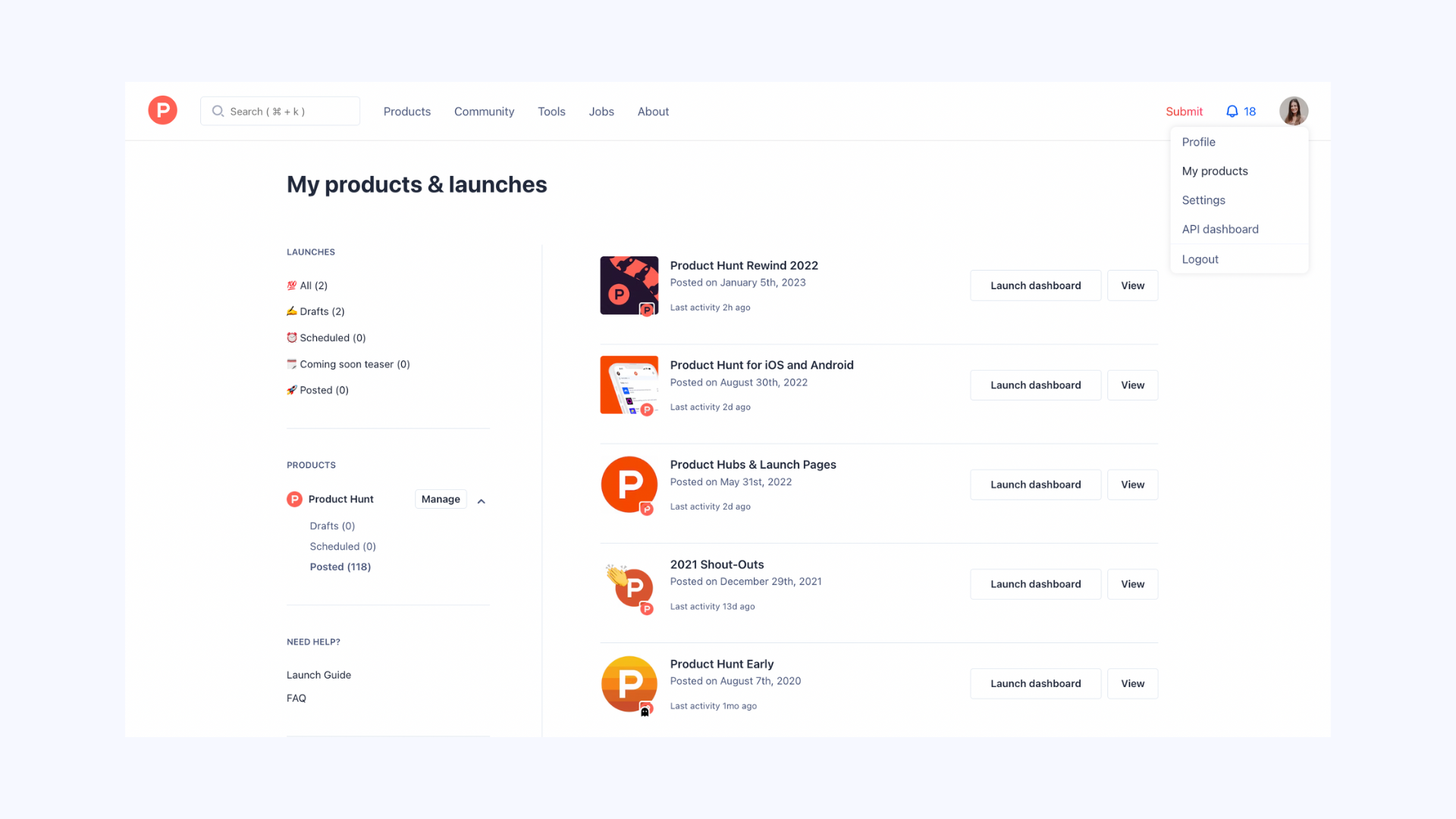
Manage your products & launches
My products now lets you easily see all your products and launches (draft, scheduled, and posted) in one place for simple management. If you missed the memo about why you should care about your product after launch day, read more here.
Self service ads
 •
•5yr ago
Dextools.io - One-stop live dashboard and research tool for Defi assets
•3yr ago