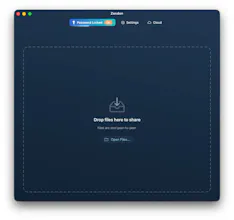
Zenden sends files from your computer straight to any browser. No recipient app or account required. Direct transfers are private and unlimited; optional encrypted Cloud Links stay available for up to 48 hours
No reviews yetBe the first to leave a review for Zenden - Private file transfers
Maker
📌
Hey Product Hunt! I’m Mauricio, the developer behind Zenden.
I built Zenden because I became uncomfortable with how ordinary file sharing usually works: upload your files to someone else’s infrastructure, accept unclear retention policies, and ask recipients to create accounts or install another app.
My background is in software development and cybersecurity. In previous work, I saw how much sensitive material eventually appeared in breach datasets simply because it had been left sitting in online services. That made me wonder whether one-off file sharing really needed permanent accounts and provider-controlled storage at all.
The problem I wanted to solve was straightforward: let someone select files, receive a link or QR code, and send those files to anyone’s browser—with no recipient app, no account, and as little infrastructure in the middle as possible.
My approach evolved quite a bit while building it. I explored several sharing models before settling on one-to-many transfers over WebRTC. With Direct sharing, files travel from the sender’s computer to each recipient whenever the networks allow it. Because the file data does not pass through Zenden’s infrastructure, direct transfers can remain free without artificial file-size or recipient limits.
Real-world testing exposed the biggest weakness in that model: restrictive NATs, mobile carriers, corporate networks, and privacy relays can block direct connections. Zenden therefore gained an automatic TURN relay fallback—2 GB per month for free users and 100 GB per month with Pro.
I then encountered the second limitation: sometimes the sender cannot leave their computer online while the recipient downloads. That led to Cloud Link, an optional Pro mode for asynchronous delivery. Zenden encrypts the files locally before uploading them, stores only ciphertext, and keeps the link available for up to 48 hours. The decryption key is not sent to the server.
The result is a native sender app for macOS, Windows, and Linux, paired with a browser-based recipient experience. Only the sender installs Zenden.
The macOS version has received most of my testing, so Windows and Linux feedback would be especially valuable. I’d also love to know:
1. Is the distinction between Direct and Cloud Link immediately clear?
2. Does the recipient experience feel simple and trustworthy?
3. Where does the installation or first-share experience still feel rough?
Thanks for taking a look—and for helping me improve it.
Report
The no-account-needed approach is such a smart call. Most file transfer tools overcomplicate the receiving end, and skipping that friction entirely makes this feel genuinely useful day to day.