YumPal

YumPal

A beautiful, privacy-first visual food journal for iOS

5 followers

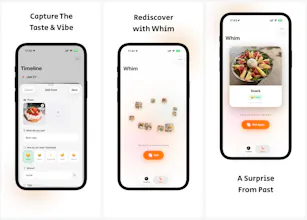
Turn your meals into a stunning visual timeline. Features smart auto-tagging, video support, batch import, and "Whim of Fate" to solve meal indecision. 100% local storage & privacy-focused.
YumPal gallery image
Payment Required
Launch Team
Wispr Flow: Dictation That Works Everywhere
Stop typing. Start speaking. 4x faster.
Promoted

What do you think? …

ElevenApril
Maker
📌
Subject: 👋 Hello Product Hunt! I built a home for your food memories. Hi everyone! I’m ElevenApril, the creator of YumPal. I am a huge foodie, and my camera roll was always cluttered with photos of meals. I wanted a dedicated space to cherish these "little happinesses" in life—not to show off on social media, but to keep for myself. Existing apps were either calorie counters (too stressful) or just list-based notes (too boring). I wanted something that felt like a gallery, so I built YumPal. What makes YumPal different? 📸 Visual First: It builds a stunning waterfall timeline of your food journey. It supports not just photos, but videos too, bringing the steam and sizzle back to life. 🤖 Smart & Lazy: I hate manual entry. YumPal automatically detects the time to label meals (Breakfast/Lunch/Dinner) and parses GPS data to find the location. You can also Batch Import hundreds of past photos in seconds. 🎲 Whim of Fate: The "What should I eat?" feature. Tap the dice, and the app randomly resurfaces a meal from your past. It’s a fun way to rediscover forgotten favorites. 🔒 Privacy First: Your diet is personal. YumPal stores everything locally on your device. No cloud uploads, no tracking. I’ve poured a lot of love into the interactions (haptic feedback, smooth animations). I’d love for you to try it out! Feedback Request: Do you prefer tracking food for health or just for memories? I’m curious to hear your thoughts in the comments! 👇 Thanks for your support! 🍕🍣
Matthew Kerr

I like the simple design and the the fact it supports dark mode . I also checked out your site and you development blog. cool app , and great ideas, i like that your app is privacy first ... some of the small orange on black text in dark mode ( batch import ) was hard to read at times ... but still a cool app.. I was curious did you build this with native code or looks like maybe react native ?

ElevenApril

@matthewkerr Hi Matthew! Thanks so much for the kind words and for taking the time to check out the dev blog—I really appreciate that! 🙏

Great catch on the orange text contrast in Dark Mode. Accessibility is super important, so I've added that to my to-do list and will fix it in the next update.

As for the tech stack, it’s actually built 100% with SwiftUI! I really wanted to leverage the native APIs for those smooth animations and haptics. Thanks again for the support!"