
WP PowerSuite is an all-in-one modular toolkit for WordPress that replaces the need for dozens of separate plugins. It brings 155 tools for security, performance, SEO, backups, email delivery, media, admin customization, user management, and more into one plugin. Enable only the modules you need, keep the rest off the critical path, and simplify how you build, manage, and maintain WordPress sites.









Hey Product Hunt! 👋
I’m really excited to finally share WP PowerSuite with the Product Hunt community today. 🚀
WP PowerSuite started from a problem I kept seeing again and again in the WordPress ecosystem: a simple WordPress site can quickly turn into a stack of 10, 20, or even more plugins just to handle everyday tasks.
One plugin for security. Another for backups. Another for redirects. Another for SMTP. Another for optimization. Another for admin customization. Then a few more for SEO, media, user management, maintenance, and small utilities.
Individually, many of those plugins are useful. But over time, managing so many separate tools becomes complicated. You have different interfaces, different settings pages, different update cycles, potential conflicts, duplicated functionality, and more things to maintain.
That’s the problem we wanted to solve with WP PowerSuite.
WP PowerSuite is a modular WordPress toolkit that brings a large collection of useful WordPress features into one place. It currently includes 155 modules covering areas such as:
⚡ Performance and optimization
🔐 Security and site protection
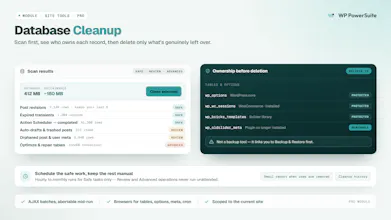
💾 Backups and maintenance
🔎 SEO and redirects
📧 Email and SMTP tools
🖼️ Media management
👥 Users and login management
🎨 Admin and WordPress customization
🛠️ Developer and utility tools
…and much more.
The important part for us is the modular approach.
You don’t have to enable everything.
You simply turn on the features your website actually needs and leave the rest disabled. The goal is to give WordPress users a flexible toolbox without forcing them into a huge, complicated setup.
We designed WP PowerSuite for freelancers, developers, agencies, site owners, and anyone who manages multiple WordPress websites and wants to reduce plugin clutter while keeping useful tools close at hand.
A lot of work has gone into organizing these features, making the modules easy to discover, and creating an experience where users can manage many WordPress tasks without jumping between dozens of different plugins and dashboards.
But this launch is only the beginning.
One of the main reasons we’re launching on Product Hunt is because we genuinely want feedback from people who build and manage websites every day.
I’d love to hear:
👉 Which modules would be most useful for your workflow?
👉 Which WordPress plugins could WP PowerSuite potentially replace for you?
👉 Are there tools or features you think should be added next?
👉 What would make WP PowerSuite more useful for agencies and developers?
If you work with WordPress, I’d really appreciate you checking out WP PowerSuite and sharing your thoughts.
Every comment, suggestion, bug report, and feature idea helps us improve the product.
Thank you to everyone who has supported the project so far, and thanks to the Product Hunt community for taking the time to check out our launch.
I’m here throughout the launch and happy to answer any questions about WP PowerSuite, the modules, our roadmap, or how we’re building it.
Thanks for the support! ❤️
— Maker of WP PowerSuite
𝗪𝗵𝘆 𝗜 𝗕𝘂𝗶𝗹𝘁 WP Powersuite 🚀
For years, one thing kept bothering me about WordPress:
𝗪𝗵𝘆 𝗱𝗼𝗲𝘀 𝗮𝗹𝗺𝗼𝘀𝘁 𝗲𝘃𝗲𝗿𝘆 𝘀𝗺𝗮𝗹𝗹 𝘁𝗮𝘀𝗸 𝗿𝗲𝗾𝘂𝗶𝗿𝗲 𝗮𝗻𝗼𝘁𝗵𝗲𝗿 𝗽𝗹𝘂𝗴𝗶𝗻?
Need redirects? Install a plugin.
Need SMTP? Another plugin.
Need activity logs? Another one.
Need backups, CAPTCHA, custom fields, code snippets, admin cleanup?
𝗠𝗼𝗿𝗲 𝗽𝗹𝘂𝗴𝗶𝗻𝘀.
Before you know it, you're managing a stack of plugins from different developers — each with its own UI, updates, settings, and dependencies.
That is exactly why I started building 𝗪𝗣 𝗣𝗼𝘄𝗲𝗿𝗦𝘂𝗶𝘁𝗲.
The idea was simple:
👉 𝗖𝗿𝗲𝗮𝘁𝗲 𝗼𝗻𝗲 𝗺𝗼𝗱𝘂𝗹𝗮𝗿 𝗪𝗼𝗿𝗱𝗣𝗿𝗲𝘀𝘀 𝘁𝗼𝗼𝗹𝗸𝗶𝘁 𝘄𝗵𝗲𝗿𝗲 𝘆𝗼𝘂 𝗲𝗻𝗮𝗯𝗹𝗲 𝗼𝗻𝗹𝘆 𝘁𝗵𝗲 𝘁𝗼𝗼𝗹𝘀 𝘆𝗼𝘂 𝗮𝗰𝘁𝘂𝗮𝗹𝗹𝘆 𝗻𝗲𝗲𝗱.
Today, WP PowerSuite has 𝟭𝟱𝟬+ 𝗺𝗼𝗱𝘂𝗹𝗲𝘀.
But the number itself isn't what I'm most proud of.
Many of these modules are designed as 𝗰𝗼𝗺𝗽𝗹𝗲𝘁𝗲 𝘁𝗼𝗼𝗹𝘀 — not tiny switches added just to increase the module count.
Some examples:
✅ Custom Fields
✅ Custom Post Types & Taxonomies
✅ Backup & Restore
✅ Redirect Manager
✅ Broken Link Checker
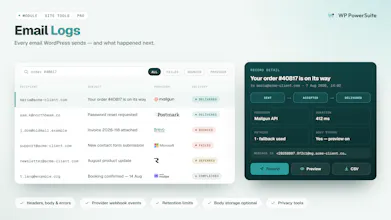
✅ SMTP & Email Logs
✅ AI Forms
✅ Code Snippets
✅ Activity Logs
✅ Security & CAPTCHA Tools
✅ Admin Menu Organizer
✅ And much more
The philosophy is simple:
𝗡𝗲𝗲𝗱 𝗶𝘁? 𝗘𝗻𝗮𝗯𝗹𝗲 𝗶𝘁.
𝘋𝘰𝘯'𝘵 𝘯𝘦𝘦𝘥 𝘪𝘵? 𝘓𝘦𝘢𝘷𝘦 𝘪𝘵 𝘥𝘪𝘴𝘢𝘣𝘭𝘦𝘥.
Over the next few weeks, I'll be sharing:
→ Why we built different modules
→ How they actually work
→ What separate plugins they can replace
→ Lessons from building WP PowerSuite
→ What's coming next
https://wppowersuite.com/
#WordPress #WPPowerSuite #BuildInPublic #WordPressDevelopment #WordPressPlugins