
Wokyintosh
Turn a spare Mac display into a retro system dashboard!
73 followers
Turn a spare Mac display into a retro system dashboard!
73 followers
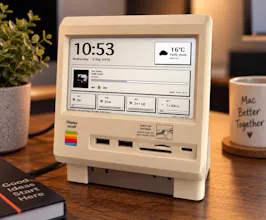
Wokyintosh is a free, open-source macOS dashboard inspired by the classic Macintosh. It combines a large clock and date, local weather, Apple Music and Spotify Now Playing with artwork, plus live CPU, RAM, SSD and network stats. I built it for my Wokyis M5 Retro Dock Station after months of not finding the dashboard I wanted — even among paid apps.




You asked for settings panel feedback, so the one I'd put above layout customization is idle cost. An always on dashboard that repaints the clock every frame keeps the GPU awake, and on a Mac mini nobody notices, but whoever runs this on a laptop's second display uninstalls it inside a week. Repainting once a second, and only when a value actually changed, is boring and it's the whole difference. Also the part I find more interesting than the retro look is that you vibe-coded a macOS app and then actually opened the repo, because the usual version of that story ends at the screenshot.
@asadmalik901 That’s really useful feedback; especially the idle cost point.
You’re right that an always-on dashboard has to be careful about unnecessary redraws, particularly on laptops. I’m going to look at reducing updates to only when values actually change, and keeping the clock refresh as low-cost as possible.
And thanks for the second point too. I didn’t want Wokyintosh to be just a nice screenshot or a one-off experiment; making the repo public and shipping something people can actually run was a big part of the goal for me.
Really appreciate the thoughtful feedback!