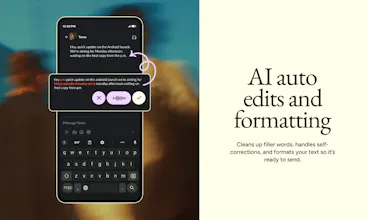
I’ve dictated tens of thousands of words by now, and honestly, there is no going back to manual typing for me. It’s easily one of the best tools in my stack.
One thing that absolutely blew me away is how it handles code-switching. My native language is Czech, but like many marketers, I use a lot of English terms. Wispr is smart enough to keep those English words in English even when the rest of the sentence is in Czech. It’s seamless.
The macOS app is perfection. The "hold Fn button to dictate" flow is exactly what I needed. If you want to stop typing and start actually creating at the speed of thought, this is it.
Wispr Flow
Hey everyone, Tanay here!
Before anything else: thank you ❤️
Every launch we've done, the OG Flow, our iOS and Android apps - all of it - y’all showed up and gave us a lot of the early feedback that made the products what they are today.
Today we're launching Wispr Notetaker, and we want to do it the same way.
So far, Flow handles what you say to your computer. Notetaker is for what you say to everyone else.
The bet we made was: almost nobody reads a raw transcript, but everything gets built on top of it. Even if a single name or acronym is wrong, it travels everywhere. If a speaker is mislabeled, everything downstream is untrustable. So we started with improving capture.
What that looks like:
Notetaker pulls in context before the meeting, so names land spelled right
The terms you've taught Flow carry into your meetings, so your jargon is already in there
Your mic and everything you hear are captured as two separate streams, so your words never get mixed up with someone else's
Real names on the final transcript, not Speaker 1 and Speaker 2. If it misses, you can easily fix it and it applies across the whole transcript
There's more in there:
a Brief before every meeting so you walk in prepped
one-click catch-up if you miss something mid-meeting
summaries with the decisions and next steps actually called out
one-tap capture for calls that were never on your calendar
MCP support so you can pull any meeting into Claude or ChatGPT without copy-pasting.
What I’d love from you: We're launching on Mac, English only. We want to get the core right with you before we roll it out to every other language and platform. Try it for a day for all your meetings and voice memos and tell us: what do you like and what would you like? That's the feedback that helps us the most.
Free to try. Can't wait to hear what you think.
Let's build magic 🔥
Wispr Flow
@tanaykothari really have nothing to say other than kudos to you for building such an amazing track record of creating delightful, genuinely useful experiences for people!
Wispr Flow
Head of Growth here, which is mostly a fancy way of saying I talk for a living. 🗣️
Slack messages: talking. Emails: talking. My calendar: several hours a day of talking...
Wispr Flow already covered about half of that. I have not typed a full sentence into Slack in months and my keyboard has quietly become a wrist rest. Meetings were the holdout. I would talk for an hour and then go repair the transcript before I could use any of it.
Wispr Flow Notetaker is the part I have wanted for a long time, and the thing that actually got me is not the summary. Since I rely heavily on meeting notes to derive action items and keep everything I'm talking about outside of messages in sync, when there was drift on who said what and what tasks were assigned, my to-do list was no longer up to date. Other people were getting my things to do, and I was getting theirs.
Now, with Notetaker, I can be confident that the transcript and assigned names are accurate. That means thanks to the MCP everything syncs with all my other systems with accurate transcripts.
We can't wait for you to try it in your meetings. Let us know what you think!
I love how I can use the Wispr Notetaker while sitting around a table with people My computer can transcribe and summarize the meeting we have, so I can have a natural human conversation and later get the transcription and the summary to process what was being talked about.
I also love how I can be on WhatsApp calls and get a summary when the call is done. Of course, it also works in Zoom, Microsoft Teams, and all the other meeting software. The great thing is it's not linked to a specific software, but just to the audio that is sent and received on the computer.
Wispr Flow
It's been a joy watching this product come to life behind the scenes. What's surprised me most is the improvements made along the way in the context Notetaker gives you when walking into a new meeting. It's something I didn't think I would rely on so heavily, but I found that it alone makes for a super pleasant companion to the many meetings I have in my role as a marketer on the team. This is coming from a former Granola and Fireflies.ai power user, too.
Asset Money
Wispr Flow
One of the most delightful experiences day in day out. The big unlock I had with Flow was that I could dictate even at a loud coffee shop. The auto-summary and cleanup was a godsend. Watching the team come together and say “hey, you already use your voice, why don’t we make your voice work for you” has been nothing short of amazing. Notetaker really does build on the strong foundation of Flow.
I fell in love with Flow way before I joined the team. So watching it quietly nail notetaking every single day this past month feels extra special. I've stopped taking notes. I walk out of a meeting, say to Uncle Claude "I just had a call, what's next" and Notetaker grabs the whole thing and wires it into the work I already have open. It's incredibly simple. Hope you all enjoy it just as much