
Vox
Voice in, voice out — with GitHub Copilot
206 followers
Voice in, voice out — with GitHub Copilot
206 followers
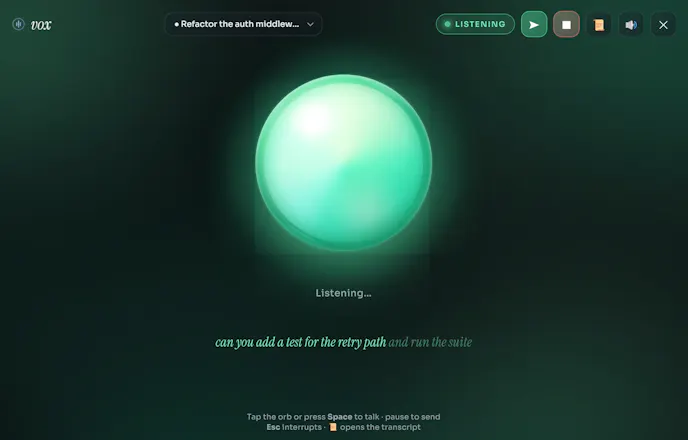
Vox is a GitHub Copilot CLI extension: run /vox and a reactive listening orb opens in its own window. Speak your turn, hear the agent reply. Voice in, voice out — on Windows, macOS, and Linux.



Free
Launch Team

Floot MCPBuild and ship web and mobile apps inside Claude or ChatGPT
Promoted
Hey Product Hunt 👋 I'm the maker of Vox. I use GitHub Copilot constantly and got tired of being pinned to the keyboard, so I built a way to just talk to it. Run /vox and a reactive orb opens in its own window — you speak your turn, the session hears it, and the reply is read back. Voice in, voice out. You can barge in by voice to interrupt and correct it, there are live captions and a transcript, and it even reads your typed replies aloud. It works in the Copilot CLI and inside the Copilot app. It's pure JavaScript with no build step — it uses the browser's Web Speech APIs by launching Chromium in app mode instead of shipping Electron — so it installs in one line on Windows/macOS/Linux. Free and open source (MIT). I started it as an accessibility-minded experiment (a hands-free way to drive an agent), so I'd especially love feedback on the voice timing and the interrupt flow. Ask me anything!
Homepage: https://aasis21.github.io/vox/ · Code: https://github.com/aasis21/vox
Launching Chromium in app mode to borrow the Web Speech APIs instead of shipping Electron is a clever way to keep it pure-JS and one-line installable. The tradeoff I'd want to pin down: Chrome's SpeechRecognition streams audio to Google's servers rather than transcribing on-device, so for someone dictating code and context into Copilot, is any of the voice actually local, or does every utterance leave the machine? And do the transcript and captions get written to disk anywhere, or are they in-memory only per session?
@hi_i_am_mimo Good catch. Recognition/TTS both run on the browser's own built-in speech service — Google's servers on Chrome, Microsoft's on Edge — not on-device, so audio does leave the machine. Nothing's written to disk though — transcript/captions are in-memory only per session and gone when the orb closes. One extra bit: Vox also rewrites your turn for voice mode, telling the agent to reply in 1-3 short spoken sentences with no code blocks — so code changes get described in plain language rather than read aloud as a diff.
Appreciate the straight answer — 'audio leaves to Google/MS but nothing touches disk, in-memory per session' is the honest version most voice tools gloss over. The turn-rewrite detail is the part I didn't expect: since it forces 1-3 spoken sentences with no code blocks, does that ever get in the way when I actually want the literal diff read out, or can I flag a turn to bypass voice-mode and get the raw output? For dictating code I'd want an escape hatch back to precise mode.
Foyer
The voice input part is straightforward enough, but the interesting question is how well it handles the parts of coding where spoken intent gets ambiguous fast. Saying "refactor that function" out loud works fine when context is obvious, but what happens when Copilot needs clarification and the back-and-forth becomes a longer conversation? Curious whether Vox supports that kind of multi-turn dialogue or whether it's essentially one-shot voice-to-prompt with no correction loop. Also wondering how it handles things like variable names, file paths, or syntax that's painful to dictate accurately.
@fberrez1 Great question - it's full multi-turn, not one-shot. The orb stays open across the whole session: you can go back and forth as many times as you want, and if Copilot needs to ask a clarifying question, it just speaks that back and waits for your next turn like a normal conversation. For gnarly variable names/paths, I lean on the transcript panel + typed fallback - you can always type a turn instead of saying it, and typed replies still get read aloud, so it mixes voice and keyboard per-turn rather than forcing pure dictation.
Voice for coding agents gets compelling when interruption and correction are first-class, not an afterthought. The agent is going to misunderstand file names, symbols, and intent sometimes; the useful workflow is being able to stop it, restate the constraint, and keep the same session alive without touching the keyboard. Nice to see barge-in called out explicitly.
@krekeltronics Exactly the philosophy — barge-in isn't bolted on, it's wired into the core turn loop. Tapping the orb (or hitting Esc) while it's thinking or speaking calls a bargeCancel() that aborts the in-flight request and stops the TTS queue immediately, so you can cut in, restate the constraint, and keep going in the same session. No waiting out a wrong turn.
How does it handle accents or noisy environments in practice, and is the voice model running locally or hitting an external API that could add latency or cost per conversation?
@feyzagpyf It uses the browser's native Web Speech API (Chrome/Edge), so there's no separate model Vox ships or bills for — accent/noise handling is whatever your browser's built-in recognizer does, which in Chrome is generally solid but does call out to Google's speech service (not fully on-device), so it needs network. No extra latency/cost from Vox itself though — zero API keys, zero cloud calls of ours. Definitely room to improve here though — a local/offline recognition option (e.g. Whisper-based) is on my radar for a future version, especially for noisy environments and stronger accent coverage
@thys_beesman Pretty smooth — sentences are queued and spoken as they stream in (so it starts talking before the full reply arrives), and interrupting is a single tap/Esc that instantly kills both the audio and the in-flight response. Try it — the "barge-in" is honestly my favorite detail to demo.
Does the orb stay open in the background while I keep coding, or do I have to keep invoking /vox every time I want to switch from typing to talking?
@nisaxvhd It stays open in the background — you don't need to re-run /vox each time. Once it's open, just keep coding as normal; tap the orb or hit Space whenever you want to switch to talking, and it goes right back to listening for your session. /vox again only comes into play if you want to switch which session the orb is listening to (it auto-focuses to whichever one last called it) or if it's been closed via /vox-stop .