
VeloFiler
Keyboard-first dual-pane file manager for macOS
62 followers
Keyboard-first dual-pane file manager for macOS
62 followers
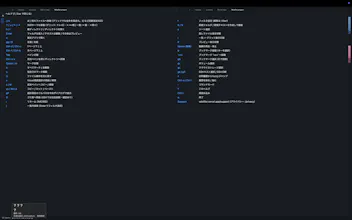
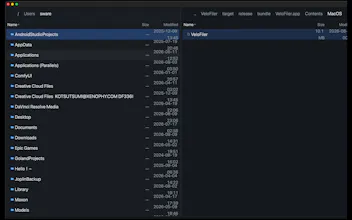
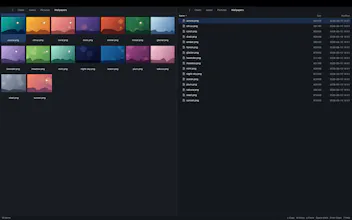
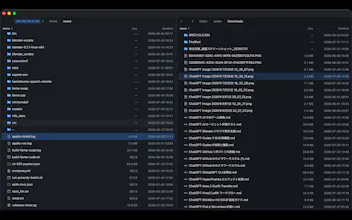
VeloFiler is a keyboard-first, dual-pane file manager for macOS, built in Rust on GPUI for instant startup and smooth rendering. Navigate with Vim-style keys, preview images, code, Markdown, PDF, video and Office documents without opening another app, and manage remote servers over SSH/SFTP right next to your local files. Stop clicking through folders — fly through them.

@kotsutsumi Built on GPUI like Zed, is Rust/GPUI as fast to build native macOS apps in as it feels to use? Would love to hear how that choice paid off (or bit you) during dev
haha
Rust/GPUI really paid off for the responsive two-pane UI and native rendering. The tradeoff was a younger ecosystem, so macOS integration and sandboxing took extra work—but the final result feels fast and predictable.
VeloFiler 1.3 is now live on the Mac App Store! The built-in editor now supports stronger search and replace, including regular expressions, case-insensitive and selection-only search, replacing the current match, and Replace All.
VeloFiler 1.5 is now live on the Mac App Store! 🎉
This release adds Vim-compatible `zz` to center the selected row without changing the selection, moves Fuzzy Jump to `gz`, and lets you press `Esc` to cancel an in-progress local or SSH transfer.
Try it on macOS: https://apps.apple.com/app/velofiler/id6799828683
VeloFiler 1.6 is now live on the Mac App Store! 🎉
This release improves the memo and built-in editor with a visible fixed-width caret and better Japanese IME candidate positioning. Help now has spacing and scrolling so key instructions are not clipped. Fast local volumes reflect external changes automatically, while slow and network volumes keep the stable manual reload path. File conflicts now offer Replace, Skip, Keep Both, or Cancel.
Try it on macOS:
https://apps.apple.com/app/velofiler/id6799828683
VeloFiler 1.8 is now live on the Mac App Store! 🎉
This release makes Markdown previews easier to read and navigate:
- Structured headings, tables, task lists, footnotes, code, math, Mermaid and Zenn syntax
- Focus the preview with Ctrl-w p and navigate long documents with keyboard controls
- Follow document anchors and relative links inside the preview
- Preview local images and SVGs, with missing resources shown clearly
Try it on macOS:
https://apps.apple.com/app/velofiler/id6799828683
VeloFiler 1.4 is now live on the Mac App Store! Press `gM` to show per-pane CPU, memory, disk I/O, and network metrics. Local and SSH metrics refresh about every two seconds, with GPU utilization shown when supported.
VeloFiler 1.7 is now live on the Mac App Store! 🎉
https://apps.apple.com/app/velofiler/id6799828683