Keep your workspace clean and automatically hide or close inactive apps after a custom set period of time. You can also keep an app active by clicking the red circle in the menu.
@boettges Hey Peter! A useful feature is that you can keep an app visible by clicking the red button for any app in the menu, and also you can set a custom time to hide apps. Hocus Focus is a great app but I have made Vanish to be really quick and easy to use. Also, it does not have a feature for groups for now and to switch between modes you have to select the mode in the main window. Thanks for the suggestions! I will add a group mode in the next update and also an option to set a Shortcut for each mode.
Keep your workflow flowing and clean your workspace by hiding or closing inactive apps after a period of time. Set a custom time for each application and Vanish will hide/close the application if it hasn't been activated for that period of time.
You can keep an application visible and disable hiding/closing by clicking the Red Circle button in the menu.
--------Features--------
• Hides or Closes applications after not being activated for a specified time
• Hover over an application in the Menu and set a custom number of seconds until hide/close timer
• Click the red circle for each application to disable hiding/closing and keep that app visible
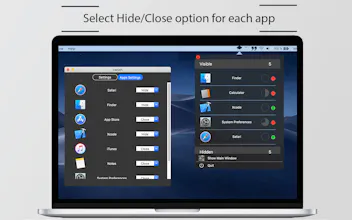
• Select hide/close option for each app in the Apps Settings window
• See all Visible and Hidden apps
• Set the Light/Dark appearance theme for the app in the Preferences window
• Select from Preset Timer Modes from the main window which are designed for some situations
• Reset all timers for all Running apps from the preferences - will set the timers to "10" seconds (default value)
******** I have updated Vanish and added the Close feature. You can choose the option to Hide/Close apps for each app. ********
Report
It is a carbon copy* of the app http://hocusfoc.us/, that is not only costs you five dollars (Hocus Focus is free), but also actually has even less features than the original app.
* Literally - just compare the menu bar drop-downs of both apps.
@karanganesan Hey Karan! No, it just hides the app's windows and the app is still running. I will update the app soon and add the option to Quit apps aswell.




NotePad
NotePad
NotePad
Luma AI
NotePad
Luma AI
NotePad