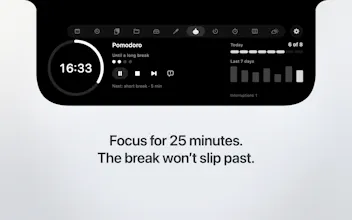
uNotch turns your MacBook's notch into a row of widgets you pick and reorder yourself. Click the notch and it opens: today's events with a one-click Join for Zoom, Meet and Teams; CPU, memory and battery; clipboard history; a shelf to park files mid-drag, where a dropped video comes back as a GIF; pomodoro, timer and stopwatch on one ring, with the countdown in the menu bar. Calendar, System, Pomodoro, Timer, Stopwatch and Color Picker are free. Everything runs on device, no analytics.
Hey Product Hunt,
I use a MacBook every day and the notch always bothered me. It takes a bite out of the menu bar and gives nothing back. uNotch is my answer: click the notch and it opens into a row of widgets you choose and arrange yourself.
What I reach for most:
• Calendar. Today's and tomorrow's events, and when a meeting is about to start the notch opens on its own with a Join button for Zoom, Google Meet and Teams.
• Shelf. Park files, text and links mid-drag and pick them up in another app. Drop a video on it and you get a GIF back.
• Pomodoro, timer and stopwatch, all on the same ring, with the countdown in the menu bar so you can see it without opening anything.
• Clipboard history, a folder of your choosing, CPU and memory, a color picker, and three months of calendar side by side.
Calendar, System, Pomodoro, Timer, Stopwatch and Color Picker are free, with no trial and no account. Premium adds the menu bar layer and a few more pages.
Everything runs on device. uNotch reads your calendar through EventKit and asks for nothing else. No analytics, no tracking, nothing leaves your Mac.
Mac App Store, macOS 14 and up. I would like to hear which widget you would want next, and I read every comment.