
Traceo
Inspect CSS values and report bugs in one click.
43 followers
Inspect CSS values and report bugs in one click.
43 followers
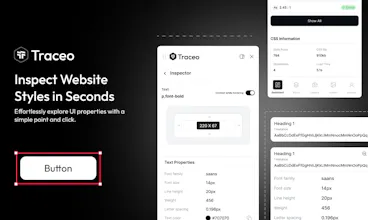
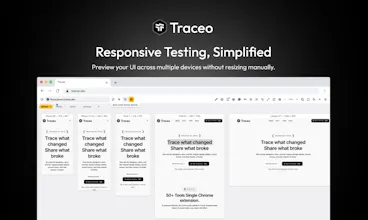
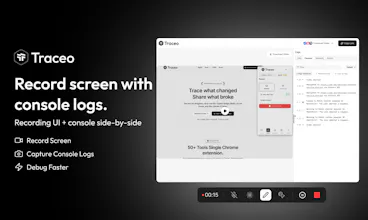
Traceo is a Chrome extension that shows real spacing and typography values on click. Record a bug with a screenshot or video, and it grabs the console logs, device, and browser info automatically. Whoever picks it up knows exactly what happened. It also shows how your UI holds up across screen sizes. Free to start today, no card needed.




Free Options
Launch Team / Built With


Atlassian LoomShow, don't just tell with Loom
Promoted
Hey Product Hunt 👋 Fahad here, one of the makers of Traceo.
We kept seeing the same frustrating loop: a designer says, “Something looks off,” drops a screenshot into Slack, and then the questions begin:
“Which padding?”
“Which browser?”
“Can you reproduce it?”
DevTools works well when you know your way around it, but many of the people reporting visual issues don’t live in DevTools every day.
So we built Traceo: one Chrome extension for the entire UI inspection and feedback workflow.
With Traceo, you can:
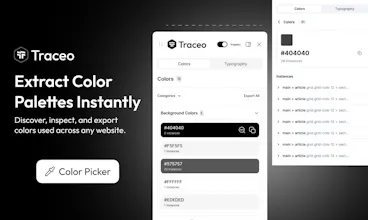
• Inspect spacing, typography, colors, and other UI properties directly on a live page
• Capture screenshots and recordings with annotations
• Include console and network context with recordings, so developers get more than a silent video
• Use Responsify to test layouts across mobile, tablet, and desktop sizes
• Use Pesticide to outline every element and quickly spot layout issues
• Use VibeGrab to select a component and copy useful context for AI coding tools
• Download images, icons, and SVGs without digging through the Network tab
Today’s launch is an important step for us, but Traceo is still evolving. We have plenty of ideas, and we want what comes next to be shaped by the developers, designers, QA engineers, and product teams dealing with these problems every day.
Traceo is free to start, with a 7-day Pro trial.
As a thank-you to the Product Hunt community, the first 100 people who upgrade can use code TRACEOPH for 50% off their first month of Pro.
I’ll be in the comments throughout the day, and I’d genuinely love to know:
When a UI bug appears on your team, what does the handoff actually look like, Slack screenshot, Loom recording, Linear ticket with almost no context, or something else?
Hello everyone,
Muhammad Usman here, co-founder of Traceo. I used to run between four different tools just to handle one bug. One for inspecting CSS, another for screen recording, another for logging device info, and then I'd still end up messaging a client back and forth, which browser were you on, can you send a screenshot, what did you click before it broke.
By the time I had enough information to actually fix anything, half my day was gone.
So we built Traceo, a Chrome extension for designers, developers, and QA people who are tired of digging through DevTools just to check a CSS value or explain a UI bug.
Here's what it actually does:
Click on anything to see the real spacing and typography values behind it
Record a bug with a screenshot or video, no separate tool needed
Auto-captures console logs, device, and browser info the moment you record
Checks how your UI holds up across different screen sizes, all in one click
Whoever picks up the bug report knows exactly what happened. No more "which browser were you on" and no more guessing.
We've been building this quietly for months, fixing what our early users flagged, and slowly turning something I built out of pure frustration into something people actually rely on. Today's the first time it's in front of a much bigger community, and honestly, I won't lie, I'm nervous. But I'm proud we made it here.
Get 50% off Traceo Pro for a month, right here on launch day.
Would genuinely love to hear what you think, what's missing, what could be better, anything. Every bit of feedback shapes what we build next.
Happy to answer anything here today.
Tried 3 other inspect tools before Traceo. Most do either screenshots OR responsive testing. Traceo does both + video recording, and it's way faster. No lag, no heavy setup. This is now my default Chrome extension for QA.
@unaiza_zafar I really appreciate this so much! We put a lot of work into making sure the video recording didn't slow things down, so this is super encouraging to read. Out of curiosity, are you mostly using it for responsive checks or quick bug reports?
The auto-grabbing of console logs and device info when recording a bug is a really thoughtful touch. Saves so much back-and-forth between reporters and devs.
@subscriptionpro Thanks Rylee! That back-and-forth was driving us crazy too, so we knew we had to automate it. Trying to keep the extension fast while pulling all that data in the background was definitely a fun challenge but really appreciate you feedback.
Love the direction behind Traceo. “Inspect CSS values and report bugs in one click.” feels like a thoughtful problem to solve—congratulations on the launch! 🚀
@leon_ostrez Thanks man! That really means a lot. Let me know what you think if you end up trying it out.