Tinkerfont is a free Chrome Extension and Firefox Add-on for designers, developers, and tinkerers who want to experiment with fonts on real websites -- without opening DevTools, touching the design system, or editing a stylesheet.
I built Tinkerfont because I got tired of guessing what fonts would look like before changing code or design.
So I made something that lets you open a website, swap fonts instantly, and see the results in context. You can scroll around, test different sections, and even save screenshots before deciding if a change is worth making.
A few things worth trying:
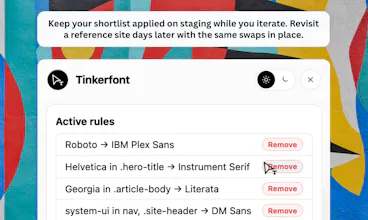
- Right-click any text to see what font the page is actually using. - Open the panel, pick an element, search Bunny Fonts, and apply one with a click. - Use Pick Area if you only want to change the nav, a hero section, or another specific part of the page. - Your changes stick when you come back, so you don't have to start over every time.
The font inspector was inspired by Fontanello. I already had the font swapping working, but I really liked how Fontanello exposed font information, so I built something similar into Tinkerfont.
It's totally free on Chrome and Firefox. If you give it a try, I'd really love to hear what you think. Whether something feels missing, confusing, or completely breaks on a site you use, that feedback is incredibly helpful.
Thanks for checking it out.
Report
Browser extensions that inject styles into live pages tend to break on sites with strict CSP headers or shadow DOM components. How much of the modern web does this actually work on cleanly, or are there entire categories of sites, like ones built with web components, where this just won't apply fonts properly?
CSP: Most sites are fine. We don’t load fonts from external CDNs on the page - Bunny fonts get inlined as data URLs, which is why strict sites usually still work.
Shadow DOM / web components: We don’t go inside shadow roots. If text lives in a closed web component, a swap might not reach it. If font-family inherits from outside, you might still see a change.
In practice: Marketing sites, blogs, staging builds, most SaaS UIs, works great.
Report
@jotzilla Inlining fonts as data URLs is a cleaner approach than I expected, makes sense that it gets around most CDN-based CSP restrictions.
Report
Nice. Does it only support Google Fonts, or can you use custom fonts as well?
Right now, it only allows you to explore the entire workflow. A more granular approach is something I'd consider, and I can implement it in the next build. Thanks for the suggestion!
Not yet -- planning to add CSS snippet export plus a quick link share flow in the next build.
Update: implemented it.
Report
The live-on-any-site angle is the part I'd actually use, testing type before committing it in the real CSS. Does it let me save a set of font plus size/spacing tweaks to reapply on the next visit, or is each session one-off? And can I export the final CSS to drop straight into the site?





Tinkerfont
Hey Product Hunt,
I built Tinkerfont because I got tired of guessing what fonts would look like before changing code or design.
So I made something that lets you open a website, swap fonts instantly, and see the results in context. You can scroll around, test different sections, and even save screenshots before deciding if a change is worth making.
A few things worth trying:
- Right-click any text to see what font the page is actually using.
- Open the panel, pick an element, search Bunny Fonts, and apply one with a click.
- Use Pick Area if you only want to change the nav, a hero section, or another specific part of the page.
- Your changes stick when you come back, so you don't have to start over every time.
The font inspector was inspired by Fontanello. I already had the font swapping working, but I really liked how Fontanello exposed font information, so I built something similar into Tinkerfont.
It's totally free on Chrome and Firefox. If you give it a try, I'd really love to hear what you think. Whether something feels missing, confusing, or completely breaks on a site you use, that feedback is incredibly helpful.
Thanks for checking it out.
Browser extensions that inject styles into live pages tend to break on sites with strict CSP headers or shadow DOM components. How much of the modern web does this actually work on cleanly, or are there entire categories of sites, like ones built with web components, where this just won't apply fonts properly?
Tinkerfont
CSP: Most sites are fine. We don’t load fonts from external CDNs on the page - Bunny fonts get inlined as data URLs, which is why strict sites usually still work.
Shadow DOM / web components: We don’t go inside shadow roots. If text lives in a closed web component, a swap might not reach it. If font-family inherits from outside, you might still see a change.
In practice: Marketing sites, blogs, staging builds, most SaaS UIs, works great.
@jotzilla Inlining fonts as data URLs is a cleaner approach than I expected, makes sense that it gets around most CDN-based CSP restrictions.
Nice. Does it only support Google Fonts, or can you use custom fonts as well?
Tinkerfont
it does support custom fonts.
Voquill
Nice idea. Can the font changes be exported as CSS once you've found the combination you like? Congrats on the launch!
Tinkerfont
Right now, it only allows you to explore the entire workflow. A more granular approach is something I'd consider, and I can implement it in the next build. Thanks for the suggestion!
Mailwarm
Can you export a little CSS snippet of the chosen font stack so you can hand it to devs after experimenting?
Tinkerfont
Not yet -- planning to add CSS snippet export plus a quick link share flow in the next build.
Update: implemented it.
The live-on-any-site angle is the part I'd actually use, testing type before committing it in the real CSS. Does it let me save a set of font plus size/spacing tweaks to reapply on the next visit, or is each session one-off? And can I export the final CSS to drop straight into the site?